What Is Anchor Text & How Can It Boost Your Link Strategy?
In short, anchor text helps users and search engines understand exactly where a link goes. It’s a critical element of any link strategy, helping direct people along their journey while optimizing SEO for linked pages.
In this blog, Anthony DiSalvo, SEO Strategist, will provide a complete anchor text guide to help you get the most from your anchor text optimization.
What You’ll Learn:
What is Anchor Text?
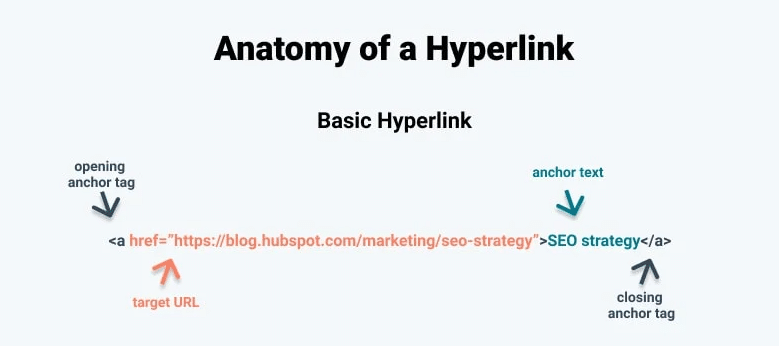
It is a term used to describe clickable text found in web content like blog posts, SEO pages, and more. Instead of including entire URLs in your content, anchor text sums up what you can expect upon clicking through.
When done right, it’s designed to provide search engines and readers with more context and plays a key role in internal linking strategies and SEO.
For example, a page could contain a link directing users to an SEO service page (example.com/seo-services/) with “SEO services” as the anchored text, which might look like: href=”/seo-services/”>SEO services.
Getting your anchor text right is critical for guiding visitors through your website, and as such, you’ll want to properly optimize your anchors to increase your chances of earning a click-through.
Why Anchor Text Matters for SEO
Correct and well-optimized link anchor text is important for SEO for a number of reasons, including:
- Crawl Discovery: Google and other search engine crawlers use hyperlinks to navigate between pages and discover new content, making it easier than relying solely on XML sitemaps.
- Good Internal Link Structure: Anchor text optimization can also help establish a blueprint for your internal links, determining how blog posts and other supporting pages link to pillar pages or other core pages, while also preventing cannibalization by identifying which anchor keywords to use for each page.
- Topical Relevance: Search engines can determine what the contents of a linked page are based on the anchored text, which can help with ranking based on semantic relationships.
- A Strong UX: Descriptive anchor text helps users navigate through your customer journey by clearly communicating what they can expect after clicking a link. It can guide visitors toward a conversion action, relevant supporting content, or other helpful pages that enhance their experience on your website.
- Improved Accessibility: Impaired users will be able to more easily scan and consume your content with anchor text, as these links can stand alone on screen readers for easier navigation, and high-contrast anchor text colors can make click and tap targets clearer.
- Backlink Context: Sites linking back to yours can help linked pages rank better by building authority while indicating to search engines what terms those pages are targeting.
- Authority Building: Strategic anchor text connects related pages, helping distribute authority throughout your site. This strengthens topic clusters, supports hub-and-spoke content structures, and reinforces the overall value and relevance of connected pages.
Expert Insight on Anchor Text Optimization
Having a good link strategy involves a lot more than simply linking to pages across your site; it’s also about choosing the right text to link to each page.
Proper link anchor text implementation will go a long way in helping both search engines and visitors navigate your site. Specific keywords and phrases attributed to each link will indicate to search engines what that page is about, while directing users to continue their journey down a logical path.
Anchor text also helps strengthen the authority of your web pages by signaling how they relate to one another. Through strategic internal linking, you show search engine crawlers that the information across multiple pages supports and reinforces a broader topic, helping build stronger content clusters and improving the flow of authority throughout your site.
Our team makes sure to incorporate anchor text SEO into each link strategy, identifying the best keywords to target to boost rankings for linked pages while keeping them from competing with each other. This practice extends to our external link building strategy, with one home services franchise client seeing a 24% year-over-year growth in organic sessions and a 207% boost in impressions, something we were able to achieve with the help of relevant backlinks as a core part of our strategy.
Now we’ll get more into the answer to “what is anchor text,” some internal and external link anchor text examples, and how to optimize your strategy.

Internal vs. External Anchor Text
In the old days, external anchor text played a larger role in helping search engines determine relevance. It helped search engines get a sense of how others perceived your page and painted a picture of what your pages were about.
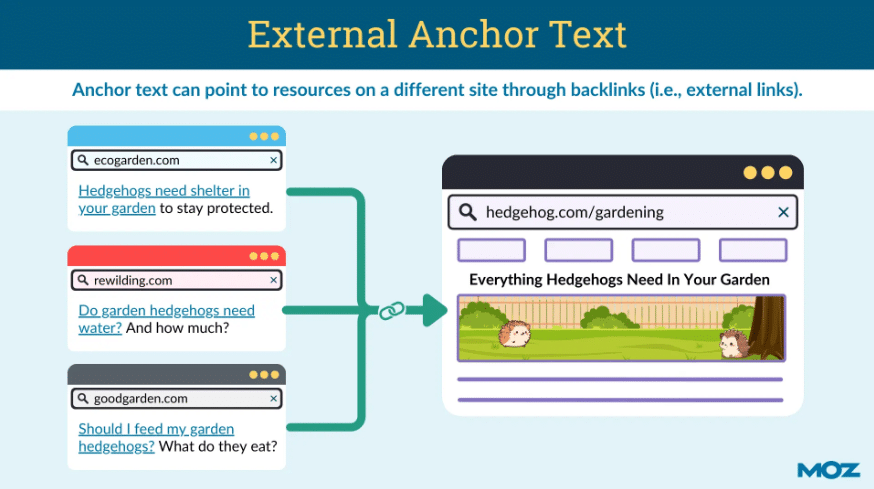
Today, Google still uses external anchor text (aka backlinks from other sites) as a reputational signal. When a reputable, authoritative website links to your content, it can pass authority and trust to your pages while helping search engines better understand the linked content’s topic and purpose.
External links are also valuable for users. They can cite sources, provide supporting evidence, direct readers to helpful resources, and help establish the credibility of your content within a broader topic area.
Internally, anchor text plays a key role in helping users navigate through your site.
Internal links establish the relationship between content like SEO and product pages, blog posts, and more. They also define your site’s information hierarchy and spread link value from high-ranking pages throughout your website.
We won’t dig into it much here, but internal link building success relies heavily on the wording used in your anchor text. You’ll want to consider why you’re linking to each page and how to convey its value to your readers.
What are the Different Types of Anchor Text?
Now, let’s go over the different types of anchor text you might use to incorporate in your internal linking strategy or boost your backlinking efforts.
Generic
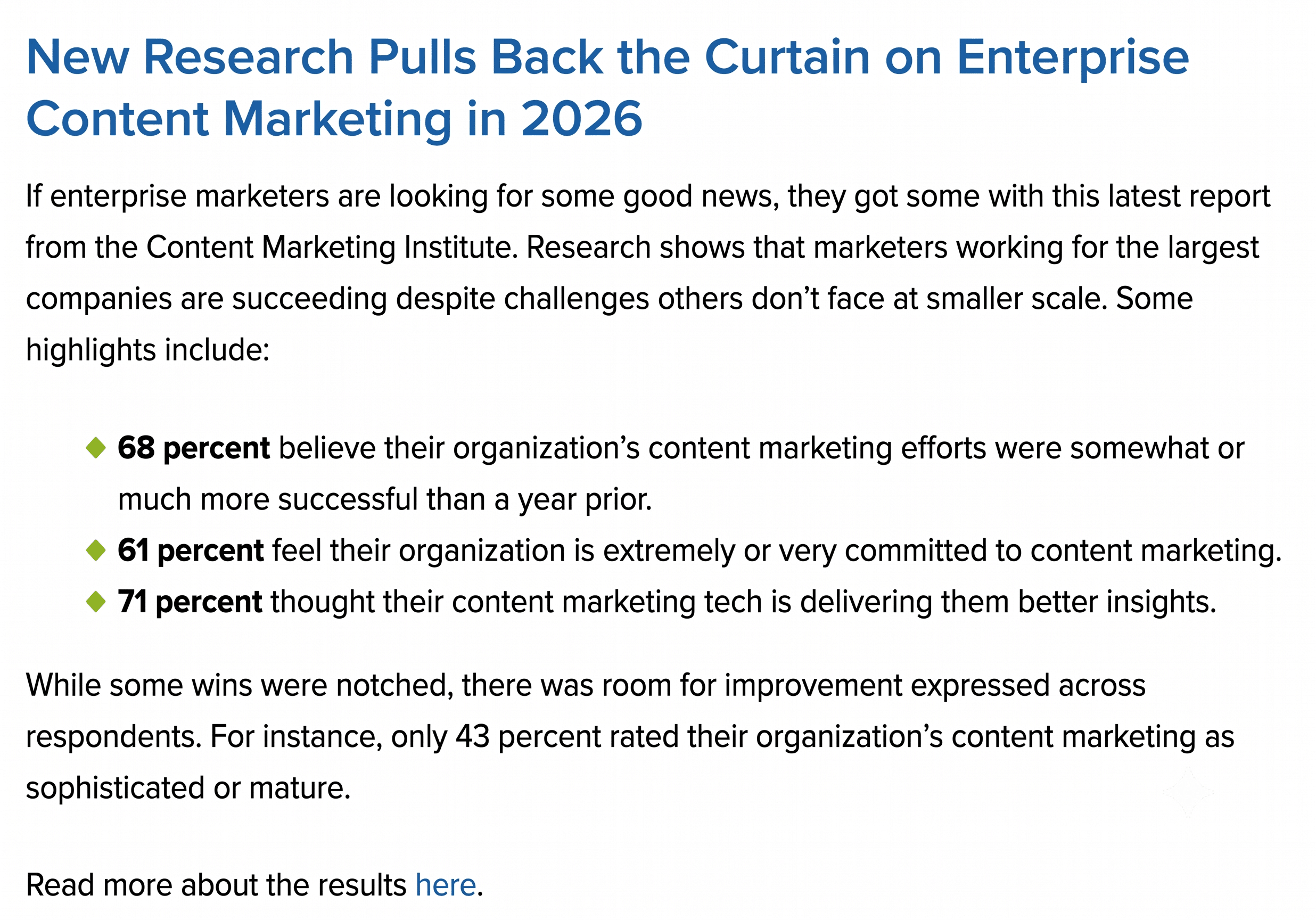
Generic anchor text refers to links with general phrases like “click here” or “read more” that don’t reveal much about what readers can expect to find if they click.
On its own, generic anchor text isn’t a very effective way to drive clicks. For instance, a standalone “click here” offers nothing for the reader.
Still, generic anchor text can work well in some cases. For example, the newsletter below focuses on a single topic, links to the article at the top of the page, and then uses a generic version as a final CTA.
Exact Match
Exact match anchor text contains the same target keywords as the page it links to. For example, using ‘SEO best practices’ to link to a page about SEO best practices.
Generally speaking, you’ll want to keep exact match at a bare minimum, as it comes across as spammy when used more than once per page.
Partial Match
Partial match anchor text includes a variation on the keyword targeted by the page it links to. In keeping with the same example, you might use “SEO tips and tricks” to link to the “SEO best practices” page.
Partial match allows you to use your target keyword more frequently in your anchor text in a way that comes across as more “natural” than using exact match.
LSI
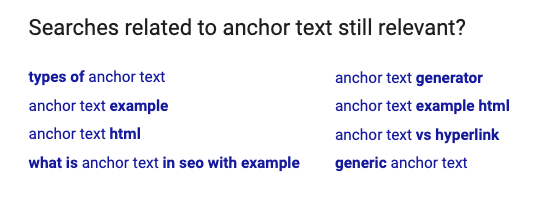
Latent Semantic Indexing is a system designed to pull up variations or synonyms when users type in the main keyword.
So, if you’re targeting “2026 blogging tactics,” the LSI results may include “content marketing in 2026,” “how to blog in 2026,” “content strategies for 2026,” etc.
A good example of this is the “searches related to…” found at the bottom of the Google search results. Here’s what comes up if I enter “is anchor text still relevant?” into the search bar:
Branded
Branded anchor text is just what it sounds like, with the brand name used as the anchor text. For instance, someone might use “Ignite Visibility” to link to this website.
A branded variation works well for bringing qualified traffic to your landing pages from a blog post on your site or off-page, external sources like guest posts.
As a link-building strategy, collecting branded backlinks from reputable websites can help raise your profile as a thought leader and increase visibility in the SERPs.
When linking to other websites, branded text works best when the brand (or person) is considered an expert on the topic discussed in your content. This might include individual thought leaders, reputable media outlets, or respected industry publications.
Page Title
The most effective type of anchor text is: Page Title/Blog Post Title.
Here’s how that might look using a recent example from the Ignite blog:
The LTV Engine: Unit-Level Economics for Franchise Growth
Naked Links
Naked links skip the anchor text and leave the URL exposed, like this: ‘https://ignitevisibility.com/’
Image Anchor Text
Image anchor text is far less common than text-based. This type of anchor is used by Google and uses an image’s alt attribute as anchor text, allowing you to link to another site using a clickable image.
Google’s John Mueller doesn’t recommend using this, stating that it doesn’t help Google understand the context of the website.
To clarify the different types of anchored text, here’s a breakdown of them and their use cases:
| Anchor Text Type | Definition | When to Use | Risk Level |
| Exact Match | Uses a precise primary keyword the linked page should rank for, e.g., “best CRM software” |
|
High; overuse, particularly in backlinks, can trigger a Google penalty |
| Partial Match | Includes a main keyword along with natural phrases or words around it, e.g., “explore our top CRM software guide” |
|
Low to medium; a generally safe way to incorporate anchor text |
| Branded | Uses a company or product name, e.g., “read more about [company name]” |
|
Very low; should comprise the majority of your backlink profile for natural branded linking |
| Naked URL | Uses the raw website address as the link, e.g., “visit www.example.com” |
|
Low; relatively safe to use, but won’t give search engines any context clues |
| Generic | Usually action-driven text with vague phrases, e.g., “read more” or “click here” |
|
Low; won’t lead to penalties, but will prevent links from establishing topical relevance |
| Image Alt Text | Descriptive HTML text that appears as clickable hyperlinks when applied to images |
|
Medium; needs to be descriptive and relevant while avoiding keyword stuffing |
| Page Title | Text within title tags on Google and other platforms |
|
Low; safe and natural while reflecting the nature of the destination page |
| Semantic | Uses words that relate to each other contextually, LSI keywords, or synonyms instead of target keywords |
|
Low; ideal for helping search engines understand a page’s broader topic as well as topic clusters |
Good vs. Bad Anchor Text Examples
What is anchor text when it’s good or bad? Let’s look at some anchor text examples across some of the different types, with anchor text bolded in each:
Exact and Partial Anchor Text
Bad: Click here to buy the best organic coffee beans online today.
Good: We offer a selection of premium organic coffee beans, with ethical sourcing behind each product.
In this example, the “click here” CTA feels kind of forced and manipulative, while the good example incorporates the text naturally while advertising the brand’s unique selling proposition.
Generic and CTA Links
Bad: Read more here about our home budget strategies.
Good: Check out our guide on home budget strategies to find out how you can save.
While “read more here” might work better for a CTA button, the second example is more detailed and direct with anchor text that’s relevant to the destination page.
Branded and Natural Links
Bad: Take a look at our project management tool [brand name].
Good: Many of today’s remote teams rely on [brand name] for their project management needs.
While the placement of the anchor text is the same in each, the good example shows why people might want to check out the tool with more context.
Image Alt Text
Bad: 
Good:
The first example stuffs keywords without being specific to the image content, while the second is more unique and descriptive.
Best Practices
While website owners don’t have full control over how other sites link to their page, you can work to ensure that you use descriptive, relevant anchor text to link to other sites and other pages within your own site.
Writing great anchors is relatively straightforward. Your goal here is to use natural language that communicates the value of what’s on the other side of that click.
Here are some dos and don’ts to help guide the process:
Do:
- Be short and specific. Consider the content and intent associated with the page you’re linking to. Try to describe that page using 2-3 words.
- Keep things relevant. It should always accurately represent the page it links to. Search engines compare anchor content with what’s on the external page to determine the relationship between page 1 and page 2. High-relevance signals can improve search performance for both sites, so it’s worth following best practices, even when linking elsewhere.
- Embrace a ‘less is more’ approach to keywords. Again, keep your keywords to a minimum. It doesn’t matter if we’re talking internal or external ones from other sites — overly optimized anchor text portfolios can trigger Google alarm bells for unnaturally acquired links.
- Variation is king. Avoid repeating the same keyword in multiple links. Instead, use similar variations of your target terms for a more natural approach.
Don’t:
- Spam readers. The sites you link to are more important than you might think. On a reputational level, bad links are a sign of poor judgment. More seriously, spammy links can put your website—and your readers—at risk.
- Go Crazy with the Keywords. When a page contains too many keywords linking out to other pages or worse, linking to the same page multiple times using different anchor text, Google could penalize your site. The purpose of anchor text is to provide users with valuable information. It shouldn’t undermine the user-experience on the page.
- Trick users into clicking. As is the case with any form of clickbait, attempting to fool users in an effort to drive traffic is a deceptive practice that undermines the user experience.
- Shoehorn target search terms. Keyword stuffing rules apply to anchor text, too. This means you’ll want to make sure that text sounds natural when read out loud.
- Use your links as an opportunity to express yourself. In other words, you want to make sure your links look like links, so that users can identify the clickable text on the site. Make sure to use a contrasting color and underline the link, when in doubt, stick to convention and use the blue links.
Internal Anchor Text Best Practices
In many cases, you’ll want to use link anchor text to connect pages within a hub-and-spoke model, linking from your supporting pages (spokes) to priority pages (hubs). This model is great for distributing link equity across pages as they support each other, and proper anchoring is key to getting the most from it.
When linking to your hubs from your spoke pages, be descriptive with your text to indicate exactly what the linked page will cover, avoiding generic “read more” or “click here” language.
Also, make sure there’s variation in your anchor text for each link, using natural synonyms, partial matches, and long-tail phrases to give search engines more varied context.
For example, you might have a hub page titled “Project Management Software” that details and promotes a project management tool. An article serving as the spoke, titled “How Project Management Tools Help With Remote Team Collaboration,” might link to the hub with the following context and anchor text: “keeping distributed employees aligned requires a centralized workspace, which you can achieve with our centralized project management software.”
Meanwhile, an ecommerce brand selling iron skillets might have a complete iron skillet buying guide as its hub. A supplemental guide on “How to Clean a Rusted Pan” could be a supporting article with a link to the buying guide, using the following phrase and anchor: “to avoid rusting in the long term, you’ll want to select the right iron skillet for the job.” That anchor gives more context to search engines and readers regarding the destination page without going with the exact match of “iron skillet buying guide.”
Backlink Anchor Text Best Practices
When using backlink anchor text in external links, make sure they appear editorial, varied, and natural.
Although you can use some exact-match anchors when appropriate, avoid pushing too many of them at scale, as this could lead to a Google penalty. The reason for this is that Google could perceive too many instances of exact-match terms linking to the same site or page as unnatural, indicating a deliberate attempt to manipulate link profiles.
Some examples of good external anchor text can include:
- An editorial article that naturally incorporates the phrase and anchor text: “If you want to start meal prepping the right way, this detailed beginner’s guide to healthy meal prep can point you in the right direction.”
- An expert quote linking to an expert’s page might: “While many companies are struggling to boost their conversion rates, [expert at (company name)] says that a good place to start is headline testing.”
- A branded link could also establish a company as an expert with data to contribute: “One recent study by [company name] revealed that 60% of marketers neglect to channel sufficient budgeting to video marketing.”
You can use an anchor text backlink checker to help you monitor anchors across your link strategy, allowing you to determine if there’s sufficient variation to avoid a penalty.
Anchor Text Over-Optimization: What to Avoid
Good anchor text can help you build topical relevance, link equity, and higher rankings, but you want to take care not to over-optimize it.
Here are some mistakes to avoid in your link strategy when implementing anchor text:
- Repeated Exact-Match Anchors: Using too many exact-match anchors on several backlinks, like “buy cheap mattresses” on 100 blogs, can create an unnatural link footprint that signals spammy practices to search engines.
- Irrelevant Links: Adding links to content that doesn’t match topically can indicate to search engines that you’re trying to manipulate link building while confusing users.
- Keyword Stuffing: Using several keywords unnaturally in anchor text or writing an unnecessarily long sentence for the sole purpose of linking can come with several issues, including reduced website accessibility for screen readers, turning away readers, and violating Google’s content quality guidelines.
- Paid Links Without Proper Attributes: Sites may accept sponsorship money, paid guest posts, or free products with standard rel=”dofollow” outbound links, which could come off to Google as an attempt to dishonestly pass page rank and result in a penalty. We’ll get more into how to properly attribute links below.
- Hidden Links: Sites could also hide links from human users while keeping them visible to search engines, such as making the link the same color as the background at the bottom of a page, which could lead to a manual penalty if discovered.
- Too Many Chained Links: Sometimes, sites may link several consecutive words or phrases to multiple URLs in a single sentence, which can hurt link equity and further confuse readers, as they may click on one link thinking it’s to another page.
How to Audit Your Anchor Text Profile
If you want to fully optimize your anchor text, take the following steps as part of a comprehensive technical SEO audit:
1. Export Internal Links
The first step is to export all of your internal links using a platform like Google Search Console, saving it as a CSV, Excel, Google Sheets, or another preferred file format.
2. Export Backlinks
With the help of an anchor text backlink checker, Google Search Console, or another platform, you can then export all of your backlinks in spreadsheet form.
3. Group Anchors by Type
You can then group all of your anchors by type, whether they fall under the category of generic, branded, exact match, partial match, or another type.
4. Identify Generic Anchors
Once you’ve sorted all of your internal and external links by type, isolate the generic anchors. These might benefit from further optimization to make them stand out with better targeting.
5. Find Repeated Exact-Match Patterns
Try to find all instances of exact-match terms and their uses. A certain number of exact matches might be permissible, but avoid using too many and change out any when instances appear too frequently.
6. Review Destination Relevance
Finally, make sure all of your anchors match their linked pages, unless you want to stick with generic anchors for some. Every keyword, phrase, and context clue in your anchoring sentences should align with the topic and content on the link paged.
Anchor Text for Images, Buttons, and CTAs
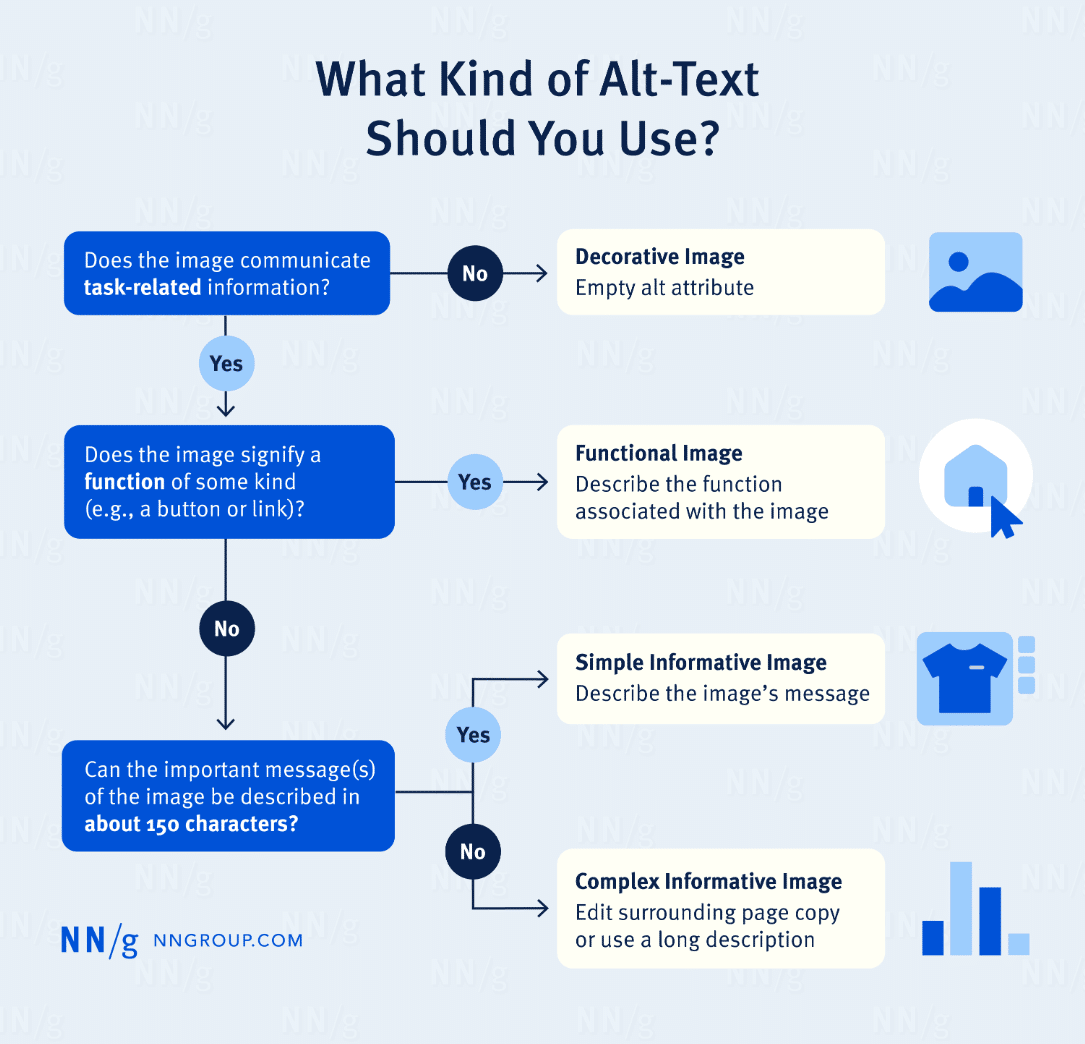
In some cases, linked image alt text can function as anchor text, such as when using clickable images and buttons.
For buttons, use clear CTA text describing the next step for readers to take. For example, instead of a simple “click here” on a newsletter signup, try something like “sign up for our newsletter.” And instead of “read more” in a link to a case study, use “read our latest case study” for more clarification.
People should always know what they’re going to get when they click on an image or button, so avoid using vague language when you can.
Anchor Text and Link Attributes
Depending on the situation, you may want to use nofollow, sponsored, or UGC links. Let’s look at the differences between them:
- Nofollow (rel=”nofollow”): These links indicate to search engines that you don’t want to endorse the target link or pass authority; this is best for when linking to pages you don’t want to help in any way.
- Sponsored (rel=”sponsored”): You may also use sponsored links to designate links included for sponsorships, ads, or paid placements, making them suitable for paid ads, affiliate links, and other links involving some kind of financial agreement.
- User-generated Content (rel=”ugc”): Include these links in comments, guest submissions, or forum posts created by site visitors.
Google also states that nofollow links work for either sponsored or user-generated links.
FAQs
1. What is anchor text in SEO?
What is an anchor text in an SEO strategy? Anchor text is the clickable text within a hyperlink, and it can give search engines more context regarding what a destination page is about for improved crawlability and rankings with proper optimization.
2. Why is anchor text important for SEO?
Keyword-rich and well-optimized anchor text can help pass link equity from one page to another and boost rankings for destination pages, as long as you have a large number of high-quality links on authoritative websites that Google trusts.
3. What are the different types of anchor text?
There are multiple types of anchor text you can use, such as:
- Exact-match anchor text targeting a precise keyword
- Partial-match anchors using synonyms or related phrases connecting to the destination page’s content
- Generic “click here” or other vague anchors
- Image alt text anchors for clickable images
- Branded anchors
- Naked URLs using the domain as the anchor
4. Is exact-match anchor text bad?
On its own, exact-match anchor text can be beneficial when used the right way if you want to boost rankings for a particular term. However, it can be bad if you have too many instances of exact-match keywords in your backlink profile, as this can come across as spammy to search engines.
5. What is the best anchor text for internal links?
For internal links, it’s often best to use either exact-match or partial-match anchor text. Exact-match anchors won’t risk penalization when on your own site, and partial-match keywords can add some context clues and topical relevance with more anchor variation.
6. Does image alt text count as anchor text?
Yes, alt text can function as anchor text when used the right way. Just make sure your alt text accurately and specifically describes the content of the image and doesn’t include too many keywords, which can help you avoid over-optimization and issues with accessibility.
7. How do I audit anchor text?
You can audit your anchor text using Google Search Console, anchor text backlink checker tools, and other solutions to export your internal and external links. After exporting, categorize all of your anchors by type, working to eliminate generic anchors when possible, and cut out overuse of exact-match terms in backlinks.
Get Help With Anchor Text SEO From Ignite Visibility
With the help of this anchor text guide, you’ll be able to get started on auditing and optimizing your anchors for both internal link strategies and link building efforts. At the same time, this process could be overwhelming if you have many links across your site and the web, especially if you have neither the time nor the resources to devote to anchor text SEO.
This is where Ignite Visibility can help. With our experts behind you, you’ll be able to:
- Audit your existing anchor text and links
- Fix any instances of poorly optimized anchor text
- Determine the right anchors to use in future content
- Ensure plenty of variation across anchors
- Build a network of high-quality backlinks on all relevant platforms
- Integrate links into an overarching SEO strategy
- And more!
Want to begin your journey with us? Learn more about our SEO services and how we can incorporate high-quality links and more to help you dominate search results.