Which Tool Is Better For You?
Should you choose Crazy Egg or VWO?
Crazy Egg is the simpler, more affordable option with heatmaps, A/B testing, surveys, error tracking, web analytics, funnels, pop-up CTAs, personalization, and AI analysis, all in one subscription.
VWO, which merged with AB Tasty in January 2026, is a better choice for deeper experimentation at scale, but to match what Crazy Egg bundles in a single plan, you need at least three separate VWO products, which is more expensive.
Crazy Egg vs. VWO: A Quick Snapshot
| Feature | Crazy Egg | VWO |
|---|---|---|
| Heatmaps | ✅ 5 map types, including Confetti Maps for per-click segmentation ✅ 20+ audience filters ✅ Free Instant Heatmaps |
✅ 7 map types, including Frictionmap, Zonalmap, Hovermap, ClickArea ✅ Dynamic heatmaps, first-click filters, historical comparison ⚠️ No per-click segmentation |
| Session Recordings | ✅ Auto-tagged with 13+ event types (behavioral, ecommerce, form, account) ✅ Linked to Error Tracking ✅ 6 months–2 years retention ✅ Configurable sampling per page |
✅ “Unlimited” but uses sampling — not every visitor recorded ✅ Downloads (Pro+), annotations, saved views ⚠️ 1–3 month retention by plan |
| A/B Testing | ✅ Visual editor, split URL, MAB ✅ Audience targeting by device, country, UTMs, conversions (by plan) ✅ Always-on personalization via targeted variants ✅ Auto-heatmaps and recordings per variant ✅ 6 goal types incl. ad pixels (Google, Meta, TikTok) ⚠️ No multivariate testing |
✅ A/B, multivariate, multi-armed bandit server-side, mobile app testing ✅ Guardrails, code editor, advanced targeting ✅ 40+ integrations ⚠️ Separate VWO Testing product |
| Surveys | ✅ Free on every plan, 50+ templates ✅ Behavioral triggers (exit intent, scroll, click) ✅ Responses linked to session recordings |
✅ Templates, question bank, AI-generated questions, concept tests ✅ Granular targeting, mobile app surveys ⚠️ Separate VWO Pulse product |
| Funnels & Conversions | ✅ Retroactive funnels, no limit ✅ 6 trigger types incl. ad pixels ✅ Free Conversion Analytics |
✅ Funnels with annotations and funnel-specific filters ⚠️ Not retroactive, editing flushes data |
| AI | ✅ Proactive AI across heatmaps, recordings, surveys, web analytics ✅ Export heatmaps, recordings, and web analytics data to ChatGPT, Gemini, Grok (Pro and above) ✅ MCP connector — query your data from Claude, ChatGPT, Cursor, or Copilot ✅ Tasks — agentic workflow builder |
✅ Wandz AI layer: analysis + test ideation + variation generation + copy recommendations ✅ AI Chat assistant and MCP server for feature experimentation ⚠️ Key AI features in “Early Access” — pricing TBD |
| Pricing | ✅ Free plan (Instant Heatmaps, Surveys, Web Analytics, Conversion Analytics) ✅ Paid from $29/mo (annual) ✅ All pricing public ✅ Bills only for tracked pageviews |
⚠️ No prices published on vwo.com — quotes only ⚠️ No free plan (30-day trial only) ⚠️ 3 products needed to match CE ⚠️ Bills for every unique visitor |
Feature Breakdown: Crazy Egg vs. VWO
1. Heatmaps
Crazy Egg has 5 heatmap types with per-click segmentation, so you can compare traffic sources, devices, and conversion status on the same view. VWO offers more heatmap types, but no way to overlay multiple segments onto one heatmap.
Crazy Egg
Crazy Egg has five heatmap types:
- Click Maps — hot/cold visualization of visitor clicks.
- Scroll Maps — how far visitors scroll before leaving. Sections where visitors pause show up more prominently, so you see dwell time — not just depth.
- Confetti Maps — every click displayed individually, color-coded by traffic source, operating system, UTM parameter, device, conversion status, or any of 17 other attributes.
- Overlay Maps — click counts per element, segmentable the same way as Confetti Maps.
- List Maps — raw numerical click data per element in a table.
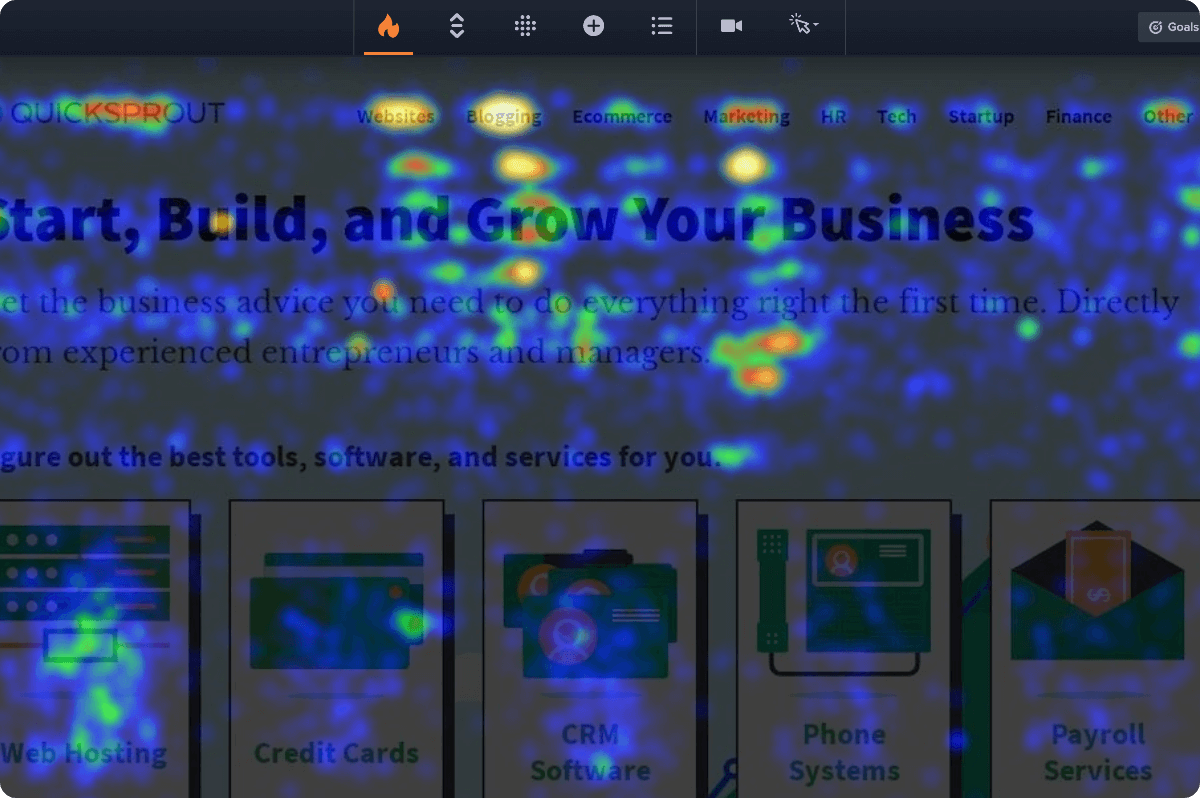
All five types support 20+ audience filters, including date range, traffic source, UTM parameters, device type, new vs. returning visitors, conversion status, and custom variables.
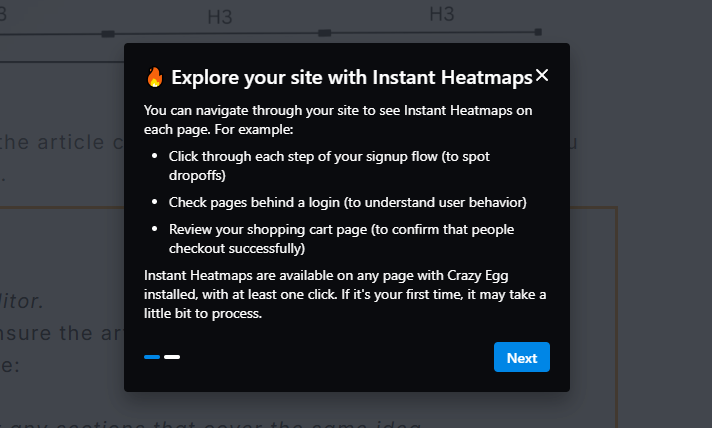
Finally, Crazy Egg offers Instant Heatmaps. This free feature auto-generates heatmaps across your entire site, so you can quickly analyze click patterns and identify pages for in-depth analysis.
VWO
VWO has the standard heatmap types (click, scroll, element list) and adds a few that Crazy Egg doesn’t have:
- Zonalmap — divides the page into structural zones and shows aggregated interaction and conversion metrics for each.
- Hovermap — tracks cursor movement patterns on the desktop.
- ClickArea — lets you draw comparison boxes to compare engagement between two sections of the page.
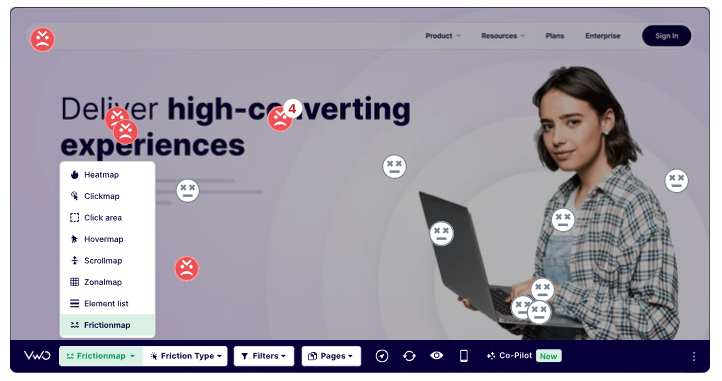
- Frictionmap — visualizes dead clicks, rage clicks, and error clicks directly on the page. So you can quickly spot frustration patterns.
The heatmaps are dynamic, so you can track interactions with moving elements, for example, modal pop-ups. In Crazy Egg, you can do it with the List Map, and Confetti Map lets you visualize dead and rage clicks.
They come with an extensive set of filters, including first-click filters, so you can see users’ first reaction when they land on the page.
But there’s no Confetti Maps equivalent. This means there’s no way to see multiple segments on the same view, with each click carrying its own attributes.
The only way to get around it is with side-by-side comparisons, but it’s just for two segments (available in Crazy Egg, too).
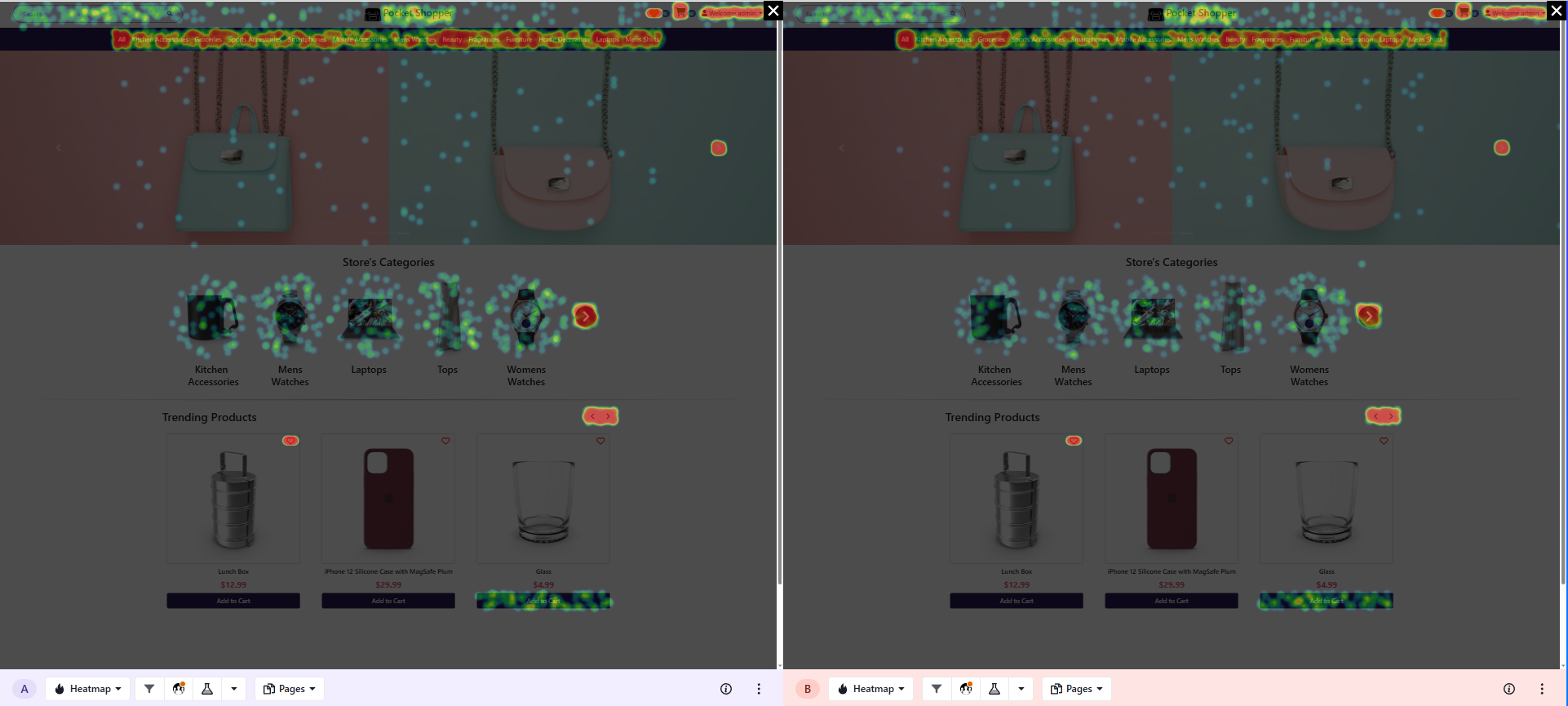
There are also historical heatmaps for comparing interactions between current and past page versions.
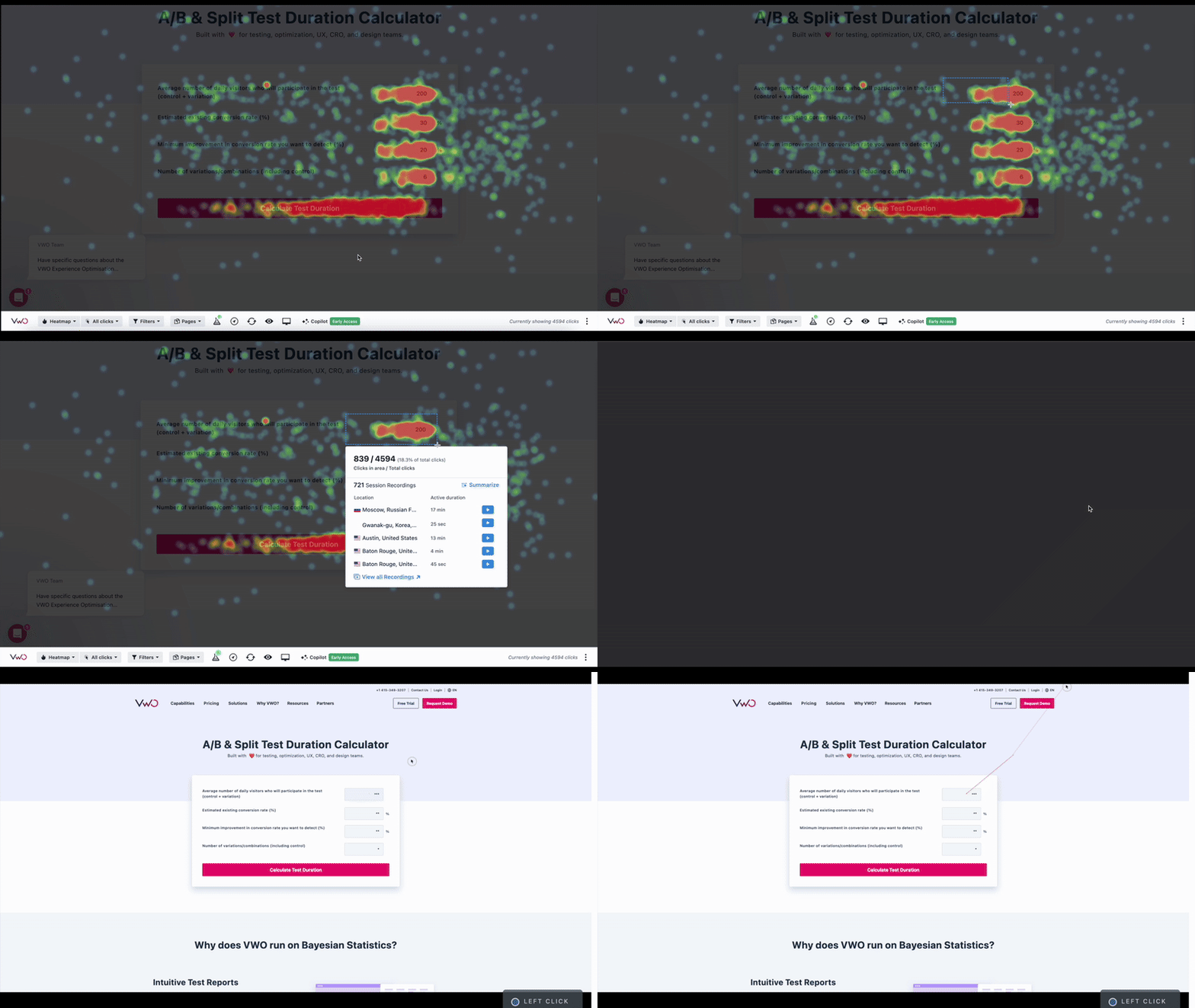
And you can navigate directly to relevant session recordings by marking a heatmap section.
2. Session Recordings
Both tools let you record your users as they navigate through the website. Crazy Egg caps session recordings, and their retention goes up to 2 years. VWO markets “unlimited” recordings but uses sampling, so not every visitor is recorded, and retention tops out at 3 months.
Crazy Egg
Session recordings in Crazy Egg capture user behavior on a page. Clicks, scrolls, mouse movements, page transitions, and more.
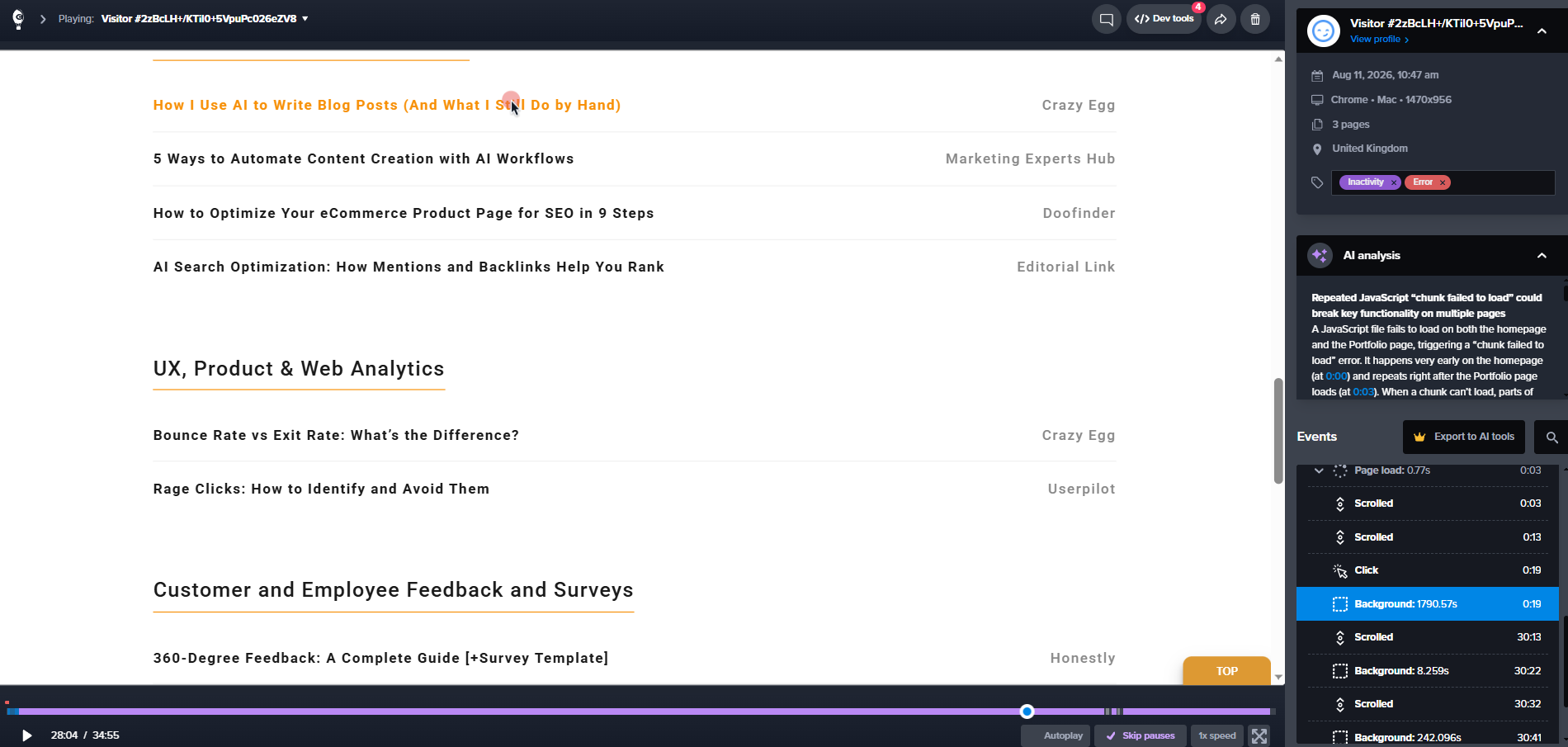
Crazy Egg tags session recordings automatically the moment they’re captured.
Tags cover behavioral signals (rage clicks, dead clicks, quickbacks, excessive scrolling, slow page loads), ecommerce actions (add to cart, checkout start, checkout complete), form interactions (submit, abandon, resubmit), and account events (signup, login, search).
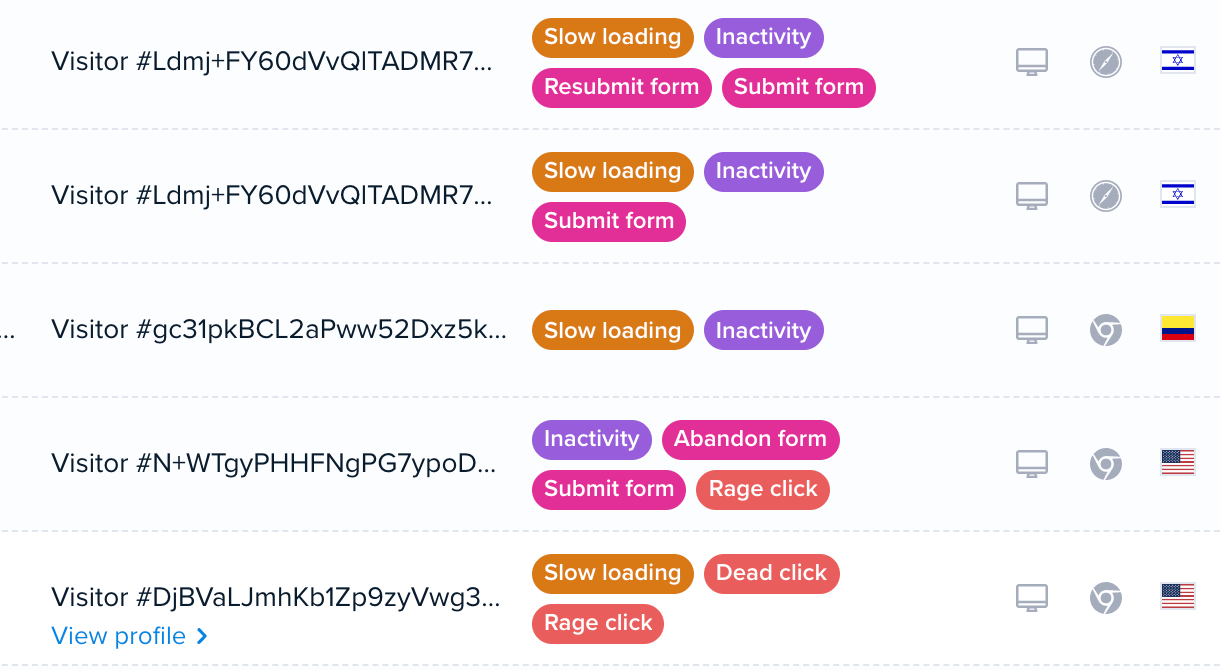
Those tags double as filters, in addition to the others like conversion status, pages visited, device, referral source, and custom variables.
You get 50 recordings on Starter, and up to 10,000 on Enterprise.
The best thing? You choose how to distribute them: set a percentage of traffic to record, or a fixed number per page. That way, you spend your recording budget where it matters, for example, checkout flows or landing pages.
The session retention is capped at 6 months on Starter, and goes up to 2 years on Plus and above.
VWO
VWO’s session recordings are available in VWO Insights (just like heatmaps). Its core recording features overlap with Crazy Egg’s — rage click and dead click detection, adjustable playback, idle time skip, and sharing.
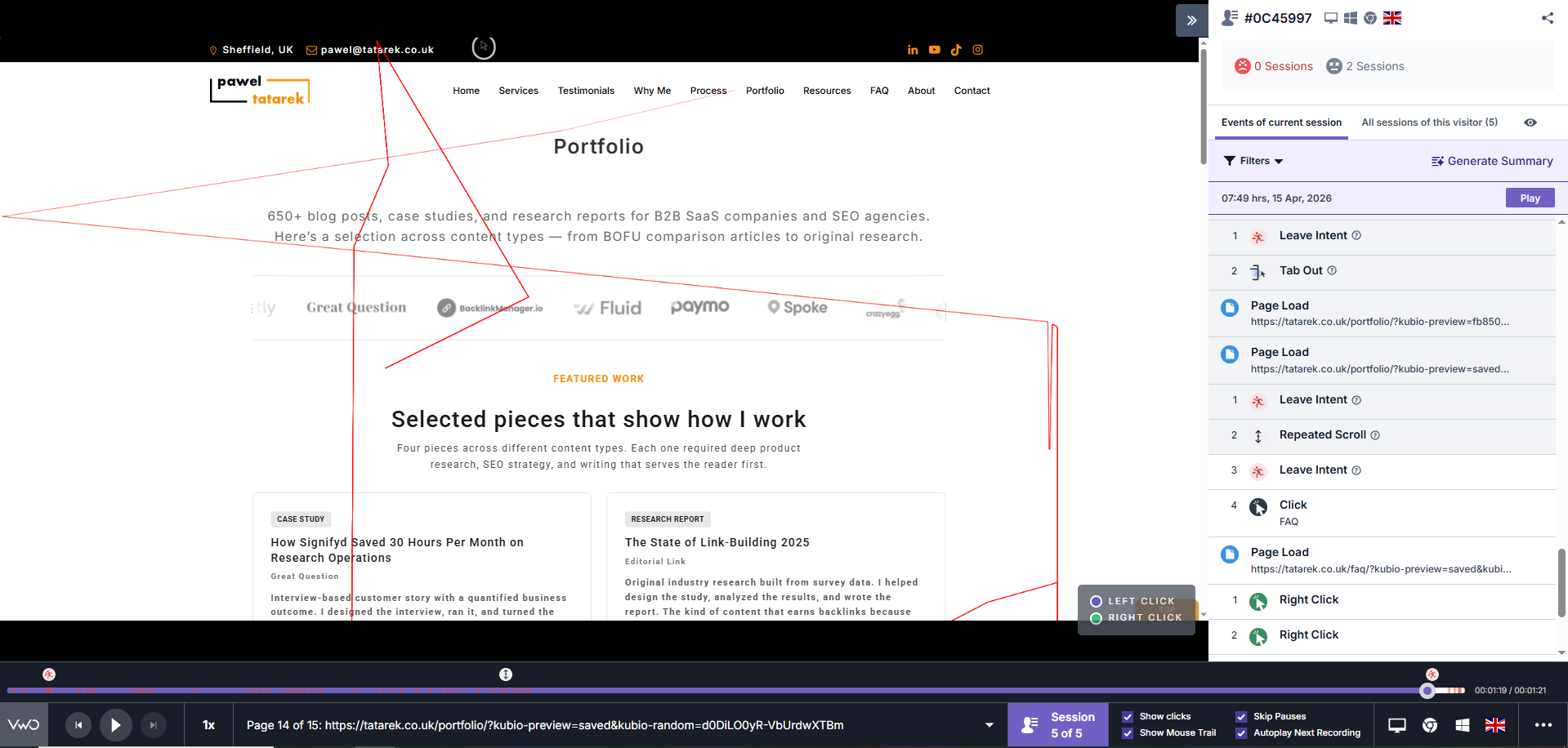
VWO also lets you annotate recordings and download your recordings for easier collaboration.
You can filter the recordings by session (e.g., duration, date), page (e.g., entry or exit page), or struggle elements (e.g., rage clicks), user segments, devices, and more. Once you configure your filters, you can save the view for future use.
Two differences to note:
- Sampling: VWO collects the data only from sampled visitors. “Unlimited” means no hard cap, but not every visitor gets recorded.
- Retention: 1 month on Growth, 2 months on Pro, 3 months on Enterprise. So, a session from four months ago won’t be there.
3. A/B Testing & Personalization
Crazy Egg allows marketing teams to run page-level A/B tests to identify the better-performing versions. VWO has a more potent testing engine with server-side experiments, feature flags, and advanced targeting, but it requires a separate subscription (VWO Testing).
Crazy Egg
Crazy Egg’s A/B testing features include:
- Visual Page Editor — you can design different page versions without writing code.
- Split URL testing — redirect traffic between entirely different pages.
- Multi-Armed Bandit (MAB) — automates traffic allocation toward the winning variant during the test for quicker results.
- Auto-generated heatmaps and recordings per variant — every variant gets its own behavioral data
- Six conversion goal types— element clicks, page reach, form submissions, ad pixels (Google, Meta, TikTok), ecommerce events, and custom scripts.
- Statistical significance: As the test progresses, Crazy Egg calculates statistical significance to ensure your results are valid.
- Audience targeting — target tests at audience segments like device, country, browser, new vs. returning visitors, UTMs, and conversion status, layered with and/or logic.
The targeting on higher plans is granular and enables web experience personalization. You can send 100% of a segment’s traffic to a customized variant, and it runs as an always-on personalized experience, with the control comparison confirming it actually converts better.

Variant data integrates directly with Google Analytics (GA4). This lets you segment analytics by experiment without manual tagging.
VWO
To run A/B tests, you need a VWO Testing subscription.
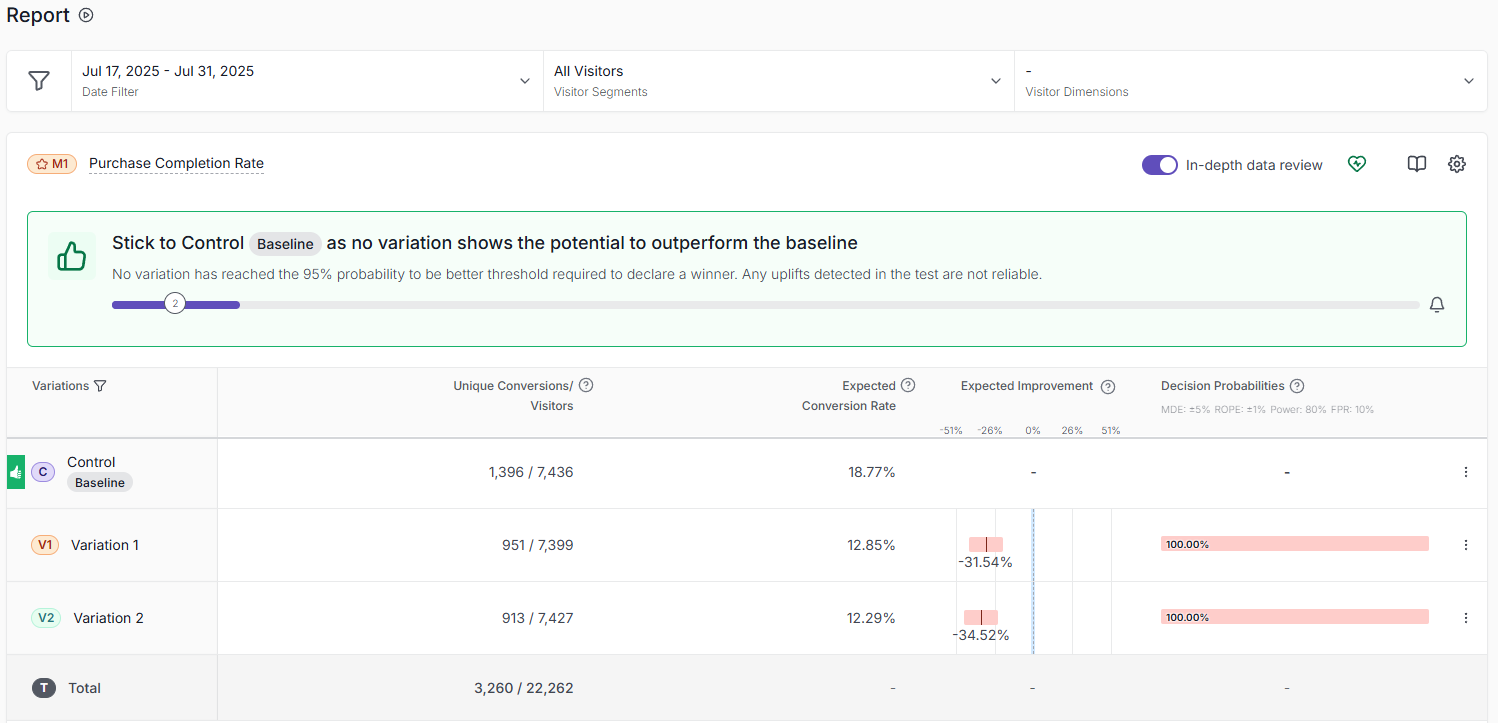
If you’re using it for UX and conversion rate optimization, you will benefit:
- Multivariate testing (MVT) for testing multiple variables simultaneously,
- Guardrails — the test pauses if critical KPIs drop (Pro & Enterprise).
- Mobile app testing with native iOS and Android SDKs (Crazy Egg supports mobile web apps only).
- Code editor (HTML, JS, CSS, jQuery) for test variants beyond what a visual editor can do (if you want to get your hands dirty).
- Advanced targeting based on 20+ variable types, like GTM data layer, user intent, JavaScript (Pro & Enterprise)
In addition, VWO offers:
- Server-side testing through SDKs — for backend logic, pricing algorithms, and recommendation engines.
- Feature flags with gradual rollouts, canary releases, and kill switches.
- 40+ integrations, including GA4, Adobe Analytics, Amplitude, Mixpanel, and Segment, and webhooks.
4. Surveys
Crazy Egg surveys are free and easy to set up — perfect for quick feedback collection from web visitors. VWO’s survey product, VWO Pulse, offers more capabilities, but not all of them are relevant for CRO or UX optimization.
Crazy Egg
Crazy Egg surveys come with unlimited responses on every plan.
Their key features include:
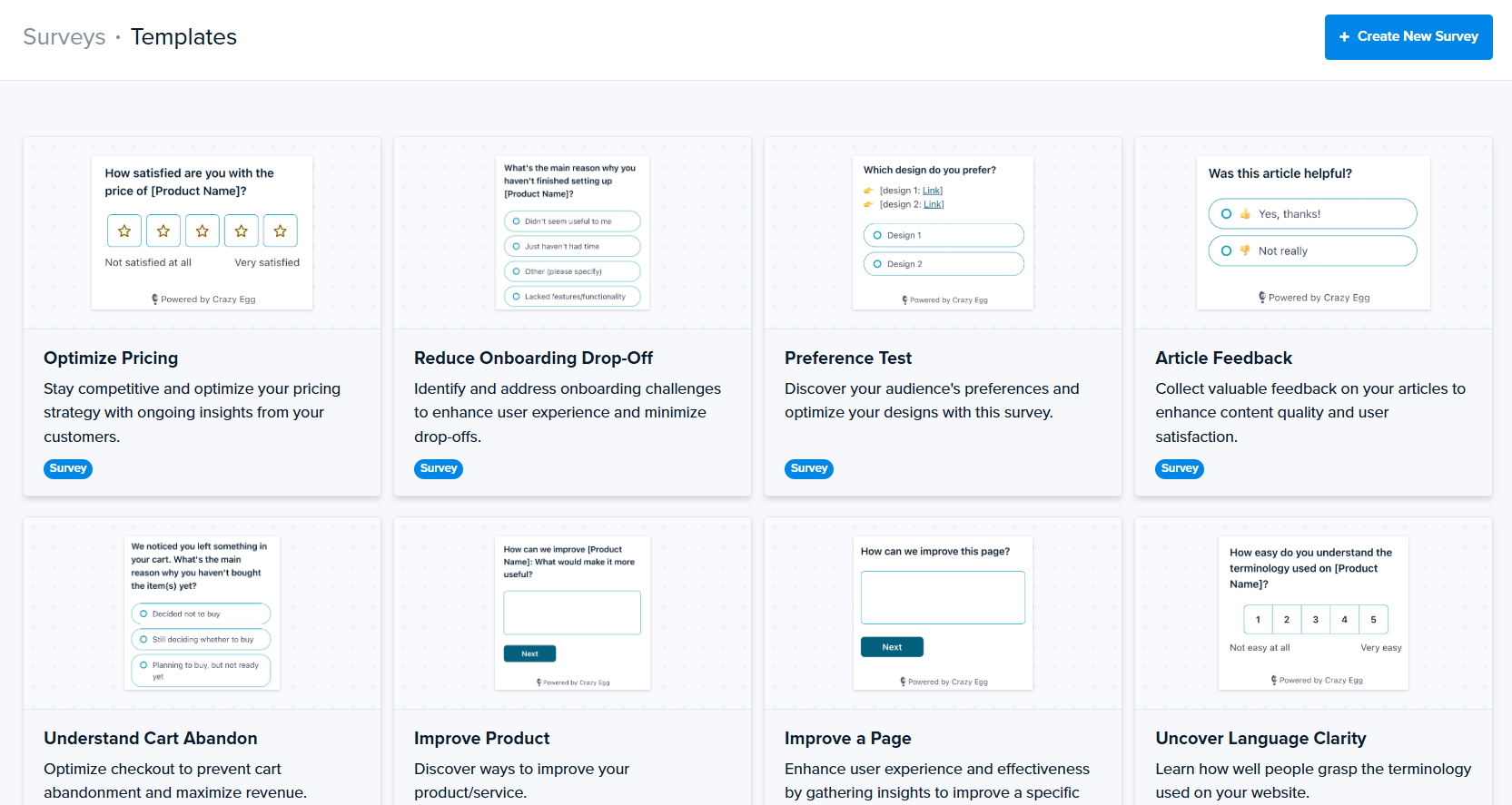
- 50+ templates, covering NPS, product feedback, support requests, and market research.
- Conditional branching to show or hide questions based on prior answers.
- Behavioral triggers: page load, scroll depth, exit intent, pages viewed, button click.
- AI sentiment analysis on open-text responses with auto-generated charts.
- Survey responses linked to session recordings— see what a visitor did on the site right before they answered.
The standout feature? Ease of use. The survey builder is simple and intuitive. You get your survey up and running in no time.
VWO
VWO Pulse is a separate product that offers similar survey features to Crazy Egg:
- Multiple templates for all industry-standard survey types (NPS, CSAT, etc.)
- Various question types (emoji scales, multiple choice, and open-text, etc.)
- Conditional branching
- Survey analysis with session recordings
On top of that, VWO has more granular targeting and triggering options than Crazy Egg.
You also get a question bank and AI-generated questions, and can collect feedback within native mobile apps.
5. Conversion Funnels and Form Analytics
Crazy Egg’s funnels are retroactive — edit or rebuild a funnel anytime, and the tool populates it with your historical data. VWO’s funnels aren’t retroactive, but the platform offers dedicated form analytics with field-level data.
Crazy Egg
Crazy Egg’s Conversion Funnels show you where visitors drop off in a multi-step sequence.
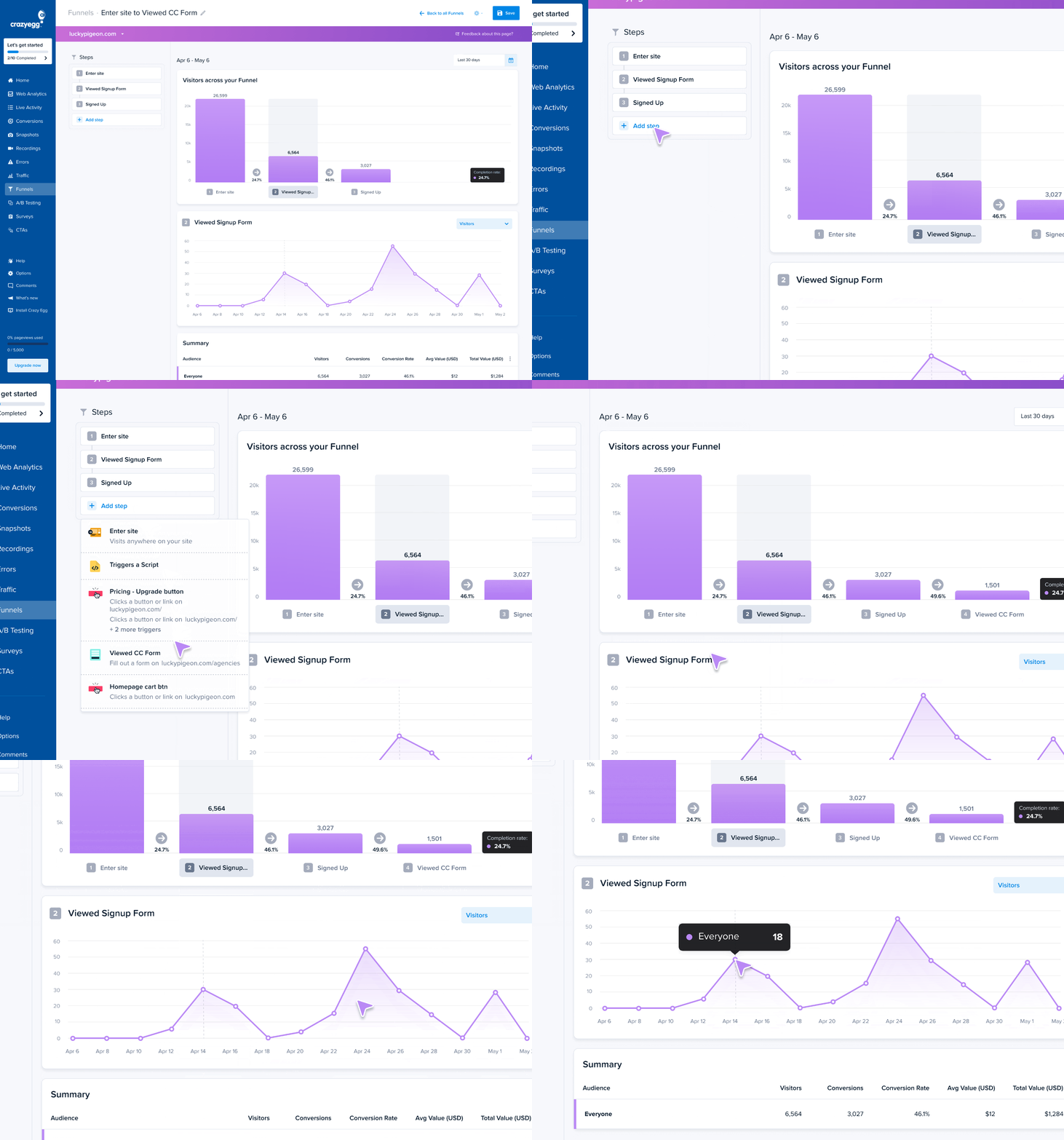
They’re retroactive. You set up your goals once and then build or rearrange funnels whenever you need to — the data is already there. No limit on how many you create.
Crazy Egg offers six conversion trigger types: element clicks, page reach, form submissions, ad pixels (Google, Meta, TikTok), ecommerce events, and custom scripts.
Funnels connect to heatmaps and recordings, allowing you to jump from a drop-off straight to the sessions where it happened.
Finally, there’s Conversion Analytics, a separate, free feature that tracks button clicks, page views, form submissions, ad pixels, ecommerce conversions, and custom events. VWO provides no equivalent.
VWO
VWO’s Funnels, part of VWO Insights, track conversion rates and drop-off percentages, and connect to recordings and heatmaps, just like in Crazy Egg.
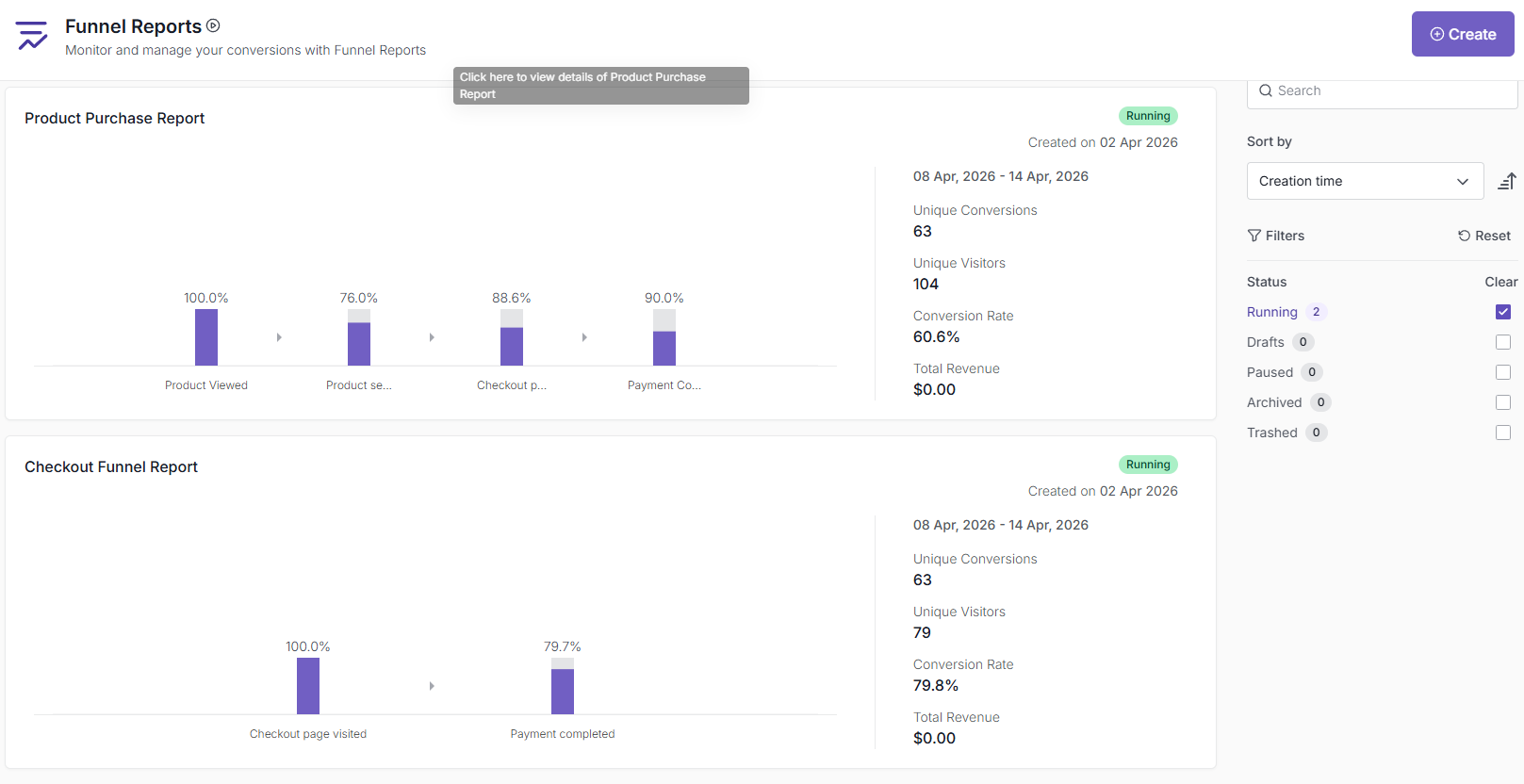
You can filter them by date, segment, plus funnel-specific filters, like trigger time or revenue.
One feature that Crazy Egg doesn’t have is observations: you can annotate the funnel section for future reference. Makes analysis and collaboration easier.
Two catches worth noting that put VWO Funnels at a disadvantage compared to Crazy Egg:
- The feature tracks data from the moment you set it up. It doesn’t generate reports retroactively.
- Modifying a funnel flushes all the data. You change anything and Poof! All gone.
What sets VWO apart is its Form Analytics, which tracks time per field, hesitation, drop-off by field, and submission rates, so you can optimize your forms for maximum conversions.
6. AI Features
Crazy Egg and VWO use AI to analyze behavioral data and surface recommendations. The AI runs automatically across heatmaps, recordings, surveys, and web analytics — it reads your data and tells you what it found. It also generates test ideas, writes variant copy, and builds targeting segments.
Crazy Egg
AI Analysis runs without prompting across four areas:
- Heatmaps — identifies click, scroll, and bounce patterns, then writes specific optimization recommendations in plain English. Available on every heatmap report.
- Session Recordings — auto-flags the most insightful sessions and generates a written summary for each: error detection, behavioral observations, and next steps.
- Surveys — AI analyses user sentiment on open-text responses, auto-generates charts, and summarizes patterns.
- Web Analytics — Top Insights automatically spots traffic anomalies (drops in mobile traffic, underperforming referral channels, pages with unusual bounce rates) and explains what to do about them.
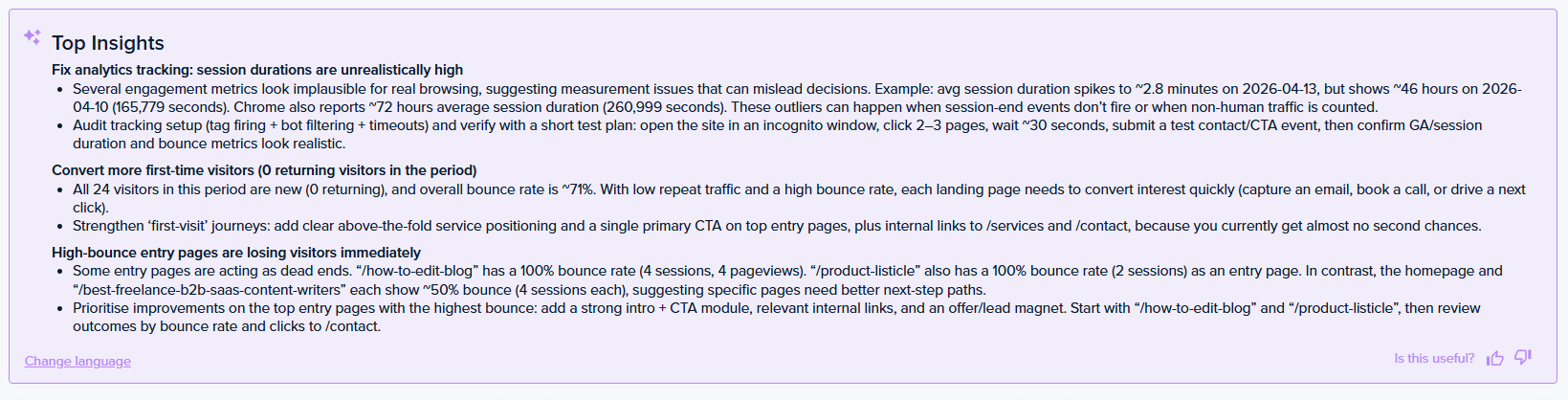
If you want to go deeper, you have two options:
- Export heatmap, recording, or web analytics data — formatted for AI — into ChatGPT, Gemini, Grok, or any other model you prefer.
- Connect via the MCP server and query your Crazy Egg data straight from Claude, ChatGPT, etc, and use them to design experiments, draft copy, or run custom agents.
Both mean you aren’t locked in a specific LLM.
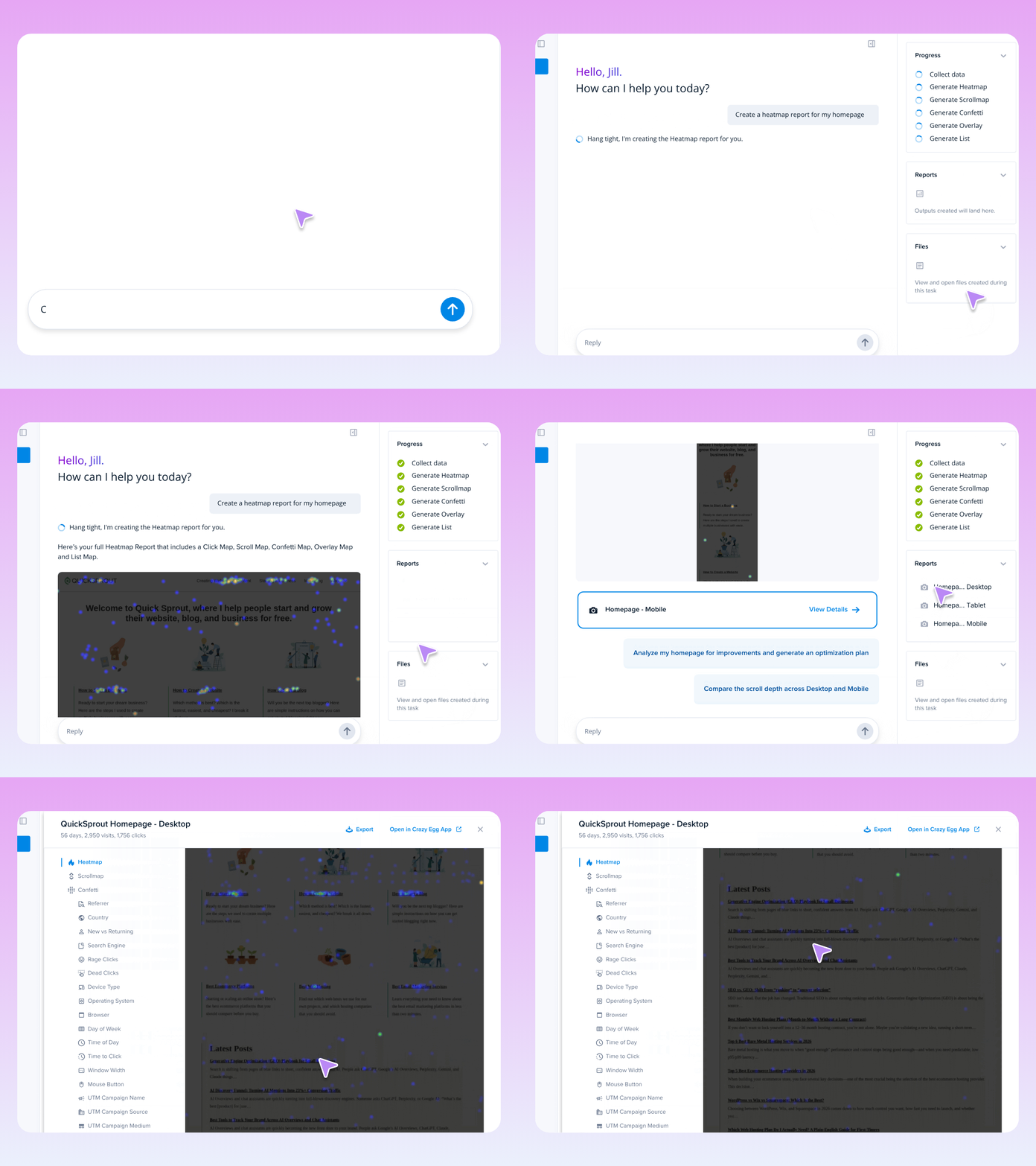
Finally, Crazy Egg’s new feature, Tasks, runs the full optimization loop in one place: set up your heatmaps, and it reads the data, identifies patterns, and delivers an executive-ready PDF with a summary, findings, and prioritized recommendations. It also drafts new page variants for A/B tests.
VWO
VWO’s AI covers similar analysis ground — heatmap insights, session recording summaries, and survey response analysis, plus A/B test insights.
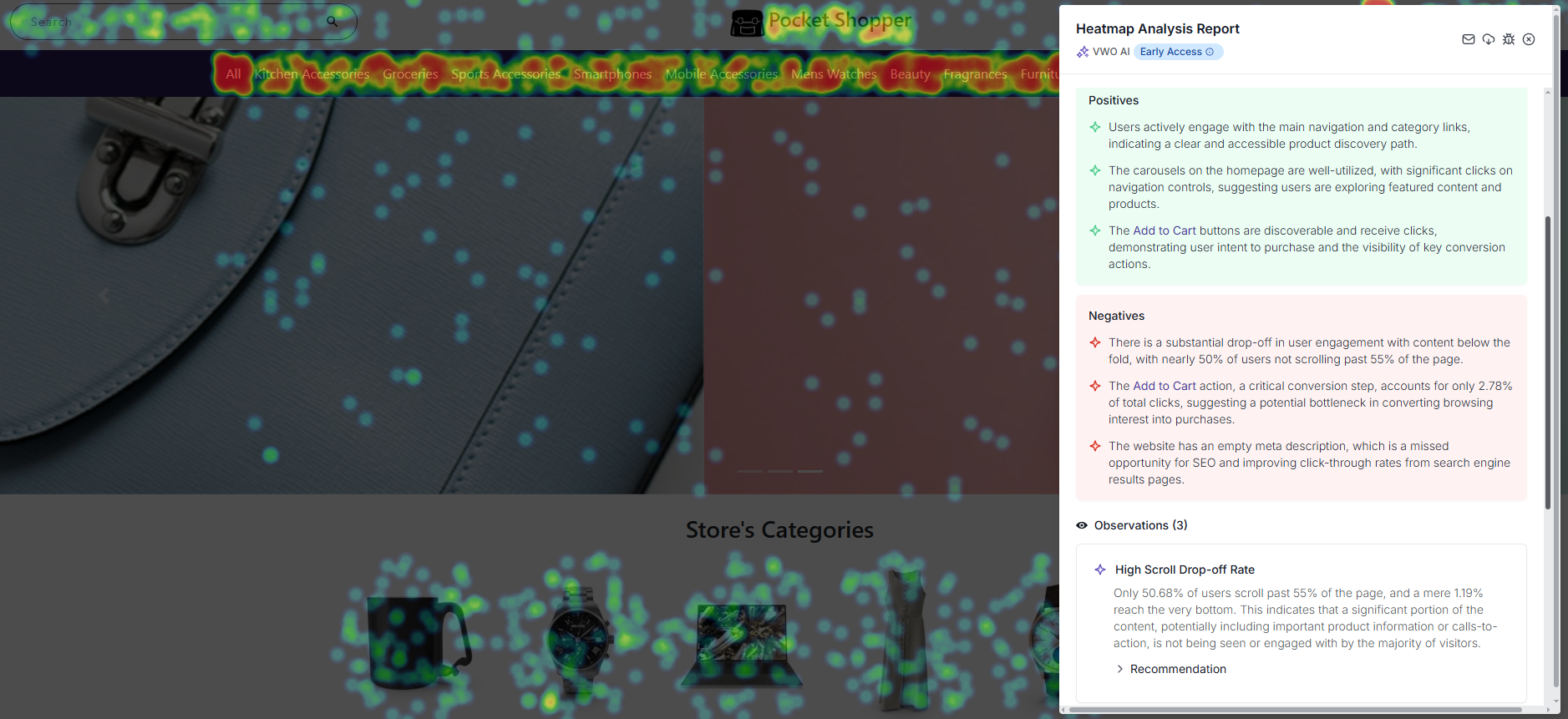
VWO’s Wandz AI, which consolidates VWO’s Copilot with AB Tasty’s Evi assistant, also includes an in-app AI chat (AI Analyze) and an MCP server.
There’s also:
- AI Workflow: Chains AI agents that automatically run routine tasks.
- AI Autopilot: Monitors live tests and acts on results
- Synthetic AB: Simulates audience and behavior to pre-test hypotheses
Overall, VWO’s AI used to be stronger, but Crazy Egg’s Tasks is bridging the gap in agentic AI capabilities.
The chat and MCP without behavioral data are included with other modules, while the full AI suite requires a paid plan. Yet another one.
7. What one tool bundles and the other doesn’t
Crazy Egg
Crazy Egg provides three features that VWO either doesn’t have or charges extra for:
- Error Tracking captures JavaScript errors with full stack traces, device and browser info, and linked session recordings. It lets your team track error status. VWO shows error click locations on its Frictionmap and lets you filter recordings by error type — but no stack traces and no triage system.
- Popup CTAs let you build no-code banners, popups, and sticky bars with behavioral triggers and conversion tracking. VWO’s closest equivalent — VWO Deploy/Rollouts — is a separate product.
- Web Analytics gives you a standalone dashboard with 8 core metrics and 15+ segmentation options. When you can connect it to Google Analytics, historical data backfills automatically. VWO doesn’t have standalone analytics.
VWO
VWO Insights and Pulse offer features Crazy Egg doesn’t offer:
- Concept tests (via Pulse) — structured tests to validate design decisions with real users before you build. Useful for major redesigns.
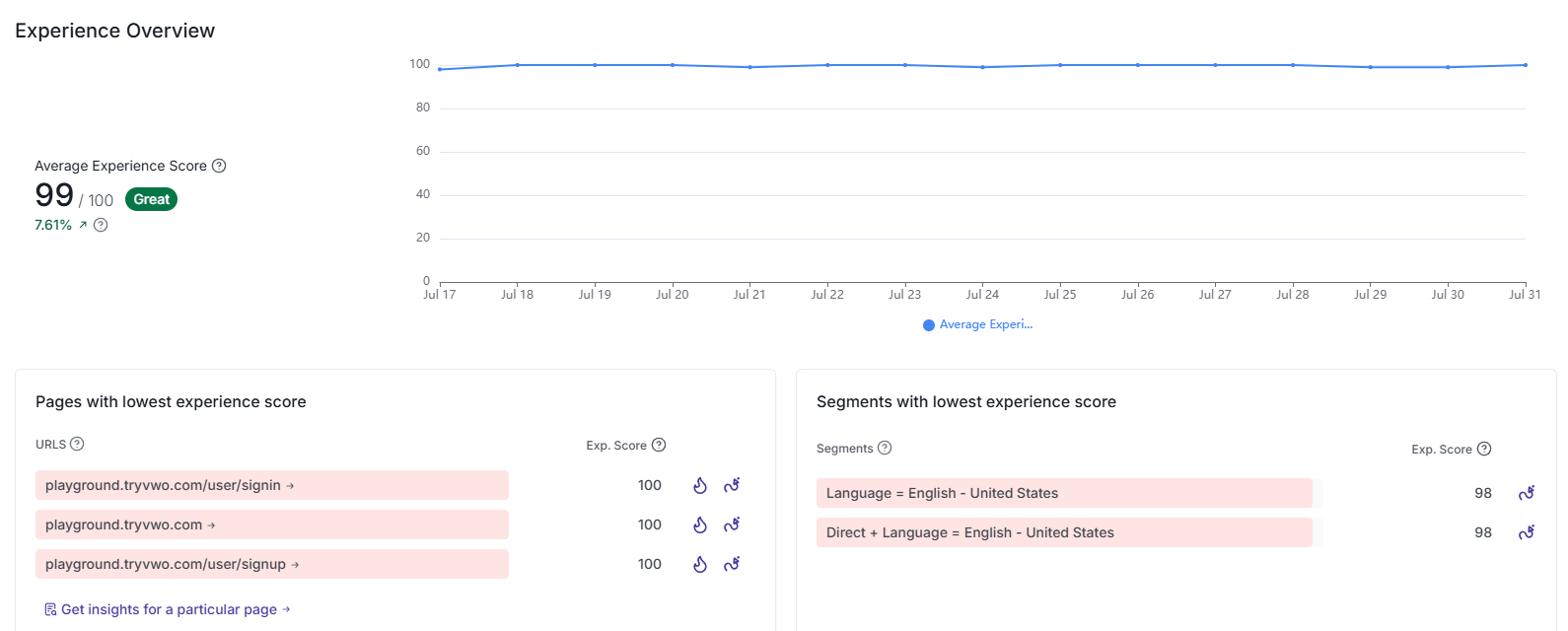
- Experience Score (via Insights) —an average score based on dead clicks, rage clicks vs. non-struggled clicks.
8. Security and Data Handling
Both tools take visitor privacy seriously.
Crazy Egg keeps it simple at the point of capture: passwords, card numbers, and personal form entries are never recorded in the first place, with field masking and IP anonymization available.
Data is encrypted, Crazy Egg doesn’t sell customer data, and it doesn’t track visitors across websites. It’s GDPR- and CCPA-compliant, and you can sign a DPA.
Role-based access control is available in all plans, and Enterprise gives you Single Sign-On (SSO) and a Compliance Audit Log.
VWO security is solid, too, and includes SOC 2 Type II, the ISO 27001 family including its cloud security and privacy extensions, and PCI DSS, with a DPA and Standard Contractual Clauses for GDPR.
9. Support
Crazy Egg includes US-based priority support on Plus and above, and agencies get priority support from the marketing strategy team on any plan, while Enterprise customers get live training and onboarding.
VWO advertises 24×7 support, with a self-reported 99% CSAT and a roughly 40-minute average first response. Those are VWO’s own numbers, and reviews of its support skew positive.
Pricing
| Crazy Egg | VWO | |
|---|---|---|
| Free plan | Instant Heatmaps, Web Analytics, Conversion Analytics, Surveys — no credit card, no time limit | No free plan. 30-day trial only. |
| Paid plans | Starter: $29/mo. Plus: $99/mo. Pro: $249/mo. Enterprise: $599/mo. All billed annually. | Not published — plan names and features on vwo.com, prices by sales quote only. |
| Billing model | Tracked pageviews — only pages with active heatmaps or A/B tests count | Monthly Tracked Users (MTU) — every visitor on every page with VWO’s code counts |
| Products | One platform, everything included | 3 separate products needed to match CE |
Crazy Egg bills by tracked pageviews, so only pages you’re actively analysing count toward your limit. Surveys, web analytics, and conversion analytics are free and don’t touch your quota.
VWO bills by Monthly Tracked Users — every unique visitor on every page with VWO’s SmartCode installed counts. As your traffic grows, VWO’s cost grows with it. Crazy Egg’s doesn’t.
How much does VWO cost exactly? You won’t find out from its pricing page. VWO moved to quote-only pricing in 2025, but Vendor puts the median contract value at $16,660 a year.
A full year of Crazy Egg’s Enterprise tier costs $7,188.
One more thing to check before renewal: VWO contracts often include annual price escalation clauses — worth negotiating a cap before you sign.
Final Verdict: Is Crazy Egg or VWO Right for You?
Choose Crazy Egg if you want heatmaps, A/B testing, surveys, funnels, error tracking, and pop-up CTAs, and agentic AI bundled in one tool — with competitive, predictable pricing and a flat learning curve.
VWO makes more sense for businesses that need server-side testing, feature flags, mobile app analytics, personalization, or form analytics — and have the budget for multiple products.
If your VWO renewal is approaching, run the honest test: list what your team used VWO for last quarter and how much you spent. Then contact our Sales team, who will price your current contract and let you try the platform before you commit. And help with implementation once you do.