What Is JSON-LD Structured Data & Why Do You Need It?
JSON-LD is a linked data format that can help optimize a website’s structured data, which helps search engines classify and understand content, and can help pages rank for traditional and AI search results in combination with other key SEO elements.
In this post, Keely McGroarty, SEO Strategist, explains JSON-LD, why it’s important, how to add JSON-LD for beginners, and how to use it effectively for SEO.
What’s Covered
TL;DR
- JSON-LD works with Schema.org and other vocabularies as a versatile code syntax
- Using JSON-LD for SEO offers multiple standout benefits, including ease of maintenance, more explicit meaning, and rich result eligibility
- You can insert this code in either the or of the HTML, with ideal placement depending on the platform
- Linked data JSON uses specific keywords to map out the meaning of data, e.g., “@context” and “@type”
What Is JSON-LD Code?
JSON-LD (JavaScript Object Notation for Linked Data) is a simplified means to create machine-readable data from websites, making your content easier for search crawlers to index.
JSON-LD offers syntactic simplicity found with the traditional JSON but offers more inherent meaning.
As a result, Google and Bing support JSON-LD because it enables developers to efficiently organize and connect data using schema markup. Today, it’s a popular language for both semantic search and AI context through entity-based SEO, helping you effectively connect with audiences in conventional and AI-driven search. However, Google also supports Microdata and RDFa, and it’s not expressly required to help with AI search.
By providing structured data, sites are better positioned to appear in rich results and adapt to evolving algorithms focused on delivering more relevant, context-aware answers.
Let’s break down the difference between JSON-LD for SEO and structured data, Schema, microdata, and RDFa.
| Concept | Type | Where It Sits in Code | Google Status | Main Benefit | Drawback |
| JSON-LD | Code Syntax (JavaScript) | Independent | Highly recommended | Clean separation from HTML and easy to maintain | Can become disconnected from visible content if a page experiences significant changes |
| Schema.org | Vocabulary | N/A | Standard | Universal agreement on tags across search engines | Requires a specific syntax to function |
| Structured Data | Overarching Concept | Depends on the syntax | Supported | Helps search engines “understand” web page content | N/A |
| Microdata | Code Syntax (HTML) | Embedded directly inside visible HTML tags | Supported | Prevents content duplication by labeling user-visible HTML elements | Potentially messy code, and layout redesigns can lead to broken-up schema markup |
| RDFa | Code Syntax (HTML) | Embedded directly inside visible HTML tags | Supported | Highly flexible and ideal for massive linked-data ecosystems | Steep learning curve with verbose syntax that can clutter HTML |
How Does JSON-LD Work?
JSON-LD works by annotating various elements on web pages, which helps create a clear structure that search engines can interpret.
When Google’s crawlers encounter structured data, they can better understand a web page’s content, making indexing more efficient.
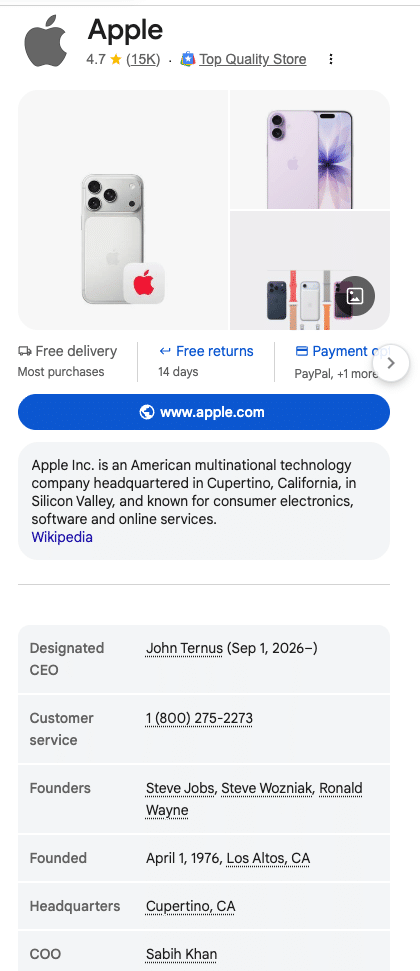
When using JSON-LD, your webpage becomes more structured, and the embedded data allows search engines like Google to display rich snippets. These features may include information like review stars, event details, and product information which can be especially important for small businesses and franchisesI work with many home services franchises that have implemented local and review schema and have seen a lift in local visibility as it helps AI and search engines gather more helpful information about their business.

Here we’ll look at the specific supported features and what pages are eligible for them based on Google’s current search policies:
| Schema Type | Primary Search Feature Eligibility | Critical Policy and Anti-Spam Constraints | 2026 Technical and Policy Updates |
| Reviews and Ratings |
|
|
July 2026 Update: Tighter guidelines on review verification and parsing of user-generated review metadata to reduce AI-generated spam |
| Events |
|
|
Entity Priority Policy: Schema functions strictly as a core verification and trust signal for AI Mode source selection |
| Products |
|
|
Merchant return policy structured data is needed under “MerchantReturnPolicy” using a two-letter ISO country code for rich result eligibility in “returnPolicyCountry” |
| Local Business |
|
|
|
Here’s more specifically how JSON-LD structured data works for SEO:
- Crawling: In this initial stage, the search engine crawler discovers and downloads your site’s raw HTML content, as long as it’s not blocked by robots.txt or noindex tags.
- Parsing: After downloading the HTML, the search engine reads the code blocks to understand the semantic data for context based on the designated vocabulary.
- Eligibility: Once the system has parsed the code, the search engine ensures the structured data adheres to all technical and quality guidelines for search features.
- Serving: If eligible, the search engine then renders the data as a rich or AI search result if the rest of the page’s SEO elements and other trust signals also facilitate ranking.
Just remember that there is no guarantee that linked data JSON will help rank for rich results; there are numerous factors at play that help with rankings.
Why Is JSON-LD Essential For SEO?
Structured data is an important asset for anyone publishing content online. JSON-LD makes it easier for machines to read, and as a result, Google can better index your content, improving its chances of appearing in rich results.
Some specific benefits of using JSON-LD for SEO include:
- Maintainability: This code syntax keeps structured data separate from the front-end presentation layer, with centralized editing and dynamic injection in CMSs as native JavaScript.
- Explicit Meaning: Regular web content is readable for human visitors to your website, but JSON-LD gives search engines more contextual clarity regarding exactly what your page is about, with the ability to map relationships between entities.
- Rich Result Eligibility: Although structured data isn’t a direct ranking factor, it can work with other SEO elements to increase your chances of ranking for rich snippets.
With the help of structured data, many brands have experienced increases in click-through rates (CTR) and visits. For instance, Rotten Tomatoes saw a 25% higher CTR by adding structured data to 100,000 of its pages, while The Food Network experienced a 35% increase in website visits after converting 80% of their pages to enable search features.
However, results can vary greatly depending on factors like search intent, trust, and visibility.
Expert Insight into JSON-LD Structured Data
There are many components that go into an effective and comprehensive SEO strategy, and JSON-LD is one of the most important, especially with the rise of AI search and how it’s changing the way websites rank.
Not only can strong JSON-LD SEO help achieve improved search appearance in the form of rich results and top organic spots, but it can also significantly boost AI visibility on Google and other platforms, helping ensure you appear for all relevant results to gain your audience’s trust and encourage more clicks.
By incorporating this language into structured data on our clients’ pages, I’ve seen how it can get real results. One of our quick-service restaurant clients implemented this and other SEO tactics to gain a 106% increase in quality leads, a 40% boost in organic conversions, and a 35% rise in franchise awards from website leads.
Now, I want to go over how to add JSON-LD for beginners and how you can use a JSON-LD schema generator for SEO.
Where Does JSON-LD Schema Go?
Unlike microdata, RDFa, or microformats, JSON-LD can be embedded directly within the
{
“@context”: “
“@type”: “Organization”,
“name”: “Example Company”,
“url”: “
“logo”: “https://example.com/logo.png”
}
It’s also possible to implement JSON-LD dynamically by inserting it into the Document Object Model (DOM).
This placement could change depending on the platform. For example, you can auto-generate JSON-LD schema in Yoast SEO or other plugins for WordPress based on post and page data. Meanwhile, Shopify allows for native management of product data via themes or specialized apps that function as a JSON-LD schema generator for SEO from the Shopify App Store.
Also, Google Merchant Center may require product markup in the initial HTML.
JSON-LD Nesting
JSON-LD structured data uses nesting to organize data into layers. Specifically, this code syntax uses nested objects that describe properties, with objects appearing as @type in the code, such as:
{
“@context”: “
“@type”: “NewsArticle”,
“headline”: “AI Advancements in 2026”,
“author”: {
“@type”: “Person”,
“name”: “Jane Doe”,
“jobTitle”: “Tech Journalist”
}
}
In the nesting, the code could also include arrays in the form of brackets ([ ]) to indicate when a property has multiple values or independent items.
This would look like:
{
“@context”: “
“@type”: “Recipe”, “name”:
“Classic Chocolate Chip Cookies”,
“recipeIngredient”: [
“2 cups flour”,
“1 cup chocolate chips”,
“1 cup butter”
]
}
In some cases, the code may also include a globally identifying entity via @id tokens, which give entities a unique, permanent URL to prevent duplication. This token also allows other items across the web or a single page to link directly to that entity.
Here’s how an @id might look:
{
“@context”: “
“@type”: “Organization”,
“@id”: “
“name”: “Example Company”,
“url”: “
}
In that example, the @id token establishes Example Company as the entity tied to that particular URL. Referencing this string anywhere else would let search engines know that the @id URL belongs to that same company.
With @graph, you can output multiple separate unnested entities within a single script tag. Together with @id, you’d be able to link independent entities together to put together a knowledge graph.
This might look something like:
{
“@context”: “https://schema.org”,
“@graph”: [
{
“@type”: “WebSite”,
“@id”: “,
“url”: “,
“name”: “Tech Insights”
},
{
“@type”: “NewsArticle”,
“@id”: “,
“isPartOf”: { “@id”: “ },
“headline”: “The Future of Web Semantics”,
“author”: { “@id”: “ },
“publisher”: { “@id”: “ },
“keywords”: [“JSON-LD”, “SEO”, “Structured Data”]
},
{
“@type”: “Person”,
“@id”: “,
“name”: “Jane Doe”,
“sameAs”: [
“https://twitter.com”,
“https://linkedin.com”
]
}
]
}
What’s the Difference Between JSON-LD and JSON?
JSON stands for JavaScript Object Notation. It’s a lightweight data-interchange format used to send and receive structured data. JSON-LD, on the other hand, uses JSON format but is structured in a way that makes it compatible with schema.org standards. Schema.org is a specific vocabulary commonly serialized as JSON-LD for search implementations.
The real difference is that JSON-LD allows web pages to communicate their content’s meaning more explicitly to search engines, resulting in rich results such as star ratings or recipe snippets that enhance user engagement. Also, JSON-LD structured data is vocabulary-independent, meaning that it can express Schema.org along with other vocabularies.
Common JSON-LD Schema Mistakes
If your structured data is not working, there may be common errors to check:
- Syntax Issues: Ensure you’re using the correct quotation marks.
- Using Wrong Vocabulary: Refer to Schema.org for required and allowed properties.
- Inaccurate Data: Information must match what’s visible on the webpage.
- Formatting Mistakes: Copying from programs like Microsoft Word can break your markup.
- Hidden Data: Another big mistake that marketers can make is providing JSON-LD structured data that isn’t visible to human users, as invisible content of any kind in an attempt to manipulate search engines can constitute a violation of Google’s policies, rendering markup ineligible and potentially leading to a Google Manual Action penalty.
- Missing Required Properties: Search engines need specific code fields to generate certain types of rich snippets. For example, a Product schema would need an “offers,” “review,” or “aggregateRating” field. Neglecting these properties could lead to a hard error in Google Search Console, rendering pages ineligible for rich snippets.
- Invalid Property Placement: You might have valid schema in the wrong placement, such as placing a “price” property under a “Product” type instead of nesting it within an “Offer” object.
Duplicate CMS/Plugin Output: Multiple tools like WordPress SEO plugins or built-in theme scripts could inject separate code blocks for one page entity, which might lead to conflicts that confuse search engine crawlers. - Stale Prices: Another mistake might involve hardcoding prices into a page’s code while the actual price changes on the front-end for users. This kind of contradictory data could lead to a Google penalty.
- Fabricated Reviews: Creating fake review data, like “Review” or “aggregateRating” schema giving a product a 5-star review, could conflict with actual reviews, counting as an unethical practice in violation of Google’s search policy.
- Canonical Mismatches: This occurs when the URL property within a code block points to an alternate URL version instead of matching the page’s canonical tag, which could further hurt indexing signals and reduce page authority.
- Inaccessible Image URLs: Including image URLs in your schema that are broken, blocked by robots.txt., or formatted incorrectly could keep search engines from caching assets, preventing them from appearing in search results.
- Incorrect Page-Type Selection: Finally, you may map a page to the wrong schema category, e.g., placing an ecommerce page under the “Article” category instead of “Product.”
What JSON-LD Can (and Cannot) Change
By implementing JSON-LD, you can expect several significant changes to how your content appears in search results. Google supports this structured data format to enhance rich results, which can include:
Event Details
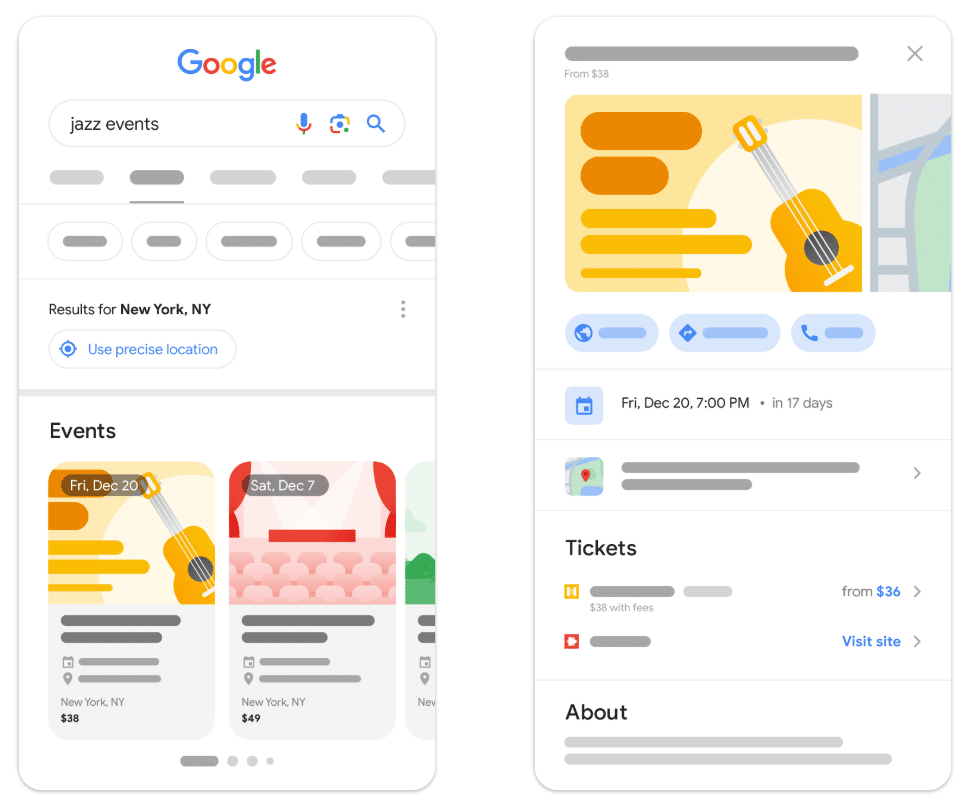
Businesses or organizations that host events can use JSON-LD to showcase upcoming events right in the search results, provided those events have a real-world component. This allows potential attendees to see event dates, locations, and even purchase tickets directly.
Every event needs to accurately detail the event name, location, and start date. It must also be available to the general public. You must also include a unique URL to direct people to purchase tickets and a nested offer for the event.
Example: If you’re hosting a seminar or another in-person event, potentially with a virtual component, the event’s title, date, and location appear in search, making it easy for users to get the details without needing to visit your site. Google lists all of the available regions that can take advantage of the event search experience.
Internal Links and Site Architecture
When you add JSON-LD with Tag Manager or other platforms, you can also optimize internal links and site architecture.
When it comes to internal linking, use @id and “sameAs” properties to connect child pages, organizations, authors, and products into a single knowledge graph instead of isolated snippets. Additionally, ensure all internal links or referenced entities in your code correspond directly to elements that users can see on the page.
Regarding site architecture, be sure to mirror all code with your visible navigation paths and canonical URL structures.
FAQs and How-to Guides
The FAQ schema that optimized for “People Also Ask” snippets is now officially retired, along with How-to schema for HowTo rich results.
The retirement began in 2023 with the introduction of new restrictions for FAQ schema, relegating the ability to optimize for “People Also Ask” rich results to authoritative health and government websites. In September that year, Google also fully deprecated HowTo rich results.
As of May 2026, Google has entirely phased out FAQ rich results.
Merchant Center Auto-Sync
With the help of JSON-LD SEO, you have the ability to engage in automatic product data correction to update price, availability, and condition based on changing data, but you’ll need to use feeds or Merchant API for more frequent changes, as schema alone can’t help keep up with frequent changes or update all attributes.
Example: An ecommerce brand might use schema and Google’s Merchant Center to update product feeds with accurate data, such as prices and descriptions.
AI Citations: Myths vs. Facts
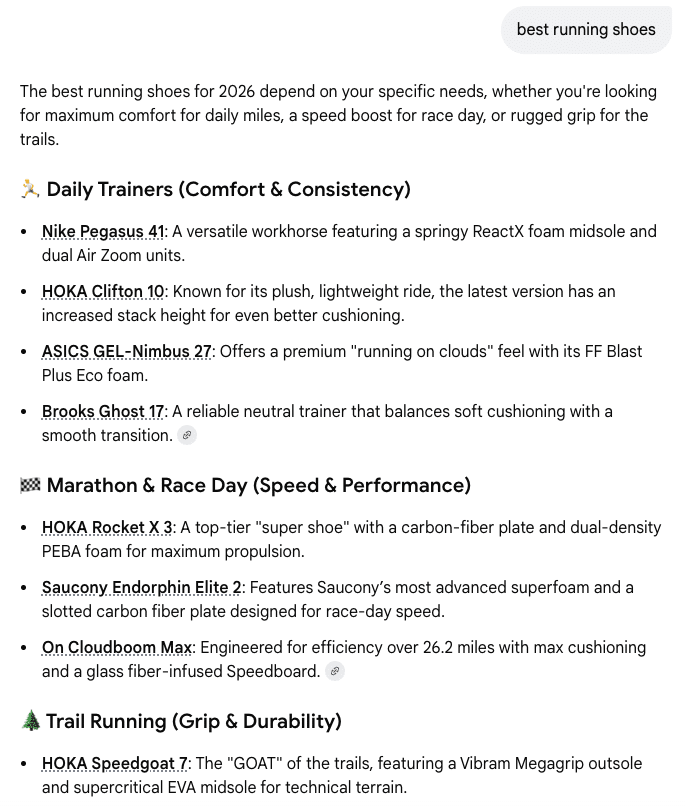
JSON-LD may help you appear in AI search results, such as Google’s AI Overviews and AI Mode. These are critical results to show up for, as they often dominate SERPs and appear as the first results, even above sponsored results.
What is JSON-LD in SEO for AI? There are some myths around this syntax’s role in AI search rankings that we should clear up.
For one, you can’t use a JSON-LD schema generator for SEO to help you directly with AI search, whether for Google, Bing, ChatGPT, or other answer engines. Google makes it clear that over-optimizing structured data to boost AI visibility could hurt rather than help your efforts.
Another myth is that passing validation means your schema is optimized for AI. An LD JSON validator like Google’s Rich Results Test tool only looks at syntactic correctness; it does not confirm entity depth or context. Instead, to help LLMs navigate schema, you need to use clean nesting in single scripts using specific anchors and parent-child properties, but, again, there’s no guarantee this will help you land AI citations or mentions.
Example: A retail brand develops JSON-LD schema that includes details about a particular product, including specifications, reviews, images, and SKU data, enabling these details to appear in AI citations like AI Overviews and ChatGPT.
Current Structured Data Use Cases
Moving into 2026 and beyond, using a JSON-LD schema generator for SEO is no longer just about optimizing for rich results—it’s equally essential for appearing in AI citations, and there are some new innovations coming along that can help with this even more:
Organization Schema
Using Organization schema, Google can use JSON-LD to place your brand and its information in the Knowledge Graph, e.g., the “knowsAbout” property that can suggest possible topical authority.
Effective schema markup will also keep AI systems from confusing your company with competitors in both Knowledge Graphs and AI citations.
Current Product Variant Support
Retailers and ecommerce businesses benefit from ProductGroup schema, which originated in February 2024 and handles product variants, such as sizes, materials, and colors.
For example, the “variesBy” property defines the dimensions of a particular product family, eliminating the need to create separate product pages for every color. In turn, people can ask generative engines questions like, “Can you show me a red version of this desk?” AI will then be able to provide the desired variant.
However, Google needs the site to be capable of preselecting each variant with a unique URL, including appropriate query-parameter URLs, as needed.
Single-page models feature all variants in a single product experience within one parent URL, while multi-page models split the same product across separate, individual pages. URL handling for the former involves a single canonical URL for your ProductGroup, while the latter will use individual self-canonicalizing pages for each product variant.
ProfilePage Schema
Additionally, you can use ProfilePage schema to help search engines understand pages focused on individuals or organizations.
Some examples of this type of schema include author, forum, social, and “About Me” profiles.
JSON-LD SEO: Testing Your Structured Data
What is JSON-LD in SEO without proper testing to gauge its effectiveness? Follow this basic workflow to help you successfully deploy your structured data:
- Local Development and Coding: Write your data manually or use a JSON-LD schema generator for SEO, and use an LD JSON validator to determine whether it’s syntactically correct before introducing it to a staging environment or CMS.
- Staging and Content Alignment: Verify that the data structures are an exact match to your visible, rendered HTML components.
- Live Verification and Testing: Test the live URLs with official engine simulators, like Google’s Rich Results Test tool, which we’ll get more into below.
- Production Indexing and Monitoring: Set up your updated page for crawling and keep track of metrics in the long term to assess performance.
To ensure your JSON-LD code is functioning, you should regularly use tools like:
1. Schema.org’s Markup Validator to validate all Schema.org-based structured data without Google specific warnings.

2. Google’s Rich Results Test remains an effective supplement for an LD JSON validator that helps determine whether your structured data can appear in rich results. You can see how a page or code will appear in rich results for desktop and mobile devices.

3. Search Console “Merchant Listings” to provide you with specific reports and performance filters that can track interactive “free listing” experiences in Google.
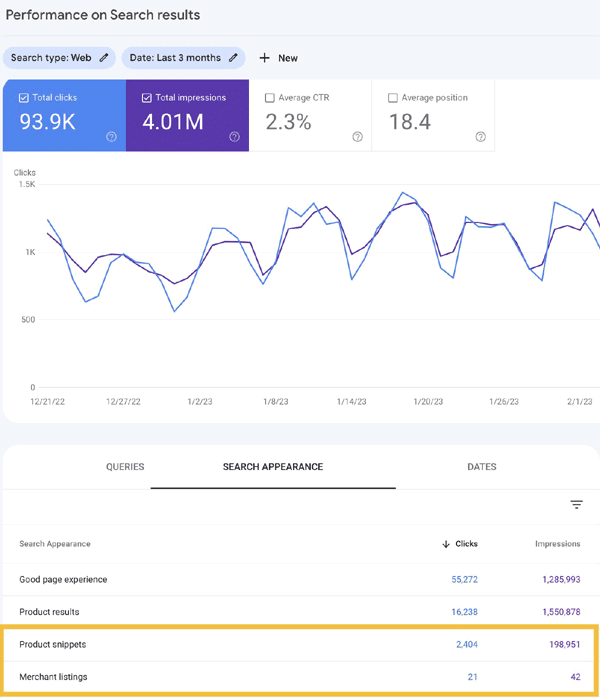
Source: Google
4. AI simulator and JSON-LD validator tools like Schema App that can check to see if your data is “chunkable” for large language models (LLMs), but they don’t have access to Google’s internal ranking or AI systems, making them more effective as workflow aids instead of AI result eligibility simulators.
JSON-LD Frequently Asked Questions
1. Does JSON-LD help with AI Overviews (SGE)?
This code could help you increase your chances of showing up in AI Overviews and other AI engine results with the help of other on-page, off-page, and technical SEO elements, but it primarily helps structure content for rich snippets and ensure search engines can comprehend your content.
2. Is it better to put JSON-LD in the head or body?
While you can add Google JSON-LD to the body or head of your web pages, it’s generally best to include it in the head, unless placement is different for a particular CMS or another platform. Putting code in the head will maintain organizational consistency in most cases.
3. What is ‘Organization’ schema, and why is it huge now?
Organization schema is a particular type of markup that gives search engines information about a company, including names, locations, and logos. This schema is important today to optimize for entity-based SEO and appear in AI-powered search results.
4. Can I have too much schema?
While having plenty of effective schema markup can help search engines better understand your website and its content, you could include too much, to the point where you struggle with irrelevant, inaccurate, misleading, duplicated, malformed, or incomplete data that causes issues. However, quantity alone won’t hurt your performance.
5. How do I monitor JSON-LD in Google Search Console?
Once you’ve added JSON-LD structured data to your site, you can use Google Search Console to determine whether it’s working or not. “Enhancement” reports can track structured data types, such as “Recipes” and “Sitelinks search box,” and you can view any errors that keep your pages from showing up in rich results.
6. What is the difference between JSON-LD, structured data, and Schema.org?
Structured data is the overarching concept of organizing information on webpages to enable search engines to understand it more easily, while schema.org is a particular vocabulary for structured data to help search engines “read” it, and linked data JSON is a specific code syntax used to write that structured data.
7. Does valid JSON-LD guarantee a rich result?
No, this code doesn’t guarantee a rich result. It allows search engine crawlers to read it, but other factors will help Google determine whether a page is worth ranking for rich results, such as overall domain authority, relevance, and other technical SEO elements.
8. Does JSON-LD help a page get indexed?
No, it doesn’t directly assist with indexing. Instead, it helps search engines understand the context of a page after it’s crawled, with indexability relying on URL crawlability via robots.txt formatting, internal links, and sitemaps.
9. Can JSON-LD be added with JavaScript?
Yes, you can add this code to your pages using JavaScript. Googlebot, in particular, has an easy time processing this format through the Document Object Model (DOM), and you can add JSON-LD with Tag Manager to write it in JavaScript.
10. How often should structured data be audited?
The frequency with which you audit your structured data will depend on your site’s unique publishing activity, but it’s ideal to audit it at least quarterly. Generally, it’s best to audit whenever you make any site code changes, Google updates its guidelines, or any errors surface.
Want to Get the Most Out of Your SEO Strategy?
Ignite Visibility has a team of expert digital marketing professionals. We leverage the power of SEO to help businesses improve their on-page optimization, boost organic rankings, and achieve their marketing goals.
Our expert strategists work closely with clients to understand their unique needs and design customized SEO strategies that maximize return on investment:
- Creating optimal content or catering to user intent,
- Address technical issues within the back end of your site
- Target keywords aligned to the buyer’s customer journey
- And more!
If you want to discover how we can help you get the most from JSON-LD for SEO, learn more about our search engine optimization services today!