Google My Business location optimization: Top the first page of search results
Your Google My Business location could be the key to attracting more customers—or why they choose your competitors instead. If your listing isn’t fully optimized, you might be invisible on Google Maps and Search, even when potential customers are actively looking for what you offer.
Moreover, a poorly optimized location limits your business’s reach, making capturing local customers and conversions harder. But the good news? With the right strategy, you can boost your rankings, enhance your presence, and turn searches into sales.
In this blog, you’ll learn how to fully optimize your Google My Business location, avoid costly mistakes, and outperform competitors on Google Maps and Google Search.
Quick win up front
Most brands optimize their Google Business Profile once and forget it. However, to win in 2025, multi-location brands must treat each location profile as a living digital asset continuously optimized, updated, and monitored.
The most successful brands don't manage listings in isolation. They connect listings, reviews, customer engagement, and local visibility into a single strategy that helps every location perform better in Google Search, Google Maps, and AI-driven discovery experiences.
Want to stop leaving more customers on the table? Keep reading.

Table of contents
- Why does your Google My Business location matter more than ever?
- Step-by-step process to optimize your Google My Business location for maximum visibility
- 5 tactics to manage and optimize multiple Google My Business locations
- Avoid these 4 common Google My Business location mistakes that cost you rankings
- How Google Maps and Local Pack rankings work in 2025
- Scale Google Business Profile management with Birdeye
- FAQs on optimizing your Google My Business Profile location
- Improve your Google Business Profile location performance with Birdeye
FYI: Google My Business (GMB) is rebranded as Google Business Profile (GBP). However, since many businesses still recognize it as GMB, we’ll use both terms interchangeably in this blog.
Why does your Google My Business location matter more than ever?
For a multi-location business, the stakes of having a fully optimized Google My Business location have never been higher. With Google’s AI Overview now influencing Google search and Google Maps visibility, your listing is no longer just an online profile—it’s your frontline for attracting potential customers.
Google prioritizes complete, actively maintained, and highly engaging listings.
Your business profile isn’t just a placeholder. It signals to searchers—and Google’s AI—that your brand is credible, local, and relevant.
Why this matters:
In 2025, Google’s AI will now reward listings that reflect "real-world authority"—complete information, active review management, and customer engagement. For multi-location businesses, this means treating every individual location like its own high-performing digital storefront.
With these insights in mind, let’s examine the step-by-step actions you can take to ensure your business is found—and chosen—by more local customers.
Data-backed reasons why optimizing your GMB location is critical in 2025
Businesses managing a Google Business Profile—whether for a single location or a growing network of multiple locations—can no longer treat GMB as a “set it and forget it” tool. Verified profiles don’t just boost visibility—they also drive customer actions like calls, visits, and clicks, making them a critical asset for any multi-location business or single-location company.
Birdeye’s State of Google Business Profiles in 2024 survey of biggest global brands revealed how verified and optimized profiles directly impact engagement and growth.
Here’s what the data shows:
- Verified Google Business Profiles average 1,803 monthly views, with 84% coming from discovery searches via Google Maps and Google Search.
- On average, businesses receive 200 monthly interactions, with 48% of these being direct website url clicks.
- Verified profiles generate 66 monthly direction requests and 50+ monthly calls, proving their value in driving offline visits and direct inquiries.
- Businesses that regularly update photos and posts experience significantly more traffic and higher engagement across maps and local search results.
- Companies that actively manage their online reviews achieve a higher local ranking, enhancing the business’s visibility and credibility.
Tip: Listings AI helps brands maintain accurate business information across locations, identify optimization opportunities, and reduce inconsistencies that can impact local visibility. For brands managing hundreds or thousands of locations, a centralized approach becomes essential for maintaining accuracy at scale.
Step-by-step process to optimize your Google My Business location for maximum visibility
Before finalizing, double-check that all the information like your business hours, website url, and phone number match exactly across your Google Business Profile and other platforms. Even one discrepancy can lower your trust with Google’s AI.
For example, businesses that consistently update listings and share seasonal promotions with the correct date tend to build trust faster with both Google and potential customers.
To help your business stand out, you need more than just a basic Google Business Profile. You need a step-by-step process that ensures your listing is accurate and highly engaging. Here are simple steps to follow:
Claim and verify your Google My Business location
Start by claiming your listing and completing the verification process. This ensures your business on Google is authentic and eligible for full visibility.
Add location-specific details
Input your business name, business address, and phone number. Ensure these match your website and other directories to avoid a duplicate location problem.
Select the right business category
Choose a primary business category that best describes your core services and supplement them with secondary ones to maximize relevance in Google searches.
Upload high-quality photos and videos
Listings with high-quality photos attract more customers and improve engagement signals on Google Maps.
Optimize your business profile description
To improve your business’s visibility, use clear, local-focused language and include relevant keywords naturally (avoid keyword stuffing).
With your business listing now technically sound, it’s time to take it a step further. For multiple locations, optimization doesn’t stop here—it’s about managing each location dynamically to outperform competitors locally.
5 tactics to manage and optimize multiple Google My Business locations
If you’re managing Google My Business multiple locations or scaling a multi-location business, the real challenge is keeping every listing optimized. Here’s how to stay ahead:
1. Add multiple locations through bulk upload
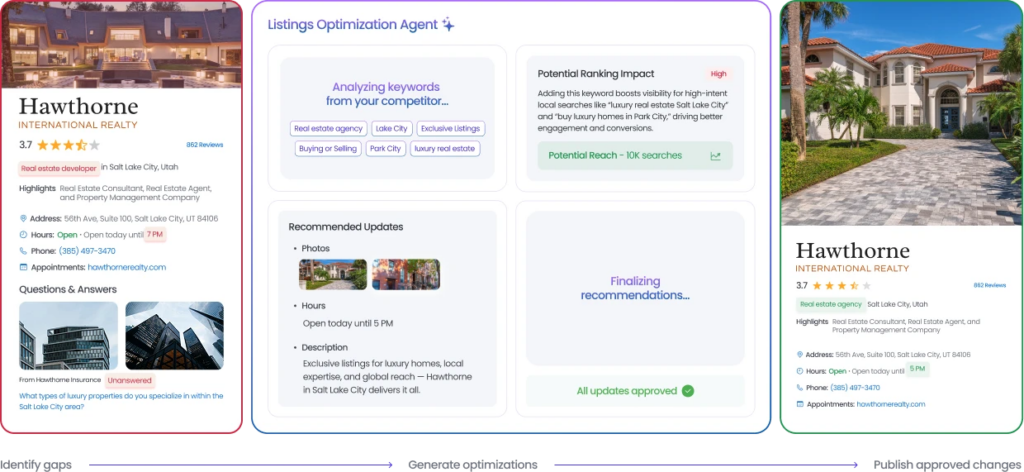
Use Google’s bulk upload capabilities alongside Listings Optimization Agent to manage location data at scale. Listings AI helps brands maintain consistent information, identify listing issues, and streamline updates across large location networks from a central platform.
2. Create localized SEO landing pages
Link each location listing to a unique local SEO landing page to help Google understand your presence across more than one business address and boost relevance in local SEO. When expanding and looking to add a second location to Google My Business or any new location, always follow Google’s simple steps for setup and bulk verification.
3. Manage customer reviews across locations
Reviews remain among the strongest signals of trust and prominence in local search. Reviews AI Agents help brands:
- Generate more authentic reviews with the Review Generation Agent
- Draft contextual responses with the Review Response Agent
- Monitor customer feedback across review platforms
- Identify reputation trends and customer sentiment
- Strengthen customer trust across locations
For multi-location brands, this creates a scalable review management process that supports stronger local visibility.
4. Take advantage of Google Q&A and suggested edits
Proactively manage the GBP Q&A section across your listings to provide accurate information and prevent user-generated errors that can affect trust and the business’s visibility.
5. Use engagement metrics to fuel rankings
More clicks for driving directions, phone calls, and photo views signal that your business is engaging and relevant to Google Maps and Google Search. This improves rankings across multiple business locations.
Optimizing multiple profiles sounds like a lot, but automation and proper structure can save time and boost consistency. Next, let’s explore common pitfalls businesses encounter and how to avoid them.
Avoid these 4 common Google My Business location mistakes that cost you rankings
As businesses expand to multiple locations, new types of challenges arise. These aren’t just technical missteps—they can slow down your ability to scale visibility and reputation effectively. Here are issues specific to scaling GMB profiles:
Lack of process for scaling listings
Many businesses rush to add multiple locations without a structured process, leading to fragmented business information and missed ranking opportunities.
Failure to centralize brand voice across profiles
Each Google Business Profile location should maintain consistency in tone, messaging, and visuals to build brand authority across all your locations.
Overlooking platform integrations
Not integrating listings, reviews, customer engagement, and marketing workflows creates operational silos that make scaling increasingly difficult. Multi-location brands benefit from a unified online reputation management platform that centralizes visibility, customer experience, and reputation management across locations.
Disjointed customer experience across locations
If one location has glowing Google reviews while another struggles, Google’s AI will flag this inconsistency, harming your online reputation and business visibility.
Once your multi-location structure is aligned, you’ll also need to understand how Google evaluates businesses inside Maps and the Local Pack—and how to influence those AI-driven rankings.
How Google Maps and Local Pack rankings work in 2025
It’s best advised to follow Google Business Profile guidelines in 2025 as rankings will be primarily influenced by proximity, relevance, and prominence, but AI will now add extra weight to engagement signals. Let’s break this down:
- Proximity: How close your business location is to the searcher at the time of the query. Google favors nearby listings for most local searches.
- Relevance: How well your business profile matches the search query based on categories, descriptions, and business information.
- Prominence: How established your business is online. This includes Google reviews, review responses, backlinks, and local mentions.
But Google’s AI now takes this further by tracking how users interact with your business listing inside maps and the Google local pack.
Key AI-influenced ranking signals for 2025:
- Clicks on phone numbers or “directions” buttons
- Review sentiment and response speed
- Uploading new images and posts
- Avoiding issues like a suspended Google business account
Now that you understand how Google ranks businesses on Maps, let’s explore how Birdeye help multi-location brands automate and elevate their GMB strategy.
Scale Google Business Profile management with Birdeye
Managing Google Business Profiles across multiple locations requires more than listing management. Brands need a way to connect listings, reviews, customer engagement, and visibility insights across every location.
Birdeye, the #1 agentic marketing platform for multi-location brands, helps brands consolidate Reviews, Listings, Social, Messaging, and Marketing Automation into a single platform.
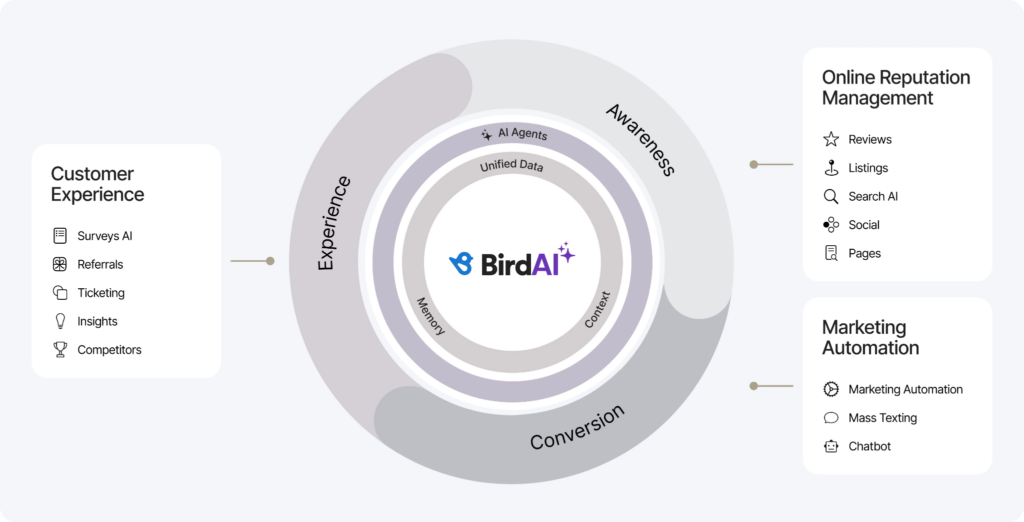
Listings Optimization Agent helps brands maintain accurate business information, optimize location profiles, and improve local discoverability. Reviews AI helps generate reviews, manage customer feedback, and strengthen trust signals that influence Local Pack performance.
With 3,000+ integrations and support for brands managing 100 to 10,000+ locations, Birdeye helps teams maintain visibility, consistency, and operational control across every location.
Brands can think with:
- Unified customer profiles
- Location intelligence
- Customer sentiment insights
- Competitive benchmarking
- Search visibility insights
- Performance reporting
Brands can act with:
- Listings Optimization Agent
- Review Generation Agent
- Review Response Agent
- Publishing Agent
- Engagement Agent
- Reporting Agent
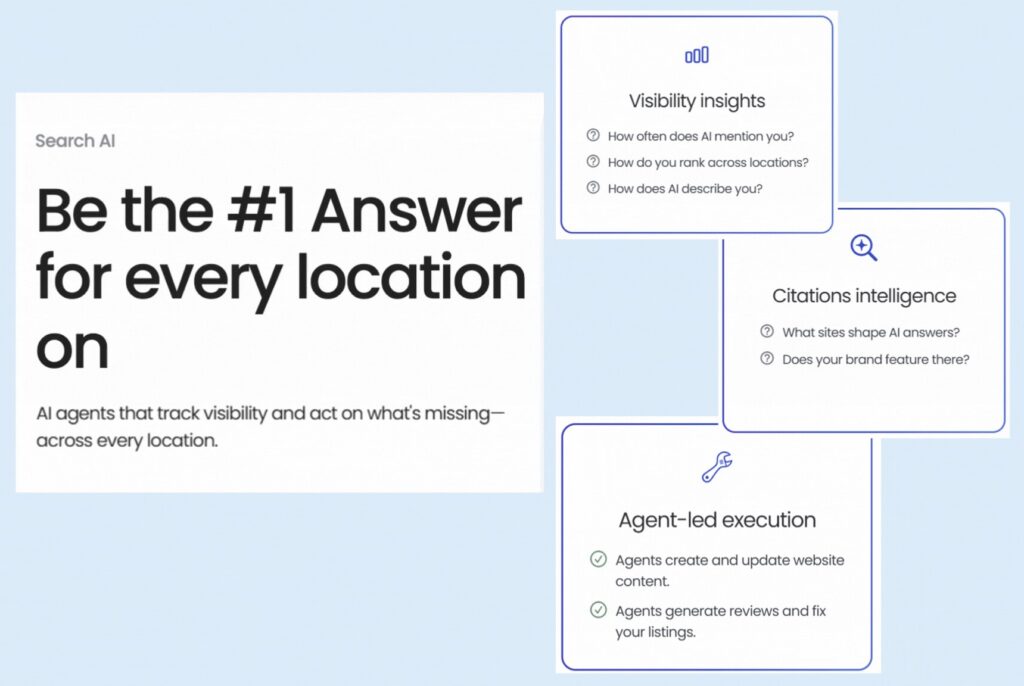
Along with the agents, Birdeye Search AI helps brands understand how locations appear across AI search experiences, identify visibility gaps, and uncover opportunities to improve discoverability beyond traditional search results.
How Foundation Partners Group optimized 80+ GMB listings with Birdeye
Foundation Partners Group, with over 250 locations, struggled to manage reviews, surveys, and listings manually. Their decentralized process created inconsistencies across Google Business Profiles, undermining online trust and hampering customer care during highly sensitive interactions. Additionally, underutilized customer feedback made it difficult to identify service improvement opportunities.
Solution:
Foundation Partners adopted Birdeye’s platform, integrating Reviews AI, Surveys AI, and Listings AI. This empowered them to automate review management, enhance feedback collection, and maintain consistent business information across all profiles.
Their team centralized operations reduced manual workloads and ensured brand consistency across markets.
Results:
- 7.8 million profile impressions and 1.6 million website visits
- A 3x increase in Google reviews, averaging 842 new reviews per month
- 97% review response rate across 10,000+ reviews
- Improved NPS tracking and data-driven operational decisions
- Maintained a 4.7-star Google rating and strengthened customer trust
Combining automation with AI-powered insights allows your business to grow faster and smarter. Next, let’s review the latest statistics shaping how businesses win local search in 2025.
FAQs on optimizing your Google My Business Profile location
You can verify your Google Business Profile location via postcard, phone, email, or bulk verification (for large businesses).
Yes, Google allows you to add a new location via your dashboard and verify it with simple steps provided during setup.
Use centralized tools like Birdeye Listings AI to ensure your business hours are accurate across all listings.
While Google Ads don’t directly boost organic rankings, they complement GMB by driving more traffic and engagement.
A location group is a collection of business listings under one organization. You can manage up to 100 manually or scale using bulk verification.
Improve your Google Business Profile location performance with Birdeye
Optimizing your Google Business Profile is not a one-time task. It requires continuous attention to listing accuracy, customer reviews, engagement, and local visibility signals.
Birdeye’s agentic marketing platform helps brands consolidate listings, reviews, social engagement, and customer communications into one platform. Powered by unified customer profiles and location intelligence, brands can better understand the drivers of local visibility and customer engagement across locations.
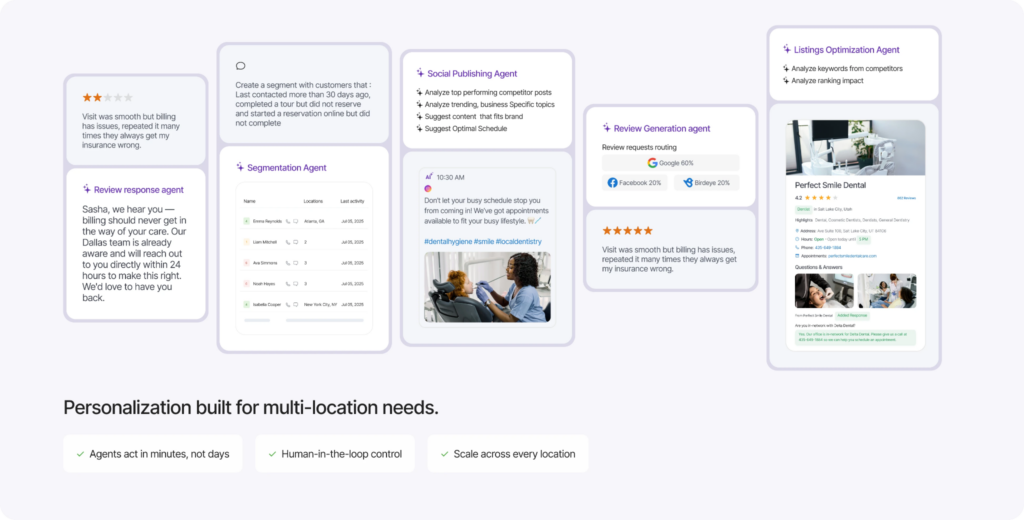
AI agents help brands act by optimizing listings, generating reviews, responding to customer feedback, and uncovering opportunities to improve local search performance.
Built for enterprise brands, supported by 3,000+ integrations, trusted by brands managing 100 to 10,000+ locations, and backed by a 99.99% SLA, Birdeye helps brands strengthen local visibility and customer trust at scale.

The post Google My Business location optimization: Top the first page of search results appeared first on #1 Agentic Marketing Platform for Multi-Location Brands.