Google Reviews & Their Importance to Marketing Strategies

In 2026, your Google Business Profile is the heartbeat of your digital presence, and Google Reviews are the lifeblood that powers it. While many marketers view review management merely as a tactical checkbox or a minor lever for paid search, the reality is far more significant: review velocity, diversity, and volume now serve as a critical algorithmic anchor for Google Maps and Local Pack rankings, with reviews accounting for around 20% of the total weight of all local ranking factors on Google, just below Google Business Profiles.
Whether you are in B2B or B2C, these reviews are no longer just customer feedback, they are a high-stakes trust signal that bridges the gap between your brand’s reputation and actual bottom-line growth.
In this guide, Mark Hite, Director of Consumer Sales and Marketing, explores how a robust, data-backed review strategy transforms your entire business from a simple search result into a recognized market authority.
Google Reviews in 2026: Quick Answer
To get more Google Reviews, businesses should verify and optimize their Google Business Profile, create a direct review link or QR code, ask eligible customers after a real experience, respond to every review, and track review velocity, sentiment, and response time over time.
The strongest Google review strategies are not built around one-time campaigns. They are built around repeatable systems that make it easy for customers to leave honest feedback and easy for your team to respond, learn, and improve.
At a high level, your review strategy should include:
- A verified and fully optimized Google Business Profile
- A direct Google review link and QR code
- Review request templates for email, SMS, in-person asks, receipts, and follow-ups
- Clear compliance rules for customer-facing teams
- A response framework for positive, negative, neutral, and fraudulent reviews
- Reporting that tracks review volume, rating trends, sentiment, and response speed
What Are Google Reviews?
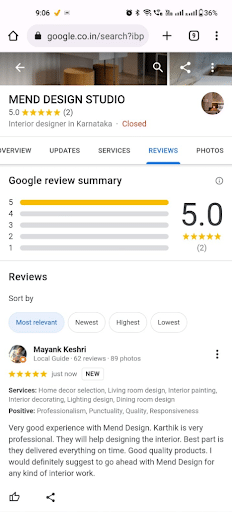
Google reviews consist of public ratings and written feedback on Google Business Profiles in both Search and Maps results. Customers can rate businesses on a scale of one to five stars and leave as much detail as they want about their experience.
Customers need a real experience before leaving a valid review, and while businesses can request reviews from their customers, they cannot manipulate them in any way.
Like reviews on other platforms, Google reviews can positively impact businesses’ performance by gaining people’s trust, building a local presence, and influencing decision-making among users to drive conversions.
With a high volume of positive Google business reviews, you’ll be able to connect to your audiences and supplement other marketing efforts.
Beyond influencing Local SEO and Local Services Ads (LSAs), reviews are increasingly used as a trust signal across Google’s entire ecosystem, including Google Ads and AI-powered search experiences.
They can influence:
- Local Pack visibility
- Paid search ad performance and perceived trustworthiness
- Google’s AI-generated answers (AI Overviews and AI Mode)
- Overall brand entity credibility within Google’s knowledge systems
In other words, Google reviews are no longer just a reputation layer, they are now a cross-channel trust signal that affects both organic and paid performance.
Where Google Reviews Appear
Google Reviews can appear in several high-visibility places across Google’s ecosystem, including:
- Google Search: Reviews often appear directly on your Google Business Profile when someone searches for your brand.
- Google Maps: Reviews help searchers compare nearby businesses and evaluate whether your location is worth visiting.
- Local Pack Results: Star ratings and review counts can influence how trustworthy your listing appears compared to nearby competitors.
- Knowledge Panels: Brand searches can show review snippets, ratings, photos, and other trust signals directly in the search result.
- Review Justifications: Google may surface snippets from reviews that match the user’s query, such as “great emergency service,” “fast appointment,” “family-friendly,” or “vegan options.”
- AI-Powered Search Experiences: Review content can contribute to how users understand your business in AI-generated summaries and zero-click search experiences.
Because of this, your Google Reviews do more than sit on your profile. They help shape how Google and potential customers understand your business.
Google Reviews vs. Google Customer Reviews
This may seem confusing, but there are traditional Google business reviews, and then there are Google Customer Reviews.
Google reviews refer to customer reviews on local Business Profiles for businesses, while Google Customer Reviews is a specific add-on to Google’s Merchant Center that collects post-purchase feedback from shoppers on ecommerce websites, with the latter contributing to store ratings.

The distinction matters because each review type serves a different marketing purpose.
| Review Type | Where It Appears | Best For | Why It Matters |
| Google Business Profile Reviews | Google Search, Google Maps, Local Pack, Knowledge Panel | Local businesses, service providers, multi-location brands, restaurants, healthcare, home services, retail locations | Builds local trust and supports local discovery |
| Google Customer Reviews | Ecommerce post-purchase surveys through Merchant Center | Ecommerce brands | Helps collect shopper feedback after purchase |
| Store Ratings / Seller Ratings | Google Ads, Shopping, and other Google surfaces when eligible | Ecommerce and advertisers | Can increase perceived trust in paid search and shopping results |
| Product Ratings | Google Shopping and product listings | Ecommerce product pages | Helps shoppers compare individual products |
For most local businesses, Google Business Profile reviews are the priority. For ecommerce businesses, Google Customer Reviews and seller ratings may also play an important role in paid media performance and product visibility.
Why Google Reviews Matter for Marketing Teams
There are multiple benefits of having many customers write a Google review for your business.
After all, according to BrightLocal, only 4% of consumers say they “never” read online business reviews, with most relying heavily on these trust signals before making a purchase.
The following are some of the specific advantages of having a large number of positive Google business reviews:
- Increased Trust: People are more likely to trust your brand if you have a lot of positive Google Maps reviews and other reviews across Google’s ecosystem, with 88% of people trusting reviews as much as personal recommendations.
- More Conversions: Having more people trust your brand over competitors will lead to a higher conversion rate as they’re more likely to do business with you, shortening the distance between initial interest and sales.
- Local Discovery: A large number of positive reviews will increase your chances of appearing in the Local Pack and Maps Pack on Google, which will make it easier for local audiences to find you.
- Better Customer Feedback: More reviews provides you with richer customer feedback, including potentially negative reviews that can inform you of certain issues that you need to address, and which you can respond to with thoughtful replies that restore trust and show that you value your customers’ input.
- Sales Enablement: Google reviews also help with sales enablement, as they can make your brand more credible and provide sales teams with actionable insights that assist their efforts.
- Improved Brand Reputation: The more people respond favorably to your brand and share their experience, the better your reputation will be, helping with overall reputation management.
- Competitive Differentiation: You’ll also be able to set yourself apart from competitors with more positive reviews backing you on Google.
What Makes a High-Value Google Review?
There are multiple elements of high-value Google Business and Google Maps reviews that can help you get the most from them.
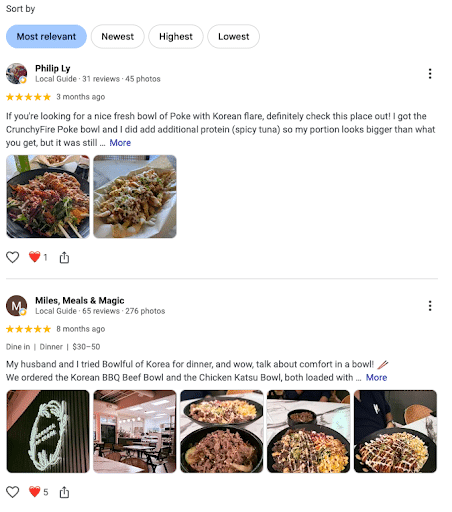
The most important factor is a combination of honesty, specificity, and demonstrated experience. When customers write a Google review, they should express their actual opinion, with details about their experience and the product or service they used.
Additionally, reviews should go into how a brand or offering solved a particular problem and the specific outcome, with optional photos supporting the review.
Specific and photo-heavy reviews can add more credibility to your reviews and possibly increase their prominence in default review sorting.
How Google Reviews Influence AI Search and Ads
One of the most significant shifts in recent years is the integration of Google Business Profile reviews into AI-driven search experiences.
Google now uses review content to help determine:
- how businesses are described in AI-generated answers
- which businesses are surfaced as “trusted options”
- contextual relevance for service queries
- sentiment signals for brand understanding
This means reviews are no longer just a ranking factor, they are becoming part of how Google “explains” your business in AI-generated search experiences.
As a result, businesses with strong, consistent review profiles are more likely to be:
- recommended in AI summaries
- perceived as credible in zero-click results
- favored in high-intent local queries
Reviews can also influence paid media performance indirectly. While Google Business Profile reviews are different from Google Customer Reviews and seller ratings, review volume and reputation can still improve how credible your brand appears when users click from paid search into your Business Profile, landing page, or local listing.
Before You Ask: Google Review Rules and What Not to Do
Keep in mind that Google has strict terms of service when it comes to collecting and managing reviews.
Specifically, you need to allow all reviews through, regardless of whether they’re positive or negative, as long as those reviews are honest and come from actual customer experiences.
Risk Warning: Filtering out negative reviews before they land on Google with review gating could result in a Google suspension.
In addition, you can ask people to leave a review, but avoid incentivizing customers to leave a review, which counts as manipulation.
Risk Warning: Incentivizing customers with discounts, freebies, or entries into raffles is in direct violation of Google’s terms and also puts you at risk of suspension.
Avoid the following tactics:
- Buying Google reviews
- Offering discounts, gift cards, freebies, or raffle entries in exchange for reviews
- Asking only happy customers to leave reviews
- Filtering customers through a private survey before deciding who gets a Google review link
- Asking employees to review your business
- Asking friends or family members without a real customer experience to leave reviews
- Posting fake reviews on competitor profiles
- Using review templates that tell customers what to say
- Creating sudden, unnatural spikes in review volume from questionable sources
The safest approach is simple: ask eligible customers after a genuine experience, make the process easy, and let them provide honest, unscripted feedback.
How to Set Up Google Reviews Correctly
You might wonder “how to see my Google reviews” and encourage more reviews from your customers, which these steps will simplify:
Set Up a Verified Google Business Profile
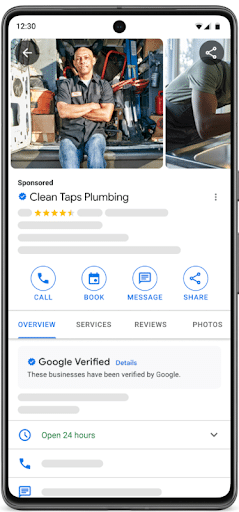
The first step to get your Google review capabilities is to set up your Google Business Profile and ensure it’s Google Verified.
You can do so in the following steps:
- Log into your Google Business Profile Manager.
- Click “Get Verified” for a new or existing business.
- Complete the video verification process by recording your physical location, proof of operations, and equipment, or, alternatively, use SMS, email, or mailed verification.
Include Accurate Business Information
Make sure your GBP has all current information, including your name, address, and phone number (NAP), along with a description and a list of product or service offerings.
Update Business Hours as Needed
If your business hours change for any of your locations, be sure to update them. Advertising accurate business hours will help keep you from frustrating your customers and, subsequently, help avoid bad reviews.
Respond to Reviews
Respond to customer reviews, even bad ones. Taking the time to appreciate your customers and address their concerns or issues will reflect well on your business, showing a dedication to resolving complaints and listening to your customers.
Include Photos and Videos for Local Visibility
You can maximize your visibility on Google by including photos and videos of your business, staff, and processes when appropriate.
The Mechanics of Google Review Optimization
When attempting to get more reviews from your customers, you need to make it clear to them how to leave a Google review and provide a Google review link that keeps reviewing simple.
Here are some steps to take to extract a Google review link and use it to encourage more reviews:
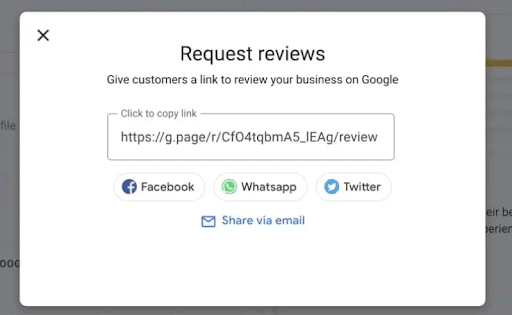
1. Extract a Link for Reviews from Your Google Business Profile
Go into your Google Business Profile and click on “Get more reviews” on your dashboard. From there, click on “Share review form” to copy your direct link.
2. Shorten and Brand Your Review Link
You may want to shorten your link to make it cleaner when instructing customers on how to leave a Google review.
Tools like Bitly and Rebrandly make it easy to shorten your Google review link, and you can even customize the link text to feature your business name for branding purposes.
3. Pull a Google Review QR Code
If you want to attract more reviews from mobile users, another option is to provide them with a convenient Google review QR code.
You can do so with the following basic steps on your GBP:
- Log into your Google Business Profile.
- Click on “Get more reviews” under “Read Reviews.”
- Share a QR code or download it by right-clicking and selecting “Save image as…”
4. Share Your Link or QR Code Strategically Across Touchpoints
Once you have your Google review QR code or link, share it on all relevant platforms during the post-purchase phase of the customer journey.
There are plenty of places you can leave your link or code, such as:
- Order Confirmation Pages: Right after someone clicks “Buy,” you can place a button on your website’s thank-you page, e.g., “Excited for your order? Let us know how your shopping experience went!”
- Packaging Slips or Boxes: When a customer receives a package, you can include a printed QR code in or on your packaging, such as asking for reviews on a little thank-you card.
- Receipts: For restaurants or other brick-and-mortar businesses, you can add a QR code to your receipts to make it easy for customers to leave a review after a purchase.
- “Order Delivered” Emails: Following a customer’s order, you could send an email one to three days later asking for a review, giving people enough time to try your offering before reviewing.
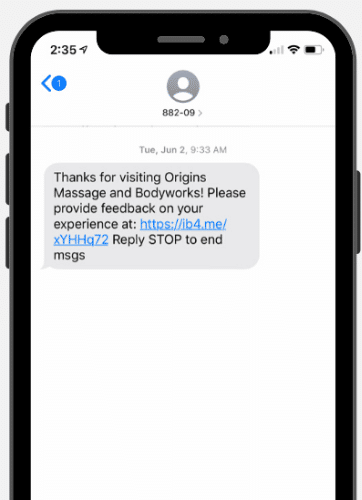
- SMS Text Messages: Send a friendly SMS text requesting a review with a shortened link after someone orders via an app or provides their phone number with an order.
How Customers Can Leave, Edit, or Delete a Google Review
A strong review strategy should also make the process clear for customers.
To leave a Google review, customers typically need to:
- Search for the business on Google Search or Google Maps.
- Open the Google Business Profile.
- Click “Write a review.”
- Select a star rating.
- Add written feedback and photos if they choose.
- Submit the review.
Customers can also edit or delete their own reviews from their Google account. This can be helpful if a customer updates a review after an issue is resolved, but businesses should never pressure customers to change or remove legitimate feedback.
Instead, focus on resolving the issue, communicating clearly, and giving the customer a reason to update their perception naturally.
How to Get More Google Reviews: Actionable Recommendations
If you want to reap the rewards of Google reviews, here are some key steps to take:
Prioritize Review Acquisition
One of the most important actions is to gather as many reviews as you can for your GBPs. Although having a few positive reviews is good, you’ll be able to maximize conversions early on if you get a large number of reviews from the start.
Just be sure that review requests are high-quality and comply with your company policies.
Using a Google review calculator, you’ll also be able to determine how many high ratings you’ll need to reach your target and gauge brand sentiment among reviewers.
Encourage Authentic, Unscripted Feedback
Encourage all satisfied customers to leave honest, detailed feedback about their experience. The most valuable reviews are those that reflect real customer language without direction or scripting.
Avoid guiding customers on what to include in their review content. Instead, focus on making the review process simple and accessible through direct links and follow-ups.
Automate Review Requests
You can also simplify the review process with automated reminders. Send these via SMS text messages or emails, kindly requesting reviews after a purchase.
Respond to All Reviews
When a customer sees that a business owner responds to their customers, they will be more likely to share their feedback, too.
Responding to positive reviews shows that you value your customers and appreciate that they took the time to complete the survey.
Being responsive also extends to complaints and criticisms.
According to the Harvard Business Review, businesses that responded to negative reviews received a higher rating than those that ignored them.
If you receive a one or two-star review, take the time to offer a thoughtful response and present a solution. That said, if you say you’ll make a change, you need to follow through.
Address any complaints right away and aim to move the conversation to an email or a phone call. This way, prospective customers will see that you care about customer concerns, but they won’t get a front row seat to an angry public conversation.
Maintain GBP Accuracy
Another way to get the best results from your GBP and reviews is to keep all of your information accurate across locations.
Each GBP should have a consistent name, address, and phone number (NAP) that matches the information on your site and other platforms.
Also, update business hours, descriptions, products, and services as needed, especially if they vary from location to location.
You can also keep your GBP more active by publishing Google Posts, covering topics like company-wide announcements, new business openings, and local events.
Remember, a well-optimized and properly configured GBP can also help you show up in local searches for the Google Map Pack, along with Google’s AI Overviews and AI Mode results, supplementing other SEO efforts.
White-Hat Strategies to Drive Review Velocity
You can implement the following automation strategies to dramatically increase review volume and frequency:
- Time SMS and Email Follow-Ups Based on Milestones: When customers complete a purchase or another conversion action warranting a review, such as a repeat purchase or interaction with a customer service rep post-purchase, time your follow-ups within one to three days to give people enough time to use your products or services and process their experience.
- Train Customer-Facing Teams: Sales teams, customer service reps, and others who interact directly with customers should know when and how to ask for Google business reviews.
- Deploy Physical In-Store or In-Office QR Codes: Whether on receipts, signage, or packaging, you can ask people to leave a review with physical QR codes that people can instantly scan with their smartphones.
New businesses should be especially cautious about rapid growth in review volume. It is generally advised to keep new reviews to fewer than 10 per week during your first month of operation, as an unnaturally high review velocity can trigger a Google account suspension.
To really drive review velocity, create frictionless user pathways that make it easy for customers to determine how to leave a Google review, with text-accompanied links, buttons, and codes that immediately direct users to review forms.
Crucial Compliance: Google Terms of Service Pitfalls
Keep in mind that Google has strict terms of service when it comes to collecting and managing reviews.
Specifically, you need to allow all reviews through, regardless of whether they’re positive or negative, as long as those reviews are honest and come from actual customer experiences.
Risk Warning: Filtering out negative reviews before they land on Google with review gating could result in a Google suspension.
In addition, you can ask people to leave a review, but avoid incentivizing customers to leave a review, which counts as manipulation.
Risk Warning: Incentivizing customers with discounts, freebies, or entries into raffles is in direct violation of Google’s terms and also puts you at risk of suspension.
The Response Framework for Positive and Negative Reviews
In responding to positive and negative reviews on Google, here is a table to guide your response protocols:
| Action Step | Positive Reviews | Negative Reviews |
| Main Goal | Express gratitude and build customer loyalty | Address and fix the issue and move the dispute offline if possible |
| Speed | Reply within 24 to 48 hours | Reply within 24 hours |
| Greeting | Use the customer’s name | Use the customer’s name |
| Saying Thanks | Thank the customer for their time and kind words | Thank the customer for sharing feedback |
| Apology | N/A | Offer a sincere apology for any inconvenience or poor experience when appropriate |
| What to Highlight | Mention specific services or products the customer enjoyed | Acknowledge the specific problem the customer experienced |
| Next Steps | Invite the customer to return | Give an email or phone number to move the conversation off of Google |
| SEO Keywords | Use your business name and top services in a natural way | Avoid using keywords to keep the negative review and your response hidden from relevant searches |
Additional Note: Flag any fraudulent or policy-violating reviews and report them to Google for review, which could help you determine how to get a Google review removed.
Multi-Location Google Review Management
For multi-location businesses, Google review management becomes more complex. Each location needs its own review strategy, response protocol, and reporting system.
A strong multi-location review program should define:
- who owns review requests at each location
- who responds to reviews
- when reviews should be escalated
- what response templates are approved
- how quickly teams must respond
- how location-level performance is reported
- how brand voice should remain consistent
- which issues should be sent to operations, support, HR, or legal
Multi-location businesses should also compare locations against each other to identify patterns.
For example, if one location consistently receives complaints about wait times while another earns praise for speed, that insight can guide operational improvements across the business.
How to Measure Google Review Performance
To manage reviews effectively, you need to track more than your average star rating.
The most important Google review KPIs include:
- Average star rating
- Total review count
- New reviews per month
- Review velocity by location
- Review response rate
- Average response time
- Percentage of reviews with written feedback
- Percentage of reviews with photos
- Positive vs. negative sentiment
- Most common complaint themes
- Most common praise themes
- Review count compared to competitors
- Conversion rate from Google Business Profile actions
- Calls, direction requests, bookings, and website clicks from GBP
Review reporting should connect reputation management with business outcomes. The goal is not just to get more stars. The goal is to understand how customer sentiment affects visibility, trust, conversions, and growth.
30-Day Google Reviews Action Plan
Follow this action plan over the next four weeks to help you get the most from your Google review strategy:
- Week 1: Audit your GBP and review policy to ensure people can leave reviews across touchpoints and maintain compliance with Google’s terms of service.
- Week 2: Create links, QR codes, and review request and response templates for customer-facing teams to use.
- Week 3: Launch requests and response workflows to respond appropriately to both positive and negative reviews.
- Week 4: Measure, refine, and report based on your goals around review velocity and brand reputation.
FAQs
1. Do Google reviews affect Google Ads performance?
Research shows that a high volume of Google business reviews can positively affect Google Ads click-through and conversion rates, more so than review scores. People will view your brand as more credible with many reviews backing it, which can lead to more ad clicks and, ultimately, lower cost per conversion.
2. Is review score or review volume more important?
When it comes to paid search performance, review volume has a more direct impact. A high volume of reviews indicates both social proof and brand maturity, which can lead to more conversions among both brand and non-brand users, as reviews assure people that you’re credible and trustworthy compared to competitors.
3. How do reviews impact conversion rate?
Google business reviews can lead to more post-click conversions as audiences perceive your brand as more reputable if you have a high volume of positive reviews, particularly among audiences who are already familiar with your brand.
4. Do reviews help non-brand campaigns?
Yes, Google reviews for business profiles can help convert more non-brand users by encouraging them to trust you over less reputable competitors, particularly if you have many positive reviews among existing customers.
5. How can I get more Google reviews?
You can increase the number of reviews on Google by asking satisfied customers to provide feedback, automating reminders to leave a review through SMS and email, and replying to reviews with thoughtful, in-depth responses that drive more engagement.
6. Can you delete or remove a negative Google review?
Can you delete Google reviews? It depends on the nature of the review. Google gives instructions on how to get a Google review removed if it’s fraudulent or in violation of Google policies. You can submit fraudulent reviews for evaluation from Google or report inappropriate reviews right from your GBP dashboard.
7. Does responding to Google reviews improve your local SEO rankings?
With relevant keyword inclusions like your products or services that people might search, you can optimize reviews subtly to boost your local SEO strategy. Just be sure not to over-optimize and only include keywords when they work naturally within your review response.
Get the Most From Google Reviews With Ignite Visibility
Gathering and managing a large number of reviews can quickly become daunting, especially if you’re focusing on growing your core business, even with the help of a Google review calculator.
The experts at Ignite Visibility can give your GBP the lift it needs to drive conversions and ROI in the long term.
With our services backing your brand, you can:
- Develop and configure a high-performance Google Business Profile
- Build multiple profiles for multi-location businesses
- Regularly acquire customer reviews with automated processes
- Respond to reviews to further boost GBP activity
- Keep all GBP information accurate and current
- Incorporate your GBP into a comprehensive paid search and SEO strategy
- And more!
To learn more about what we can do for your business, take a look at our SEO services and discover how we can fully optimize GBP performance as part of a complete strategy.