How to Tell if a Facebook Account Is Fake
Fake Facebook accounts and profiles affect consumers, content creators, brands, and Marketplace users in various ways, from impersonations and driving fake engagement to scam and phishing attempts. It’s an ever-present problem, with the platform taking action on 1.1 billion fake accounts in Q4 of 2025.
As such, knowing how to tell if a Facebook account is fake is essential in ending potential threats and indicating when to report one. Keep in mind the distinction between a fake Facebook account and a hacked one: While malicious parties create a fake profile on FB under a false identity, hacked accounts are formerly legitimate ones that another party has taken over.
In this blog, Glenette Broma, Social Media Specialist will tell you how to tell if a Facebook profile is fake and what you can do about it if you discover one.
What You’ll Learn
TL;DR
No single sign proves a Facebook account is fake, but there are various indicators that could help you weed out fake profiles on FB. In learning how to tell if a Facebook account is fake, here are some of the key signs:
- Copied identity
- Unsolicited duplicate friend request
- Sudden change in a known account’s behavior
- Contradictory profile details
- Suspicious login link
- Urgent payment request
- Refusal to verify through another channel
Once you know how to tell if a Facebook account is fake based on these signs, it’s important to avoid clicking, paying, or sharing codes involving an account until you’ve completed verification.
Fake Facebook Accounts vs. Hacked Real Accounts vs. Cloned Accounts
There are different types of potentially malicious accounts on Facebook. While a fake Facebook account is entirely fabricated, some accounts might be hacked, turning a once-legitimate account into a compromised one for the sake of scamming.
Others might be cloned accounts, which are duplicates of existing accounts, usually with the purpose of scamming the legitimate profile’s friends by pretending to be that person.
Types of Suspicious Facebook Accounts and Activity
Here is a breakdown of how to tell if a Facebook account is fake or if it’s another type of compromised account, along with signs of each account type and next steps to take:
| Account Type | What Is It? | Typical Signs | Next Steps |
| Fake Account | A fake Facebook account created from scratch with the intent to mislead or catfish users or build fake audiences |
|
|
| Cloned / Impersonating Account | A duplicate of an existing Facebook profile, copying a person’s name, bio, and photos, usually in an attempt to pretend to be that person and request money or sensitive data from the real person’s friends |
|
|
| Hacked Account | A legitimate account hijacked by malicious parties, typically through a phishing scam. Scammers may then use this account to send phishing links to the account’s friends or request money from them |
|
|
| Marketplace Scammer Account | A fake buyer or seller profile using a new fake or hacked account, usually for the purpose of committing counterfeit sales, financial fraud, or overpayment scams |
|
|
| Bot / Spam Account | Automated accounts that automatically perform repetitive tasks, such as liking or commenting on posts, often to drive engagement and spread spam |
|
|
| Coordinated Inauthentic Account | A network of fake, bot, or hacked accounts working cohesively to complete various objectives, like spreading disinformation, manipulating public opinion, or boosting certain trends |
|
|
My Expert Opinion on Fake Facebook Accounts
Someone always has to ruin a good thing, right? While there are a ton of great attributes about Facebook and its impact on digital marketing, there are some downsides. One of the biggest? Facebook scammers.
Learning how to detect scammers on Facebook is important not only for your brand but also for you personally. When it comes to digital marketing specifically, you have to be on the lookout for Facebook scammers pretending to be a representative of your business or a former unhappy customer.
Toward the end of 2025, Facebook estimated that around 5% of worldwide daily active people (DAP) comprised violating accounts, and malicious parties are always creating new ones. Identifying and reporting these profiles can help protect your reputation while also protecting others on the platform from potential scams, manipulation, or other actions that might otherwise compromise users.
Knowing how to spot a fake Facebook account based on the key red flags can protect your own account, your business, and your followers.
Pro Tip: If your business is going to be active on Facebook, you have to be aware of potential scams and fake profiles. If you come across one, learning how to report it is paramount to keep it from interfering with your digital marketing strategy.
Fake Facebook Accounts: Everything You Need to Know
What is the point of a fake Facebook account? Well, some accounts may attempt to scam you through some form of action, such as sending money to them or visiting a phishing website. Meanwhile, others may contribute to ad campaigns to sway public opinion or otherwise engage with other users.
Today’s scams on Facebook also go beyond simply creating fake profiles, involving deepfake videos pretending to be influential politicians and other public figures, often with the help of AI tools to create convincing videos.
Facebook has an inordinate amount of fake accounts that defy its terms of use on a daily basis. However, Facebook isn’t just letting them be, as the platform removes or otherwise acts on billions of fake accounts every year.
What Are They Used For?
People use these accounts for fake likes, fake comments, and fake reviews. But what is really interesting, is that the issue perpetuates itself.
Someone who creates a fake account to like pages or leave comments actually has to like a variety of items, leave a variety of comments and interact with a range of people. Otherwise, the account will be deleted by Facebook.
Why Is This An Issue For Marketers?
These fake accounts also cause an issue for marketers. First, you don’t want to be in a position of guilt by association. Secondly, you don’t want to tarnish your company’s good name by having unsavory or ill-intentioned ads run on your content.
Here are some of the main reasons marketers should know how to identify a fake Facebook account:
Brand Impersonation
Scammers clone businesses’ logos, bios, and content to develop copycat pages that are nearly indistinguishable from legitimate profiles. Bad actors may then use these fake profiles on FB to scam customers, spread propaganda, or sell unauthorized products using your brand name, tarnishing your reputation in the process.
Fraudulent Customer Support
Impostor accounts can monitor public posts and reply directly to any customer questions or complaints, all while posing as representatives of your brand, often to direct customers to phishing scams in direct messages, where they can steal personal details and payment information.
Fake Giveaways
Scammers use fake accounts to announce inauthentic giveaways or contests, ultimately directing audiences to phishing links to “claim a prize” while compromising users’ personal accounts.
Polluted Engagement Metrics
Networks of bot accounts and click farms could contribute to false engagement metrics, including inaccurate likes, clicks, and shares, leading to murky analytics and potentially increased ad spend.
Customer Data Theft
Bad actors could also use a hacked, cloned, or fake Facebook account to trick users into sharing their personal payment information or other sensitive data, possibly leading those victims to perceive the associated brand as the culprit.
Ad Account Phishing
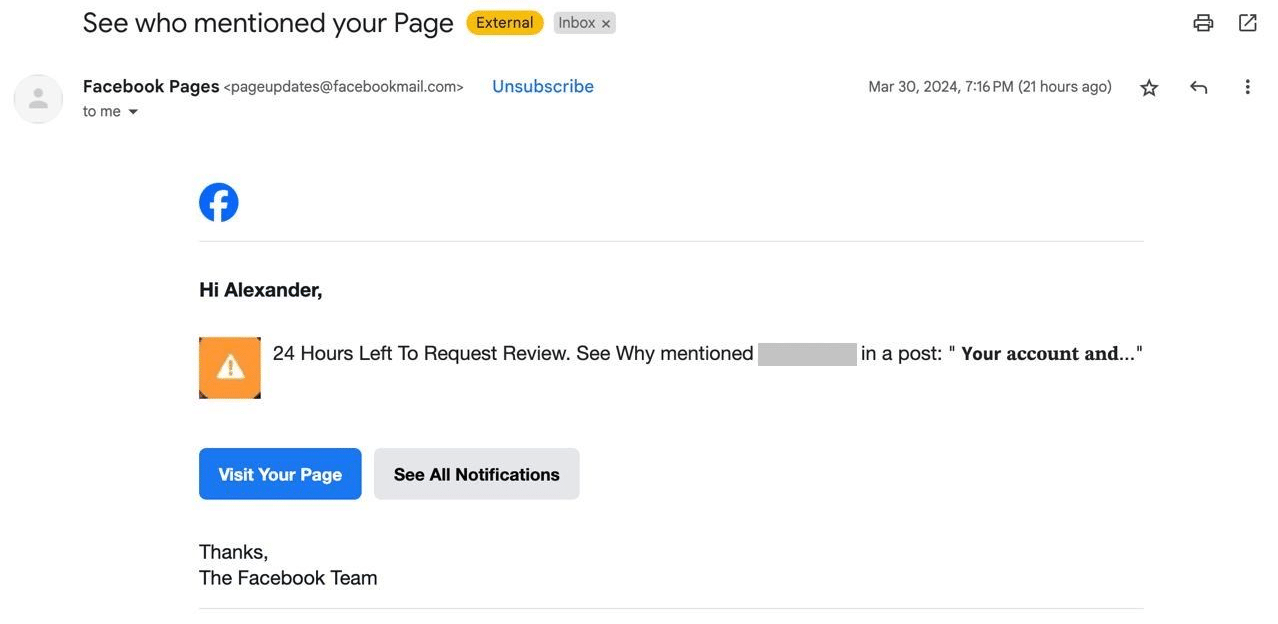
Malicious parties could send fraudulent direct messages or emails to a business’s employees, claiming that the business’s page is violating certain policies and requesting verification, at which point employees may inadvertently provide hackers with ad account login credentials.
Reputation Damage
Victims of scams on Facebook from users posing as your business could lead to negative reviews directed toward your business, which can hurt your reputation on a large scale.
Escalation Demands on Legal and Support Teams
Businesses managing the fallout of scamming issues, fake impostor accounts, and other related problems can lead to legal complications and a burden on customer service departments as they try to restore the business’s reputation.
How Are Fake Facebook Accounts Maintained?
With the recent light shone on these fake accounts and the spread of disinformation, Facebook has started to take a hard-line stance against those who use the platform for nefarious reasons.
But while Facebook works on doing its part to eliminate the problem, you need to do your own due diligence to spot the fakes.
The Most Common Warning Signs of a Fake Account
If you want to know how to tell if a Facebook account is fake, the following are some of the main indicators:
Profile Photo Issues
How do you know if a Facebook account is fake? One key way is to look at the account’s profile photo.
Many fake accounts tend to use photos from other real profiles, while others may use generic or stock photos, with many using images of famous or semi-famous influencers or celebrities.
You might also notice things like unnatural backgrounds or details that indicate AI-generated content, repeated photos across multiple accounts, and images found under various names.
Also, it’s a big red flag if the profile only has one profile picture, particularly if the profile has apparently been around for some time.
- What to Look for: Blurry, stock-like, or overly glamorous profile pictures, multiple accounts using the same profile photo with different names, or photos that mismatch the user’s apparent age, gender, or region; check for any stolen or copied images by doing a visual search on Google Images or using tools like CopyChecker AI Image Search to confirm whether an image is AI-generated.
- Why It’s Suspicious: Scammers may use fake images to get users to trust them and treat them as real people.
- Why It’s Not Proof of a Fake Account by Itself: Real users might use AI-generated or other potentially suspicious-looking images to avoid using their actual likeness out of the desire to maintain privacy and safety.
Sparse or Inconsistent History
You can also learn how to know if a Facebook profile is fake based on the profile’s history.
For one, you might see that a profile has very few posts with little to no engagement.
Conversely, a profile could have a large number of posts, but it might be clear that posting habits and content are inconsistent. For instance, one post could use a certain type of language in the caption, while another uses very different language, suggesting that those captions (and possibly images or other content within) are stolen from various profiles.
Pages may also suddenly change entire topics, names, locations, profile pictures, and posting frequency, all of which could indicate a hacked or cloned account.
- What to Look for: An account created very recently or an older account with little or no posting history, no tagged photos, or sudden shifts in posting habits and language.
- Why It’s Suspicious: Scammers often create new accounts in place of banned ones to avoid permanent banning, or they create many fake accounts at one time, which can lead to a lack of posting history.
- Why It’s Not Proof of a Fake Account by Itself: People might create new accounts for a fresh start, or they may simply not post a lot on their profiles, sticking to commenting on others’ posts or communicating through direct messages.
Suspicious Friend Patterns
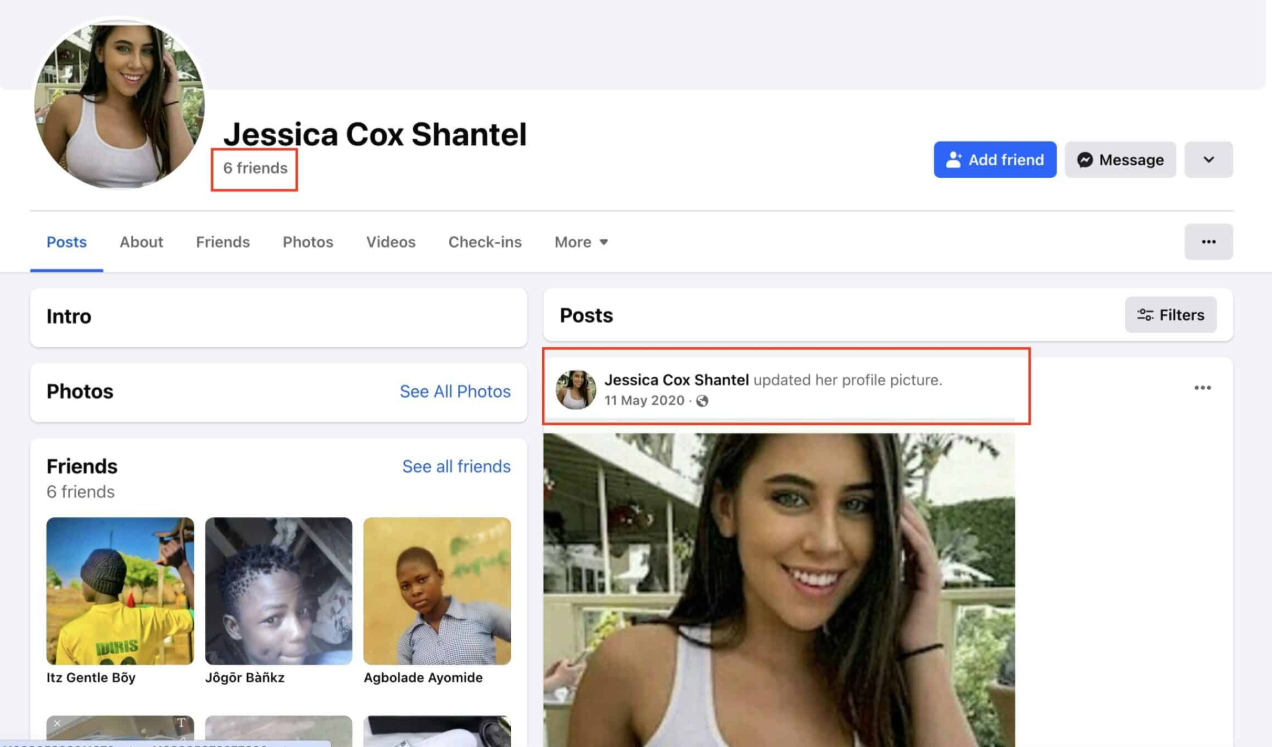
How many of your real Facebook friends have thousands of friends on Facebook?
Chances are, not too many.
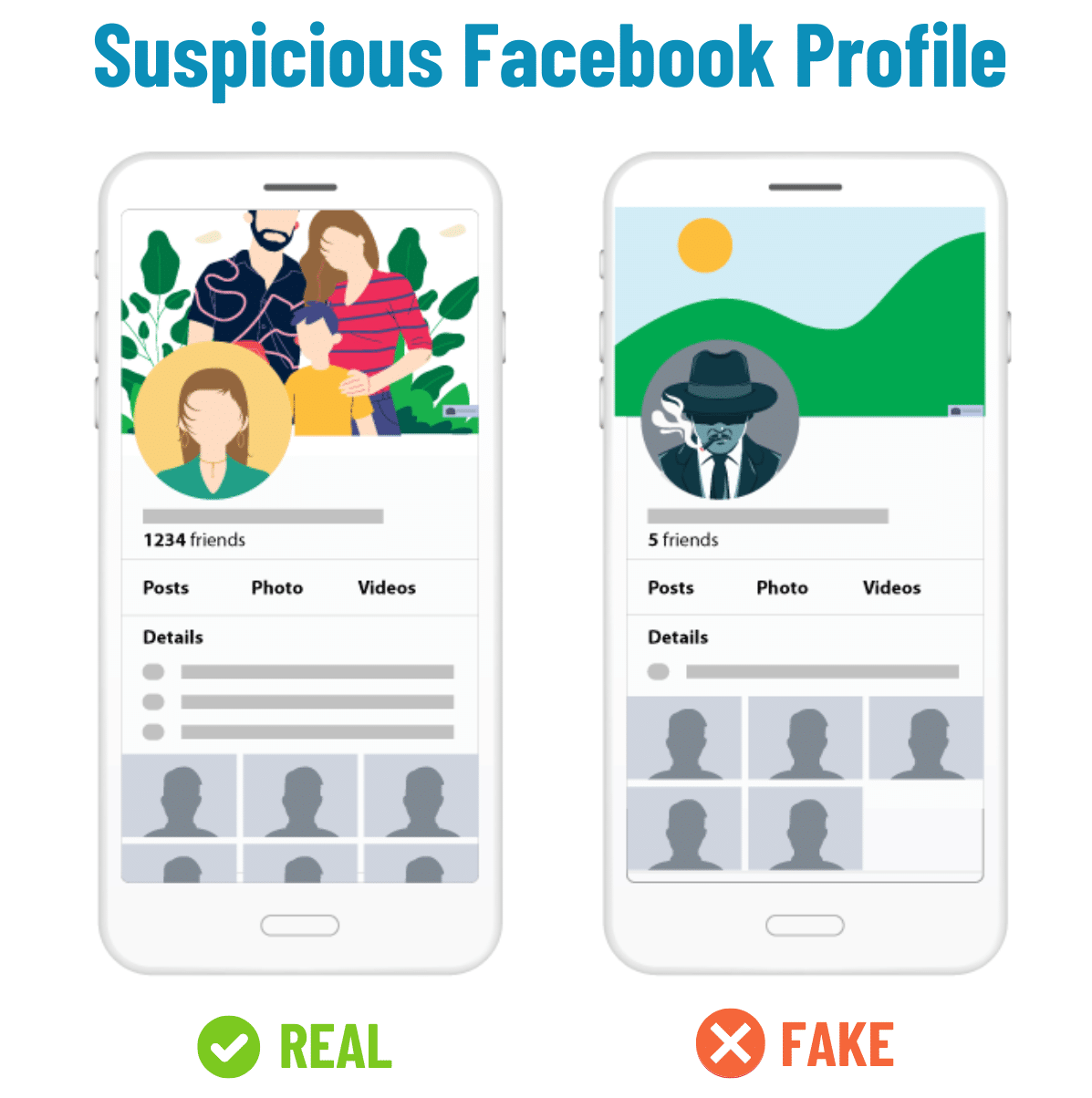
On the flip side, if the account only has a few friends or zero, that is also a sign.
If you see a Facebook account with friends that number into thousands (or less than 10), the account could be fake. While some people may really have that many friends, use your best judgment.
You might also wonder how to tell if a Facebook profile is fake even if the profile has many friends. In some cases, you might see a profile with hundreds of friends, but if the account is relatively new, this could merely indicate many fake friends like fellow scammers or bots or people who recently accepted the friend request. The age of the account is still a big factor here when deciding whether the account is fake.
- What to Look for: Accounts with a very low number of friends (usually below 20 or so), or accounts with thousands of friends or followers, particularly those with a network consisting of people from many different countries and regions, or who have suspicious names.
- Why It’s Suspicious: New scam accounts may not have many friends or, conversely, bot accounts might harvest thousands of friends or followers to make accounts appear legitimate.
- Why It’s Not Proof of a Fake Account by Itself: Some users may limit the number of friends they have, and others could legitimately have hundreds or thousands of contacts in their networks, such as influencer accounts with a large following.
Strange Bios
When you click on somebody’s Facebook link, you can see a brief biography about the user on the left-hand side of the page. If the information there seems fishy, it’s a sign that the account is fake.
For example, if somebody claims to have been born in Cape Cod, Massachusetts, but went to school in Mumbai, India, and now works for a car repair shop in Tulsa, Oklahoma, then you have a good reason to suspect that account.
- What to Look for: Vague or basic quotes or biographical data, conflicting information like claiming to live in the U.S. while attending a university in another country, or flashy titles like “Content Creator” without any content to show for it.
- Why It’s Suspicious: Scammers may use copy-pasted data from other bios or stick with generic templates when generating profiles, especially when creating profiles en masse.
- Why It’s Not Proof of a Fake Account by Itself: Real users could include fake details to protect their privacy (or even as a joke), and many accounts use sparse bio info for various reasons, like a simple lack of interest in crafting a unique profile bio.
Link-Heavy Posts
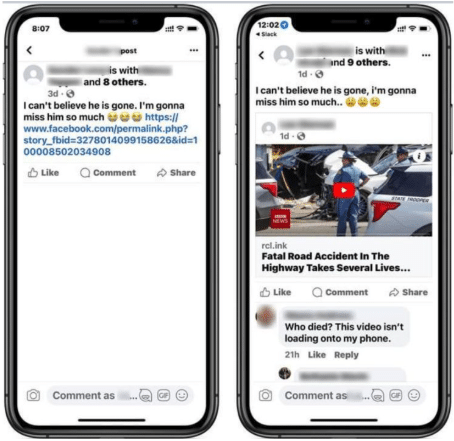
You might also find that a profile has a lot of fake Facebook posts with suspicious links.
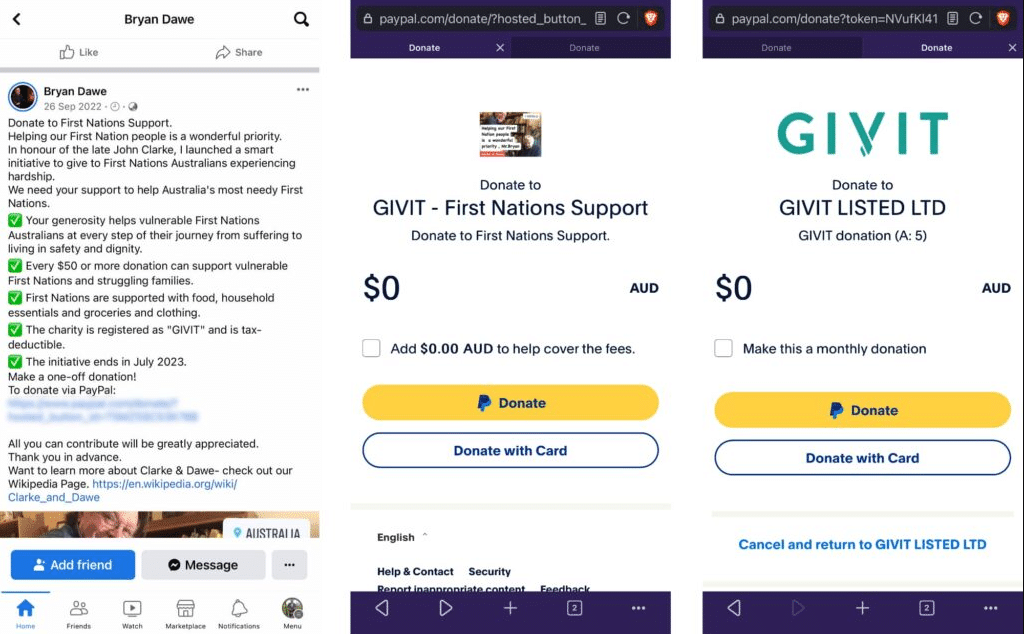
Profiles might use different types of malicious links to scam users, such as:
- Fake links to news articles that take users to phishing sites
- Links that appear to belong to PayPal, Facebook, or banks to steal sensitive data
- URL shorteners using tinyurl, bit.ly, or other programs to disguise the link destination
- Fake coupons or prizes that require users to complete forms with critical information
- Fraudulent phishing links in lost pet or missing person posts
- Installable malware or other malicious software disguised as video or photo links
- What to Look for: Timelines containing many links to low-quality content, suspicious sites, unrelated goods, or clickbait articles.
- Why It’s Suspicious: Profiles with a large number of links could be spam or bot accounts with the goal of simply driving more traffic or spamming malicious links.
- Why It’s Not Proof of a Fake Account by Itself: Real users could frequently post links to blogs, news articles, products, or other destinations of interest to them and their audiences.
Repetitive Comments
In some cases, you could also encounter profiles that make the same or similar comments across posts, groups, or pages.
If you see this kind of activity, it’s a good indicator that the profile is a bot that might be attempting to drive profile or post engagement, disseminate disinformation, or scam users with a suspicious link.
- What to Look for: Short, vague, or off-topic comments on posts, like those simply exclaiming “Wow!” or “Love this!” Many may also simply reply with emojis.
- Why It’s Suspicious: Bot accounts will often leave a large amount of generic comments on public posts to trick algorithms into thinking those posts have high engagement or encourage people to visit their profiles.
- Why It’s Not Proof of a Fake Account by Itself: Real people could also leave generic comments in many cases, particularly if they’re just scrolling through their feeds and want to leave a quick comment before moving on.
Odd Language Patterns
It’s also important to know how to spot a fake Facebook profile based on the language it uses in posts and comments.
As you may have noticed, a growing number of posts are using generic, AI-written content to tell stories of all kinds or promote brands or offerings. These posts could appear formulaic and have certain tells, like the overuse of phrases like “it’s not [blank], it’s [blank],” or an overabundance of m-dashes (—).
Posts could also simply put things awkwardly in a way that sounds inhuman, such as a structure that’s overly formal or uses odd English.
- What to Look for: Stiff phrasing, unusual sentence structures, poor grammar, or indicators of AI-written comments or posts, such as the overuse of m-dashes.
- Why It’s Suspicious: Bot and spam accounts often use AI writing or translation tools to write generic spam posts or comments, which is especially the case with spammers commenting in a non-native language.
- Why It’s Not Proof of a Fake Account by Itself: Some users may simply have poor grammar or awkward ways of phrasing, or may use AI tools to help them craft posts or comments.
Urgent Requests
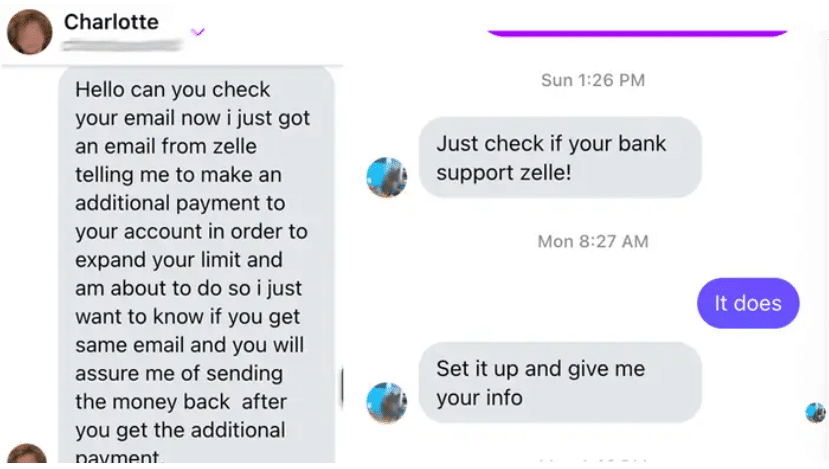
Scammers often attempt to get people to pay them money or complete another action, either through comments or DMs.
If you receive one of these requests, there’s a good chance there’s a scam involved. For instance, you might receive a message from a fake friend profile asking you to send them money ASAP, or they may claim they want to send you money if you provide them with your bank details.
- What to Look for: Direct messages asking for money, help with access to an account, or for you to click on a suspicious link.
- Why It’s Suspicious: Impersonation, romance, and tech-support scams frequently use this method to get account details or scam users out of money.
- Why It’s Not Proof of a Fake Account by Itself: Accounts, such as those belonging to close friends or family, could genuinely ask for money or assistance, but if this is sudden and unexpected behavior, it could indicate the account was hacked or is an impostor.
How to Verify Before You Assume
While a profile might look questionable, there are some instances when it might be genuine, it could just be new or simply doesn’t see much activity. Remember, suspicious does not always mean fake.
Here are some ways to confirm whether a profile is real or fake:
Reverse Image Search Profile Photos
One of the easiest ways to determine that a Facebook account is fake is by examining the photo.
It’s often the case that fake accounts use a profile photo that they’ve downloaded from somewhere else online.
Here is one that liked a post I wrote. Looks a little suspect, don’t you think?

How can you tell if the photo was “borrowed”?
Simple. Just follow these quick steps:
- Download the profile photo of the suspected fake Facebook account.
- Go to Google Image Search.
- Upload the profile photo into Image Search or drag and drop it into the upload box.
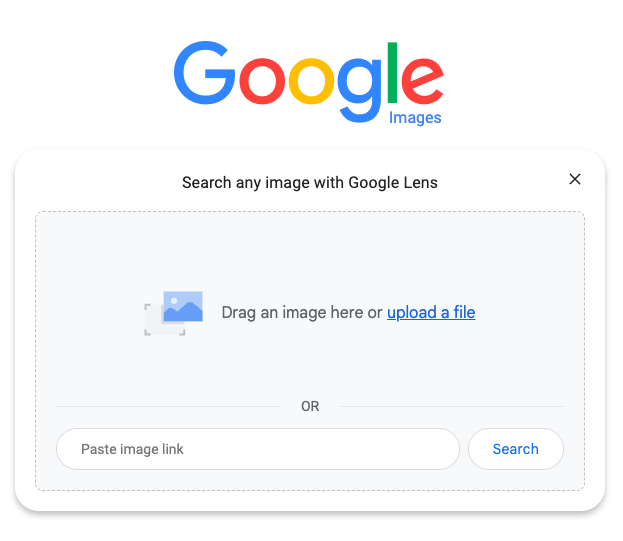
4. If the image is a fake, you may see many instances across the web.
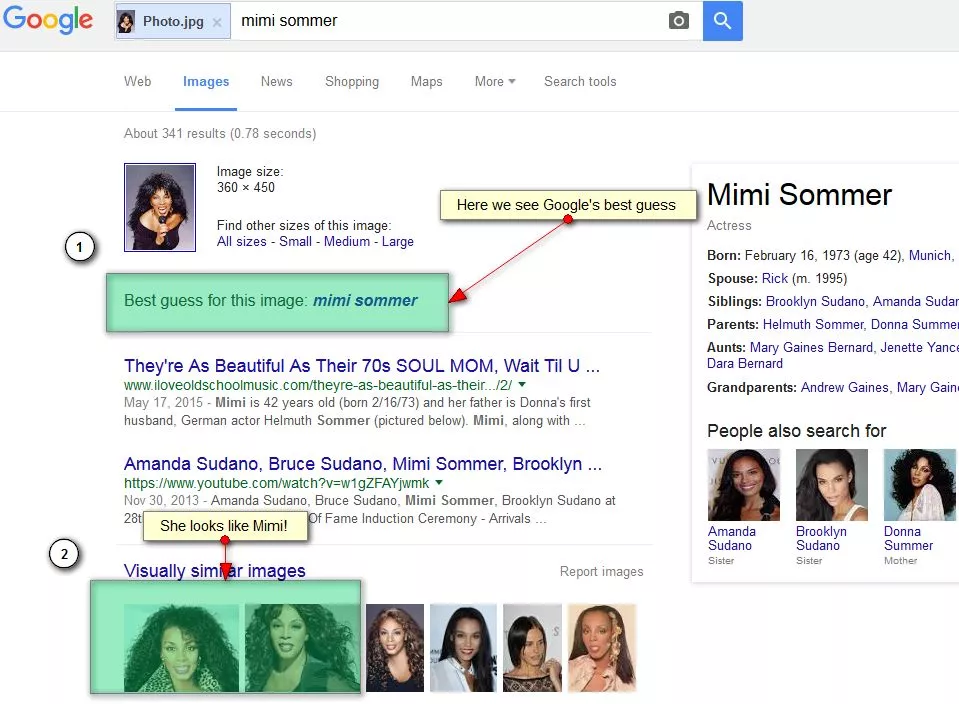
Not sure how to tell if a Facebook profile is fake when the image doesn’t pop up in Google? Even if you can’t find a photo of an existing person through a reverse image search, the photo could belong to another person whose identity the scammer is using, such as another Facebook member. The image could also be newly generated, altered, or otherwise absent from search indexes.
Just remember, a reverse image search is only one signal of many in determining how to identify a fake Facebook account. Some users may not use their actual photo, so you should check for other indicators of fake profiles, including the aforementioned signs of strange bios, odd language patterns, or a lack of timeline history.
Check Profile Age and History
Many people who are on Facebook share a common trait: They use Facebook fairly regularly.
If you suspect a fake Facebook profile, check the recent activity on the user’s wall.
If the user is performing various activities from time to time, such as posting updates, adding photos and getting tagged by friends, then it’s probably a real account.
On the other hand, if the timeline is strangely absent of any type of activity, you’re probably looking at a fake Facebook account.
Also, it can be a signal of a fake account if you see conversations that people would never have, like this.
- Hi
- Great photo
- Thank you
- You are great
- Good day!
Review Tagged Photos Carefully
Not only should you look at and do a reverse image search of the page’s profile photo, but you also need to look at any other photos on the profile, including those with tags.
Photos could feature a lack of tags of friends or family in group images, for instance, or they might feature certain irrelevant tags and hashtags that don’t match the image content.
In images with tagged people within a photo, another way to spot a fake profile is by the lack of comments from those tagged individuals.
Compare Public Details Across Platforms
If a profile looks suspicious on Facebook, check out other profiles to determine whether the profile is actually fake.
Look up the user’s name on platforms like Instagram, LinkedIn, and elsewhere. If other people show up for that name or there’s a distinct lack of activity anywhere else, it’s likely that the profile isn’t real.
Inspect Comment Behavior
Look for weird language or repetitive comments on posts. If the profile appears to only provide limited responses, the same response, or no response at all, it’s probably a fake.
Marketplace-Specific Red Flags
Facebook Marketplace is a great place to promote your business or sell used household items, but it can also be a scammers’ paradise.
Just like regular fake Facebook accounts, doing a little due diligence ahead of time will help you spot a fake Marketplace account or listing.
Here are some red flags to look for in fake sellers and buyers.
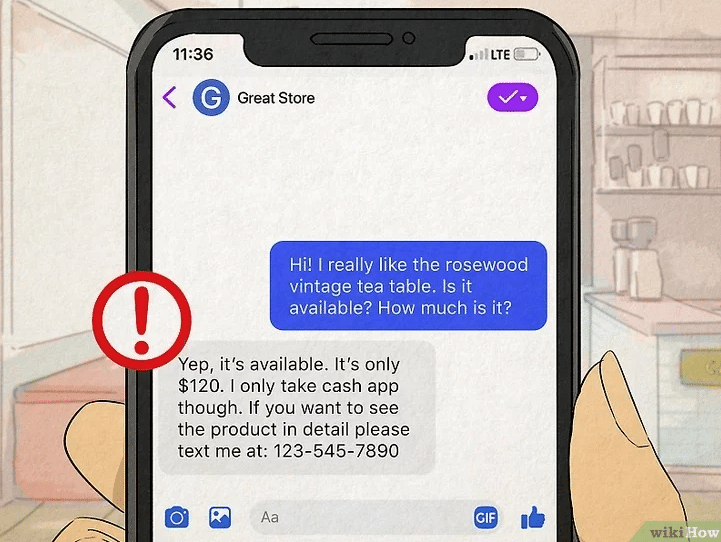
Sellers
Here’s how to tell if a Facebook account is fake when purchasing a product:
- Requesting Deposits: Scam sellers could request a non-refundable deposit to “hold” an item, only to disappear after you send them the funds.
- Requests to Move Off-Platform: Some sellers might also ask for personal information to move the conversation off of Facebook, such as your phone number, email, or WhatsApp contact, usually in an attempt to bypass Facebook’s fraud filters and security checks.
- Fake Rentals: Certain scams might involve listing fake rental properties, offering vacation homes, apartments, or other rentals at prices that are too good to be true, ultimately demanding application fees or security deposits before even showing the nonexistent property.
- Counterfeit Products: Sellers might also post fake luxury goods at suspiciously low prices, from high-end electronics to authentic-seeming designer clothing, when in reality those products are cheap or even entirely nonfunctional knockoffs.
- Pressure to Act Quickly: Scammers may create fake urgency by claiming that multiple buyers are lined up to purchase a product, with the intent of leading buyers to bypass safety inspections or avoid physical meetups before stealing their money.
Buyers
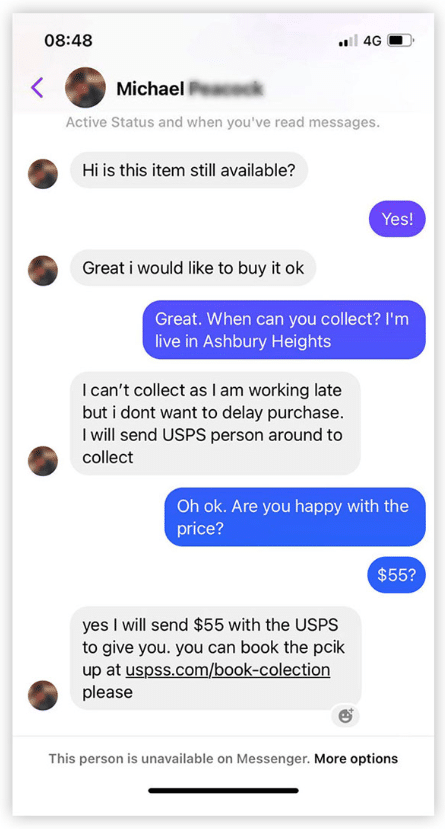
How can you tell if a Facebook profile is fake when selling to someone? Let’s look at some indicators of fake buyers:
- False Payment Screenshots: Buyers could send fake images or emails showing that they completed a money transfer when they haven’t, intending to steal items once shipped or handed over.
- Fake Deposits. Buyers may send an illegitimate deposit, potentially using stolen accounts or credit cards, often with the intent of requesting a refund to another account.
- Overpayment/Refund Scams: Fake buyers may also fake an overpayment in an online transfer, then ask sellers to send back the funds minus the cost of the product, before the seller realizes there was no initial transfer.
- Verification-Code Requests: Another scam involves buyers asking for sellers’ phone numbers to send a “verification code” to prove that the seller is real, using those numbers instead to hijack accounts.
- Courier Links: Sometimes, fake buyers may claim they will send a courier like UPS or FedEx to pick up an item, sending a suspicious link requesting the seller’s credit card details to cover “insurance.”
What to Do if You Find One
So, you’ve learned how to tell if a Facebook account is fake. Now what? You might wonder, “How can I report a fake Facebook account?” or “What is the best approach to deal with a fake profile?”
Here are some specific steps to take, depending on the circumstances:
Suspicious Strangers
If an unknown profile sends you any unsolicited messages or a friend request, do the following:
1. Don’t reply to any messages, accept the friend request, or click on any links (this goes for every other circumstance).
2. Block the user by navigating to the profile, tapping the three dots (…), and choosing Block.
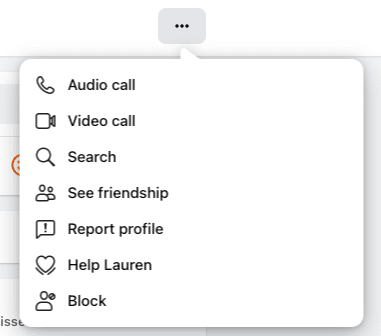
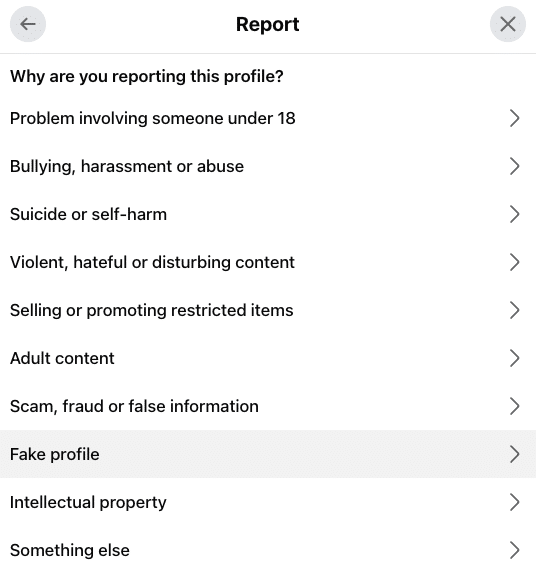
3. Report the profile in the same menu by clicking on Report Profile, followed by selecting Fake Profile or Bullying, harassment or abuse.
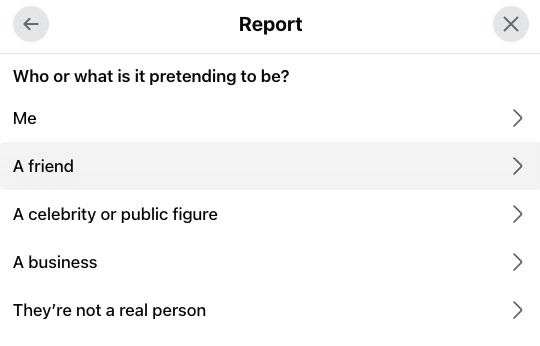
4. Indicate who they’re pretending to be or if they’re not a real person in the next menu.
5. Change your privacy settings by going into Settings & Privacy > How People Find and Contact You, and ensuring only Friends of Friends can send friend requests (this also applies to other situations).
Accounts Impersonating Someone
Scammers often duplicate or “spoof” profiles to impersonate users in an attempt to trick their friends, family, or fans into sending money, submitting sensitive information on a phishing site, or completing another harmful action.
In addition to not engaging or clicking on any links, take these steps to address impersonators:
1. Verify the fraud by checking the account date and friend count, which could indicate that it’s a duplicate.
2. Report the profile with the three dots menu on the profile page by choosing Report Profile, and click on Fake profile.
3. Specify the target of the scam, which could include various parties, such as yourself, family members, friends, or a celebrity.
4. Warn your network about the scam with private messages to those who might be affected or a public post to your profile.
Hacked Accounts Belonging to Friends
If a friend’s existing account is hacked, malicious parties may use the account to send a message to you urgently asking for money or click on a suspicious link, or they may post out-of-character topics with links to fishy websites.
If you notice this activity, take these steps:
- Contact the friend whose account has been hacked off-platform, such as through other social media channels or with a text or phone call.
- Report the account by going to the profile, clicking on the three dots menu, and choose Report Profile > Something else, at which point you can indicate that you believe the account is compromised.
- Direct the affected person to Facebook’s Hacked Recovery Page using a secure device, which could help them reclaim their account.
Marketplace Scammers
If you come across any fraudulent buyers or sellers in the Facebook Marketplace, do the following:
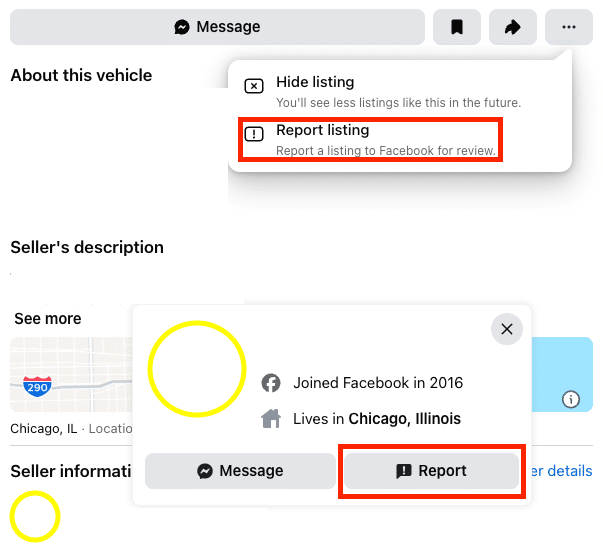
1. Click on the listing menu or the user’s profile, selecting either Report Listing or Report User.
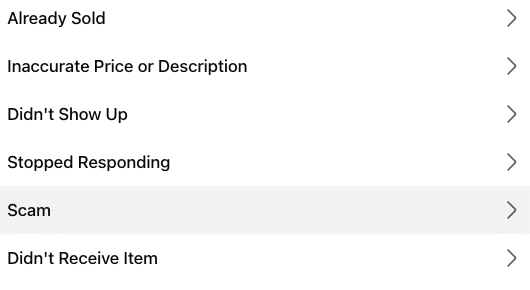
2. Select Scam to report the fraudulent listing or user profile.
For all of these, keep in mind that menu labels may vary across devices and over time, as Meta often updates its interface. Also, submitting a report does not guarantee the removal of any account or page.
Facebook also provides guidance on how to keep your account consistently secure. So, once you’ve figured out how to tell if a Facebook account is fake and addressed the issue, you can prevent future fraud.
What to Do if You Clicked a Link, Shared Information, or Sent Money
In the event of an encounter with a suspicious or clearly fraudulent profile, never engage with the user in any way. You’re safe if you simply view or reply to a user, but you risk compromising your own account, identity, or finances if you enter any login credentials, download malicious files, share verification codes, approve a login, or send payment.
Depending on the nature of the interaction and the level of compromise, you can take the following courses of action:
- Get help from the Meta Account Recovery Hub, which will guide you on how to recover a hacked or otherwise compromised Facebook or Instagram account, with steps to secure your profile for the future.
- If you suspect identity theft or a potential fraud, scam, or bad business practice that could affect you and your community, it’s also important to report the fraud to the Federal Trade Commission (FTC) through its official website.
- For interactions involving payment scams, and if you sent any money to a scammer, be sure to contact your payment provider for assistance. Your financial institution may be able to identify fraudulent transactions and reverse them if you report them quickly.
- If there’s an emergency that involves a serious crime or if someone is in immediate danger, contact the local authorities and call 9-1-1.
How Brands Can Protect Themselves
Once they determine how to identify a fake Facebook account, businesses can implement the following workflow to address the situation and protect themselves:
- Detect. Audit for any potential fake or hacked profiles pretending to be your brand or a representative of it. Through brand monitoring with social listening tools, you can look for any brand mentions and identify any accounts impersonating your business or specific employees.
- Document. Create documentation for any instances of fraud and fake profiles, including an impersonation watchlist that includes recognized lookalike handles and usernames, unauthorized domains, and misspellings of your business name.
- Verify. Take steps to verify any fake or hacked profiles, looking for all indicators from an empty timeline and friend count to the use of suspicious links.
- Report. Once you’ve verified that fraud is taking place, report the affected profile or listing to Meta, which could help address it.
- Escalate. If needed, escalate reporting to the FTC, payment providers, or relevant authorities to further mitigate fraud.
- Warn. Through public posts and announcements, warn your audiences or internal teams of any detected fraud attempts, which could help protect all potential victims.
- Secure. Follow Meta’s guidance to keep your account secure, and develop moderation workflows for your teams to instruct employees on how to handle any fake profiles or impostors. Also, update guidance as needed if Facebook reporting steps change.
- Monitor. Continually check for any fake Facebook posts or other fraud that could impact your business, employees, or customers. Social listening tools can help you spot any claims among customers of “being scammed” or other red flags, enabling you to address them before they become bigger issues.
What Not to Do
Now that you have a good idea of what to do and how to tell if a Facebook profile account is fake, let’s go over some things you shouldn’t do.
One thing you should never do is message suspicious accounts, as this could encourage them to try to push phishing or scam attempts.
Also, never send money to a party you don’t trust. If a friend or family member requests funds, check with the person, either through their existing account or in person, to confirm whether it’s really them.
You shouldn’t trust caller IDs or screenshots, either. Always check sources before engaging with any profile.
Finally, don’t try amateur “tracing,” as trying to find a specific individual through a profile is potentially illegal without a subpoena.
Common Myths About Fake Accounts
Let’s bust some common myths about fake Facebook profiles.
Myth #1: Lots of Friends Means Real
Just because a profile has dozens, hundreds, or even thousands of friends doesn’t mean it’s legitimate.
In some cases, a lot of friends could indicate a large presence of fake accounts or bots, giving the illusion that the profile is real, established, and regularly active on the platform.
Myth #2: One Normal-Looking Photo Proves Legitimacy
A profile pic or post image that looks real might be an attempt at deception.
Always look for multiple consistent images and conduct reverse image searches as needed to identify fake Facebook posts and profiles.
Myth #3: Only Older Adults Get Targeted
Anybody can fall victim to a scam, not just older users.
Many bots and scammers try tactics that younger crowds might not be familiar with, and they can work to scam these users just as much.
Myth #4: All Fake Accounts Are Obvious Bots
While many fake profiles consist of bots, this isn’t always the case.
Just as many profiles involve real people who may attempt to manually manipulate users through comments, DMs, and posts.
FAQs About Fake Facebook Accounts
1. How Do You Know if a Facebook Account Is Fake?
There are numerous ways to tell whether a Facebook profile is fake, such as:
- Brand new profiles will minimal posts and engagement
- Inconsistent profile and post images
- Spammy DMs
- Suspicious links in profiles or posts
- Copied details
- Urgent messages and money requests
2. How Does Facebook Measure Fake Accounts?
At this time, Facebook measures fake accounts based on enforcement report metrics that pertain to content violations against their terms of service. According to Facebook, most activity on the platform is genuine and involves real users, but Meta is also looking for ways to improve the ability to report fake accounts.
3. What Can a Fake Facebook Account Do?
One way to know how to tell if a Facebook profile is fake is the type of conduct the “person” uses. They often randomly friend people on the platform to gain access to their personal information, either through chat or the person’s profile. The endgame is often to commit identity theft.
4. How Does Facebook Recognize Fake Accounts?
While you might know how to spot a fake Facebook account, you might wonder how Facebook detects them. Upon identifying a potentially fake account, Facebook uses technology to look at fanout, direct, and aggregated features to determine whether the account is truly fake.
5. Can a fake Facebook account be traced?
Occasionally, yes. If the account was used in serious illegal activities, law enforcement can request information from Facebook that will show them who created the account and where they were located.
6. Can you find out who created a fake Facebook account?
Sometimes! The most reliable way is to trace the IP address linked to the fake Facebook account. This information can tell you the name of the person who created the account, their location, device details, and other valuable information.
7. What is the difference between a cloned Facebook account and a hacked account?
How can you tell if a Facebook profile is fake or hacked? A cloned Facebook account is a fake new one imitating another person or brand, while a hacked account is an existing account that hackers have taken over and repurposed.
8. Can you see if someone checks your Facebook profile?
Generally, you are not able to see if someone viewed your Facebook profile, but you can see who viewed Facebook Stories before they disappear. Using a creator or professional account, you can also see metrics like overall profile visits, but you still cannot see specifically who viewed your profile.
9. What should a business do if a fake account is impersonating its customer support team?
How do you know if a Facebook profile is fake and pretending to represent your brand? Through brand monitoring and auditing, you can determine if there are any cloned or hacked accounts impersonating customer support members, and report those profiles to Facebook for removal or reclaiming. Also, warn your teams and customers of these attempts.
Manage Your Facebook Account the Right Way With Ignite Visibility
If you want to avoid any issues with fake Facebook profiles, it helps to work with experienced experts who provide reliable Facebook marketing solutions.
With Ignite Visibility, you’ll be able to:
- Set up a high-quality official Facebook profile for your brand
- Regularly monitor for impersonation profiles and report them
- Develop a solid Facebook marketing strategy
Continually manage your brand reputation through digital PR
And more!
Does this sound good to you? Learn more about our Facebook marketing services today.