How To Optimize For AI Overviews
It’s been 2 years since Google rebranded Search Generative Experience (SGE) and officially launched AI Overviews (AIO). Since its global rollout, which expanded to over 100 countries by October 2024, the impact of AIO on search results has become increasingly clear.
When AI Overviews were first introduced, many marketers speculated on their potential impact and how this would affect search. According to recent data, Google AI Overviews now appear in about 20.5% of all searches. For long-tail information-seeking terms, they appear for keywords of seven words or longer 46.4% of the time, and 99% of all AI Overview results appeal to informational search intent.
In this blog post, Danny Conlon, SVP of Marketing, will explore what Google’s AI Overviews mean for the future of search. She’ll discuss how they work, their effect on search results, and how marketers can adjust their strategies to stay ahead in this new AI-driven search landscape.
What You’ll Learn:
What Are AI Overviews?
AI Overviews are AI-generated summaries that appear at the very top of Google Search Results for a variety of search queries. (Note, an AI overview does not appear for all queries, only some). These overviews are designed to give users concise answers directly on SERPs. They may also include relevant ads for products or services, especially for shopping-related queries.
Here’s an example of Google search results featuring AI Overviews.
Going off of the question of “what is an AI Overview,” you might also wonder, “Where do Google AI Overviews get information from?” When users enter a query, a Google Search AI Overview pulls relevant information from one or multiple resources to compile the best possible answer.

AI Overviews are similar to featured snippets in that they both aim to provide users with concise answers directly in the SERPs. However, they differ in that, instead of pulling content from a specific webpage, AIOs generate a summary based on multiple sources using AI.
AIO’s can also provide much more in depth answers than traditional featured snippets and answers, especially for complex questions.
For example, beyond the first paragraph is a detailed guide on how to find a doctor, with various subsections.

If you’re curious to know where Google is specifically pulling their answers, as you can see, each section has a citation at the end that you can click to take you to the source of the information, along with underlined text with links to other Google searches for more information.
Google’s AI Overviews also list the cited sources on the right.

You can then click on the cited source to go to the corresponding website for more information.
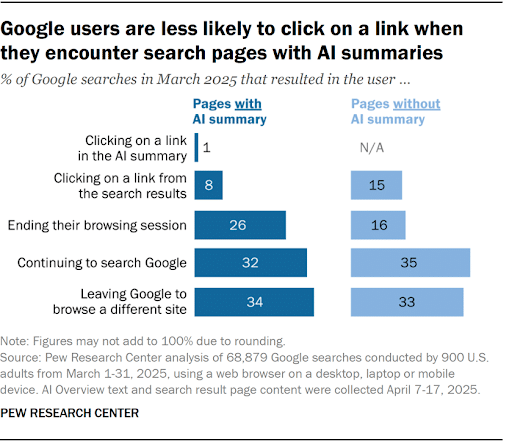
Because of their in-depth nature, users are far less likely to leave the search engine when they can get most if not all of the information they need in one place.
My Expert Insight into Google’s AI Overviews
With the rollout of Google’s AI Overviews, I believe marketers need to be more agile than ever, keeping a very close eye on how users are interacting with search. While it’s true these AI Overviews are designed to provide direct answers, we must understand exactly where they’re showing up in the SERPs and, more importantly, how we can still ensure visibility. It’s okay for users to get information right in the results page. In fact, that’s Google’s intent. However, as savvy marketers, we need to understand where AI Overviews are most prevalent for our brand and strategically optimize our content to be featured.
Let’s also not forget that certain queries require more detailed, in-depth information, and that’s where your content can shine. For these complex or research-driven searches, offer comprehensive, expert-driven content that entices users to click through and explore further. Focus on providing value and engaging users, so they’ll have a reason to seek more information beyond the AI Overview. As AI Overviews and SEO evolve, this balance between concise AI answers and the need for deeper content will be crucial for long-term SEO success.
Our team at Ignite Visibility helped one home service franchise achieve substantial placements for Google AI Overviews. By developing optimized and well-structured content and aligning it with users’ search intent, we were able to earn more than 15 placements in AI Overviews when the client previously had no AI visibility. Not only did these placements boost visibility, but their ability to build brand authority also increased click-through potential.
Optimizing content for google AI overviews is no longer optional, it’s essential. To succeed, ensure your content aligns with the principles of E-E-A-T (Experience, Expertise, Authoritativeness, and Trustworthiness). Additionally, adapt your content to match real-world search language by integrating conversational phrases and targeting long-tail keywords, which are more likely to be captured by AI.
Ultimately, marketers need to monitor AI Overviews closely, understand when they’re taking the spotlight, and make adjustments to their strategies to maintain visibility and relevance. Stay proactive in optimizing your content for AI and traditional search results to ensure your brand is both visible in summaries and engaging for deeper exploration.
How Do Google AI Overviews Work?
First, let’s consider the role of Google’s AI engine, Gemini. This is what powers all of Google’s AI-driven solutions, including the recently added AI Mode, which is now directly connected to AI Overviews.
Gemini’s language models use a large language model (LLM) to understand and contextualize people’s search queries. Gemini also uses multi-step reasoning to handle some of the more complex search queries, gather information from several sources it deems reliable, and summarize that information.
When users enter a query, Gemini performs deep information retrieval using real-time web data from multiple sources.
In the process, Google uses a “query fan-out” method to simultaneously conduct several additional searches covering certain related subtopics, providing the AI with more diverse information.
Once the AI summarizes the information, it presents it in an organized form, usually with a few sections and subsections. At the end, it then links to the sources from which it pulled all information.
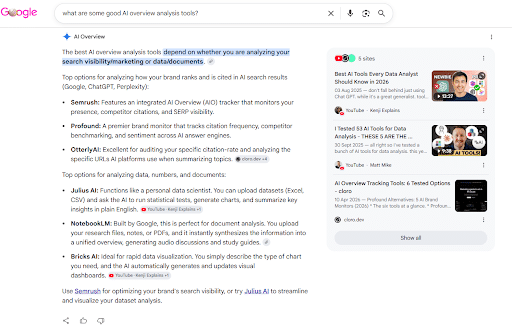
Here’s an example:
Let’s say I want to search for “what are some good AI overview analysis tools?”
The AI would then go through and look at some of the many sources for information about “good AI overview analysis tools,” pulling from review sites with lists of top solutions, forums with suggestions from users, and industry-related websites making their own recommendations.
The end result is an organized summary with plenty of recommendations and links to various sources.
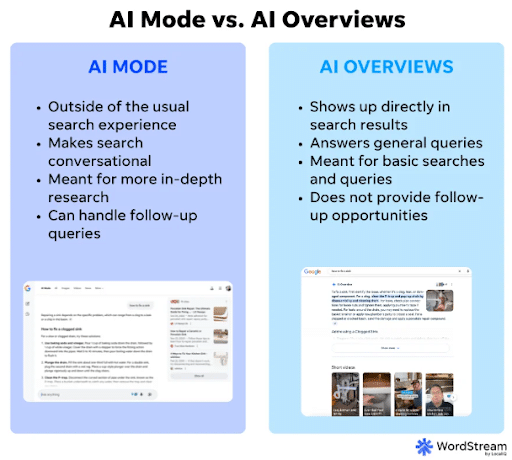
AI Overviews and AI Mode: Why Marketers Should Track Both
Considering AI Overviews and AI Mode interact with each other, and yet both connect with users in different ways, marketers should track both to gauge their overall SEO performance.
Google AI Overviews generally give users the basics about a certain topic, while people will be more likely to use AI Mode to do a deeper dive.
At the same time, they actually provide different information based on the topic and the depth of exploration. Although 9 out of 10 times, both platforms agree on what information to provide, they each use different phrasing and tend to cite different sources.
In terms of entity SEO, AI Mode also provides users with 2.5 times the brand and people entities you get from AI Overviews. Also, if AI Overviews mention your brand, it’s 61% more likely to show up in AI Mode responses.
So, tracking both will give you a better picture of the kinds of AI interactions people are having and whether each cites your brand in the results. You’ll then be able to determine which is driving better performance and optimize for either more precisely.
Strategies For Optimizing Content For Google AI Overviews
To show up for a Google AI Overview, there are some steps you can take in your content creation and optimization to appear for these results.
The following are some specific tasks covering how to optimize for AI Overviews:
Create Unique, Non-Commodity Content
When optimizing for AI Overviews, Google wants to see “unique, non-commodity” content that stands apart for its helpfulness. What Google doesn’t want to see is keyword-stuffed, over-optimized content clearly geared toward search engine algorithms instead of users.
Keep in mind that people often conduct more in-depth searches on various topics, often beginning with a surface topic before expanding on that search with additional subtopics. You may want to reflect this kind of behavior in your own content to go with the natural flow of the searcher’s journey.
Meet All the Necessary Technical Requirements
You must also ensure your AI Overviews optimization efforts incorporate all technical requirements. You can do so by making sure that:
- Your website isn’t blocking Googlebot with a robots.txt file
- Pages are loading correctly and adhere to all Google Core Web Vitals for user-friendliness
- Google can index all of your targeted pages
- Your site has a mobile-friendly, responsive design for all users
- Your pages load quickly to keep people engaged
Optimize Your Images and Videos
To give your content even more of an upper hand, be sure to optimize your pages with high-quality images and videos, including captions and alt text that indicate to search engines and Googlebot what your content is about.
Today, users can add images to their search and ask questions about the images, which leads to SERP results with AI Overviews answering questions and connecting them to content with additional related images.

Ecommerce brands can also optimize for these searches as people look for certain products online. They should include plenty of images of their products and an updated Google Business Profile that helps them show up in visually oriented Google AI Overviews.
Review Your Meta Directives
When you optimize for AI Overviews, you must take into account robots meta tags and how they influence your content’s visibility.
You will want to use certain critical meta directives to impact how bots interact with your site, including:
- Nosnippet: If you want to remove AI Overviews from Google search results related to your pages, you would include this tag that tells Google bots not to include your page content in a snippet, including AI featured snippets.
- Data-nosnippet: If you only want specific sections of your page to avoid showing up in Google AI Overviews, you would use this to indicate parts of the page that you want to omit from results.
- Max-snippet: This tag dictates how many characters can show up at a maximum in snippets on Google, e.g., “max-snippet:155.”
- Noindex: Like the “nosnippet” tag, you would include this in your pages’ tag at the top of the code. This tag can prevent Google from indexing the page, keeping it from appearing in search results.
For the most part, your pages should only incorporate these tags if you want to remove AI Overviews from Google Search for certain pages.
Optimize Your Structured Data
According to Google, the search algorithm can interpret “imperfect HTML,” establishing schema markup as a mere support signal and not necessarily needed for getting found in AI Overviews.
However, we here at Ignite Visibility always recommend implementing optimized structured data using schema, as it can only help you fine-tune your SEO for better targeting across platforms, including AI chatbots and summaries.
Structured data is a type of code that you can add to your web pages describing their contents for Google and other search engines to better understand them.
Not only can structured data help optimize for Google AI Overviews and AI Mode, but it could also give more context to other LLMs like ChatGPT, Claude, and Perplexity. This specific element can indicate to these platforms that your content is both comprehensible and authoritative, potentially increasing the chances of getting cited.
Rethink How You Measure AI Traffic Quality in Your AI Overview Analysis
To gauge the quality of traffic from AI Overviews in SEO campaigns, you may want to reconsider the metrics that define success.
While you may want to focus on how many clicks you get, keep in mind that you are likely to get fewer clicks from AI Overviews. Instead, you will want to redirect your attention to more critical AI-related metrics like signups, sales, and user engagement, bearing in mind that AI will tend to attract more engaged users.
Also, remember that real-world research and observed patterns in your site’s performance can differ or even directly contradict each other. So, it’s of utmost importance to focus on your own metrics to gauge performance and determine how best to pivot, as even what a search giant like Google says might not entirely apply in your situation.
Through this AI Overview analysis, you might discover that some of your highest-value customers come from Google AI Overviews.
Will AI Overviews Appear for All Queries?
No, AI Overviews won’t appear for every query, but they do appear in many of them, with a recent report finding that AI Overviews appear in around 20.5% of searches.
AI Overviews are most likely to appear at the top of search results for complex queries that require more detailed information. For example, a query like “steps for building a website” may include an AI Overview with basic steps and considerations for website design, along with links to more in-depth resources. In contrast, a straightforward query like “who is the author of The Lord of the Rings” would likely return a featured snippet with a simple answer.
Will the Increase of AI Overview Answers Decrease My Website Visibility and Traffic?
Yes, AI Overviews can reduce website traffic, especially for informational searches, because users often get answers directly in Google without clicking through to websites.
However, being cited within AI Overviews can still increase brand visibility and drive higher-intent traffic. Success should be measured not only by clicks, but also by conversions, brand awareness, and AI citation visibility.
Ads in Google AI Overviews: What Marketers Need to Know
Google Ads can appear above, below, or within AI Overviews, giving advertisers new opportunities to reach users during the research and discovery phase of their search journey.
Search, Shopping, and Performance Max campaigns are automatically eligible for these placements, and advertisers cannot currently target or opt out of AI Overview placements specifically. Google determines ad placement based on the user’s query, the AI-generated response, and overall ad relevance.
For example, someone might enter an informational query like “What are common cold symptoms,” and the algorithm may determine whether there’s any commercial search intent behind it, such as seeking a nearby pharmacy. In turn, the AI Overview might display an ad for a local pharmacy somewhere within or adjacent to the summary.
To appear for these ads, here are some things to keep in mind:
- You are automatically eligible to appear in these ads if you currently run traditional Google Search, Shopping, or Performance Max (PMax) campaigns, eliminating the need to start new campaigns.
- At this time, advertisers are unable to specifically target ad placements, with Google’s auction system determining the right placement automatically.
- When running traditional search campaigns, you cannot opt out of AI Overview placements.
- Reporting is also a bit murky right now, as Google consolidates AI Overview clicks and other data into its “Top Ads” reports, so you will want to set up other tracking tactics like UTM tags to help you gauge the number of clicks from these placements.
How to Measure Your Website Appearance in AI Overview Answers
It’s no longer a guessing game: Google Search Console (GSC) and Google Analytics 4 (GA4) now offer native, dedicated ways to track how your website performs within generative AI search features and chatbot ecosystems.
Google Search Console provides native reporting specifically for generative AI search features. Website owners can access Search Generative AI performance reports within GSC to view impressions, clicks, and CTR specifically driven by AI Overviews and AI Mode.
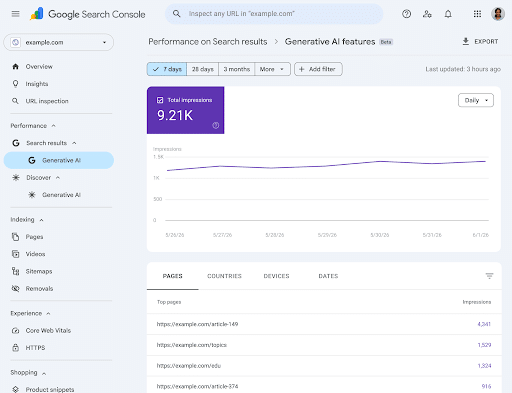
While third-party SEO platforms like SEMrush remain excellent for tracking competitor data and volatile keyword rankings, GSC is your source of truth for first-party performance metrics. Additionally, GSC features an AI-powered configuration tool, allowing you to use natural language prompts (e.g., “Show me pages with high impressions in AI Overviews”) to automatically filter and analyze your data.
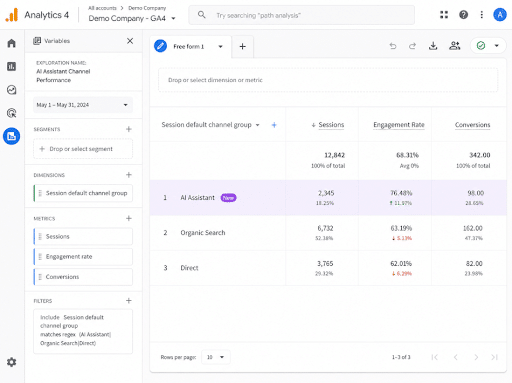
Another tool you can use is Google Analytics 4’s recently introduced AI Assistant channel. This metric appears in your dashboard’s Default Channel Group reports and relays how much website traffic comes from chatbots from Google Gemini, ChatGPT, and Claude.
This solution makes it far easier to discern what traffic comes from AI interactions, and it shows up in the form of:
- Medium: When GA4 recognizes an AI chatbot as a referrer, you will see “ai-assistant” in the medium category.
- Channel Group: This feature will also appear under the channel group “AI Assistant.”
- Campaign: View AI traffic in “(ai-assistant)” within campaigns.
How to Use Semrush to Track AI Overviews Visibility
SEMRush includes a handy AI Overview checker that can help you discover how ranking in the ai overview in google seo can be done.
Here are some basic steps to do so.
1. Set Up Position Tracking
To generate an AI Overview report in SEMRush, you can start by setting up a project in the Position Tracking tool, indicating the keywords you want to target and monitor along with your domain.
In the Keyword Magic Tool, you can also filter keywords based on the AI Overview SERP Feature.

You can then track specific terms for your domain and see if AI Overviews include you as a source.
2. Use the Sensor Tool to Track SERP Volatility
Using the Sensor tool, you can see where you show up in AI Overviews for all industries or industry-specific searches.
You can also see what kind of volatility your rankings have and the frequency of appearances.

Keep in mind that seeing as AI Overviews are still relatively new and undergoing experimentation, they’ll often have a lot of volatility.
Common Issues and Failures in AI Overviews
Here are some of the most common errors that people have seen with AI Overviews since its initial rollout:
Unusual and Harmful Advice
One of the most well-known types of Google AI Overview fails has involved the platform giving people bad advice, and not just bad advice, but potentially harmful guidance in some cases.
For example, AI Overviews once advised someone to put glue on pizza to help the cheese adhere or to consume rocks for nutrition.

Generally Inaccurate Information / Misinformation
AI Overviews have occasionally delivered false or misleading information due to misinterpreting sources, hallucinating facts, or failing to fully understand context.
In one instance, the tool incorrectly claimed that Tropicana orange juice contains an average of two insects per cup.

These inaccuracies can escalate into the spread of misinformation, especially when the tool pulls from unreliable or conflicting sources.
At one point, an AI Overview falsely claimed that Barack Obama was the first Muslim president, a long-debunked conspiracy theory.
In response, Google has taken steps to improve the reliability of AI Overviews by refining the tool, monitoring feedback, and addressing violations of content policies.
As of 2026, the technology continues to evolve, with improvements in accuracy alongside the broader rollout of AI Mode.
How to Remove AI Overviews from Google Search
If you’re wondering how to turn off Google AI Overviews when viewing search results, now you can.
You’ll need to select the Web button.
This button is a filter that will only show relevant text-based links to searchers. It’s similar to the other filters you see at the top of the SERPS such as Images or Videos. Once you select the Web button all of Google’s knowledge panels, including featured snippets, Shopping features, and Google’s new AI Overviews will be removed from your search results.
This method has been tested but might not be universally available, especially as Google continues to refine the search experience, so some users who are looking into how to remove AI Overviews from Google might not be able to do so. There is no recent confirmation from Google that this filter option is consistently available.

Will AI Overviews Replace Featured Snippets?
Not entirely. While AI Overviews often occupy the most prominent position in Google Search, featured snippets, knowledge panels, local packs, and other SERP features continue to appear when Google determines they best satisfy user intent.
In many cases, AI Overviews and featured snippets coexist, serving different purposes. Featured snippets typically provide a concise answer from a single source, while AI Overviews generate a broader summary using information from multiple sources.
For marketers, the goal should be visibility across both AI-generated and traditional search features, as each can drive brand awareness and user engagement.
What Makes Google’s AI Overviews Different From Featured Snippets?
While they summarize information in a digestible format, AI Overviews are considerably more complex than featured snippets. While the latter extract content from a single web page and present it as a paragraph-long search result, AI Overviews do a deeper dive into several sources, compiling them while summarizing their content in a more extensive exploration.
How To Improve Visibility In Google AI Overviews With Our AI SEO Strategy
If you’re looking to gain visibility in AI powered search results like Google’s AI overviews, ChatGPT, CoPilot, Perplexity and more, Ignite Visibility can help. We offer AI SEO services that are sure to help you stay ahead of your competition.
Our AI SEO Services Includes:
If you want to successfully optimize for AI Overviews and other generative engines, learn more about our AI SEO services and see how our experts can help you achieve top results and citations.