What Is a Nofollow Link? Complete Guide
A nofollow link is a hyperlink with a rel=”nofollow” attribute. It tells Google that you do not want the link treated as a standard endorsement, though Google may still use it as a hint.
The hard part is knowing when nofollow is right, and when sponsored, ugc, or a normal link is better. Ashley Mushayabasa, Digital Marketing Coordinator, breaks it down in this guide.
What You’ll Learn:
TL;DR: Nofollow Links at a Glance
- A nofollow link uses rel=”nofollow” inside an HTML anchor tag.
- Google treats nofollow as a hint, not a strict command.
- Use sponsored for paid or affiliate links.
- Use ugc for links added by users, such as comment or forum links.
- Use nofollow when those values do not fit and you do not want to vouch for the destination.
- Do not use nofollow to block indexing, manage private content, or sculpt PageRank.
- There is no ideal ratio of followed to nofollow links.
What Is a Nofollow Link?
A nofollow link is a regular clickable link with a nofollow attribute in its HTML:

The link works normally for users. They can click it, visit the page, and take action. The difference is in the signal sent to Google.
The attribute tells Google that the site owner does not want the link treated like a standard editorial recommendation. Under Google’s current outbound-link guidance, Google generally will not follow qualified links, but it may use them as hints.
A standard link looks like this:
SEO professionals often call this a “dofollow link.” But there is no rel=”dofollow” tag. “Dofollow” is shorthand for a normal link that has not been qualified with nofollow, sponsored, or ugc.
Why Do Nofollow Links Exist?
Google introduced nofollow in 2005 to help fight comment spam.
Spammers were posting keyword-rich links across comments and forums to manipulate rankings. Nofollow helped site owners separate those links from editorial recommendations. As link types grew, Google added sponsored and ugc in 2019.
How Does Google Treat Nofollow Links Today?
Google treats nofollow, sponsored, and ugc as hints.
In September 2019, Google announced the hint model. The attributes became hints for ranking at that time. On March 1, 2020, nofollow also became a hint for crawling and indexing.
Google may choose to analyze or use a nofollow link. This does not mean every nofollow link passes PageRank or improves rankings. Google says it generally will not consider these links for ranking.
The safest approach is simple: do not expect ranking credit from a nofollow backlink. Judge it by the audience, context, traffic, and brand value it can provide.
Nofollow also does not keep a linked page out of Google. A page may still be found through a sitemap, another website, or a different internal link. If you need to keep a page out of search, use the correct indexing and crawl controls instead.
My Expert Take on Nofollow Links
Do not make nofollow harder than it needs to be. Don’t count link types, chase a perfect ratio, or add nofollow to every external link “just to be safe.” None of that creates a better website.
Start with the relationship behind the link. If you paid for it, use sponsored. If a user added it, use ugc. If you do not want to vouch for the page and the other values do not fit, use nofollow. For normal editorial citations and important internal links, use a standard link.
Your goal is not to control Google with one tag. Your goal is to make each link useful to the reader and clear to search engines.
Nofollow vs. Dofollow Links
The main difference is whether the link is qualified.
| Factor | Standard “dofollow” link | Nofollow link |
|---|---|---|
| HTML | No qualifying rel value | Includes rel=”nofollow” |
| User experience | Clickable | Clickable |
| Ranking treatment | Can pass ranking signals | Treated as a hint; generally not counted for ranking |
| Discovery | Can help Google find a page | Google may still use it for discovery |
| Best use | Normal internal links and editorial citations | Links you do not want to endorse when another value does not fit |
For both types, use clear anchor text that tells people what they will find after they click.
Nofollow vs. Sponsored vs. UGC
These attributes describe different link relationships.
| Attribute | Use it for | Example |
|---|---|---|
| nofollow | A link you do not want to endorse when sponsored or ugc does not apply | Example |
| sponsored | Ads, affiliate links, sponsorships, paid placements, free products, or other compensation | Partner |
| ugc | Links added through comments, forums, reviews, profiles, or other user-generated content | User link |
Use rel=”sponsored” for Paid Links
Use sponsored when money, a product, a service, or another benefit influenced the link.
This includes affiliate links. Google accepts nofollow for paid links, but prefers sponsored. Leaving compensated links followed can violate Google’s link spam policy.
Use rel=”ugc” for User-Generated Links
Use ugc for links that users add to your site. Common examples include blog comments, forum posts, reviews, and community profiles.
You still need moderation. The attribute does not turn spam into useful content. Google says you may remove it from links posted by trusted, high-quality contributors.
Use rel=”nofollow” When Other Values Do Not Fit
Use nofollow when you want to link to a page but do not want to vouch for it, and the link is neither paid nor user-generated.
For example, you may write about a misleading claim and link to the original page for context. The link helps the reader verify what you are discussing, but you may not want to treat it as an endorsement.
You can use more than one value when needed:
Google accepts multiple values. Using spaces between them is clear and easy to maintain.
You can also use rel=”nofollow” when:
- You link to a page you do not trust or endorse.
- You need to cite a questionable claim for reporting or criticism.
- Your system cannot yet support sponsored or ugc, and you need an accepted fallback.
- A third-party widget or embedded feature creates links you do not control or vouch for.
For paid and user-added links, use the more specific values when you can.
When Should You Not Use Nofollow?
Do not add nofollow to every external link. Google’s link best practices explain that normal external links can help establish trust when they cite useful sources.
You also should not use nofollow for:
- Normal editorial sources: If you trust and cite a useful source, use a standard link.
- Important internal links: Keep key navigation and contextual internal links crawlable. Strong website architecture helps users and search engines understand your site.
- PageRank sculpting: Nofollow is not a tool for pushing more link equity into selected links.
- Index control: Use noindex when you do not want a crawlable page in search results.
- Private content: Use login controls or password protection. Search directives are not security tools.
- Canonicalization: Use rel=”canonical” to identify the preferred version of duplicate or similar pages.
For a real crawl-budget problem, clean up the URL inventory and use the right crawl controls. Google’s crawl-budget guidance targets sites with very large or fast-changing URL sets, not most small sites.
Do Nofollow Links Help SEO?
Nofollow links do not offer guaranteed ranking value. Google may use them as hints, but you cannot assume that they pass PageRank.
They can still create value:
- Referral traffic: People can click nofollow links like any other link.
- Brand discovery: A relevant placement can introduce your brand to buyers and publishers.
- Follow-on coverage: A publisher may find your resource through a nofollow link and cite it later.
- Audience trust: A respected placement can support credibility without known ranking credit.
Do not turn those benefits into promises. Measure what the placement sends: qualified visits, assisted conversions, leads, and new mentions.
Nofollow Backlinks and Modern Link Building
Do not reject a strong placement only because it is nofollow. A page your audience reads can beat a followed link from an irrelevant site. Avoid low-quality directories, automated comments, and paid link packages. Google defines link spam by manipulative intent and behavior, not one attribute.
Create something worth citing. Original data, expert insight, and useful tools can earn editorial links over time. Ignite’s guide to the skyscraper method explains one approach.
Nofollow Links, AI Overviews, and AI Search
Do not treat nofollow as a separate AI-search tactic.
Google says the same SEO practices apply to AI Overviews and AI Mode. A page must be indexed and eligible to show with a snippet before it can appear as a supporting link. There is no special nofollow markup for AI visibility.
Nofollow does not keep content out of AI Overviews. Google points to
How to Add a Nofollow Attribute
Add rel=”nofollow” inside the opening tag:
For a paid link, use:
For a link in user-generated content, use:
Most content management systems set link attributes through a link panel, plugin, or HTML editor. Inspect the published HTML after saving.
If the rule applies to many links, ask a developer to handle it at the template or component level. Test the output on staging first.
How to Check Whether a Link Is Nofollow
You can check whether a link has a nofollow attribute by looking at the source code of the page:
1. Open the published page in your browser.
2. Right-click the link and choose Inspect.
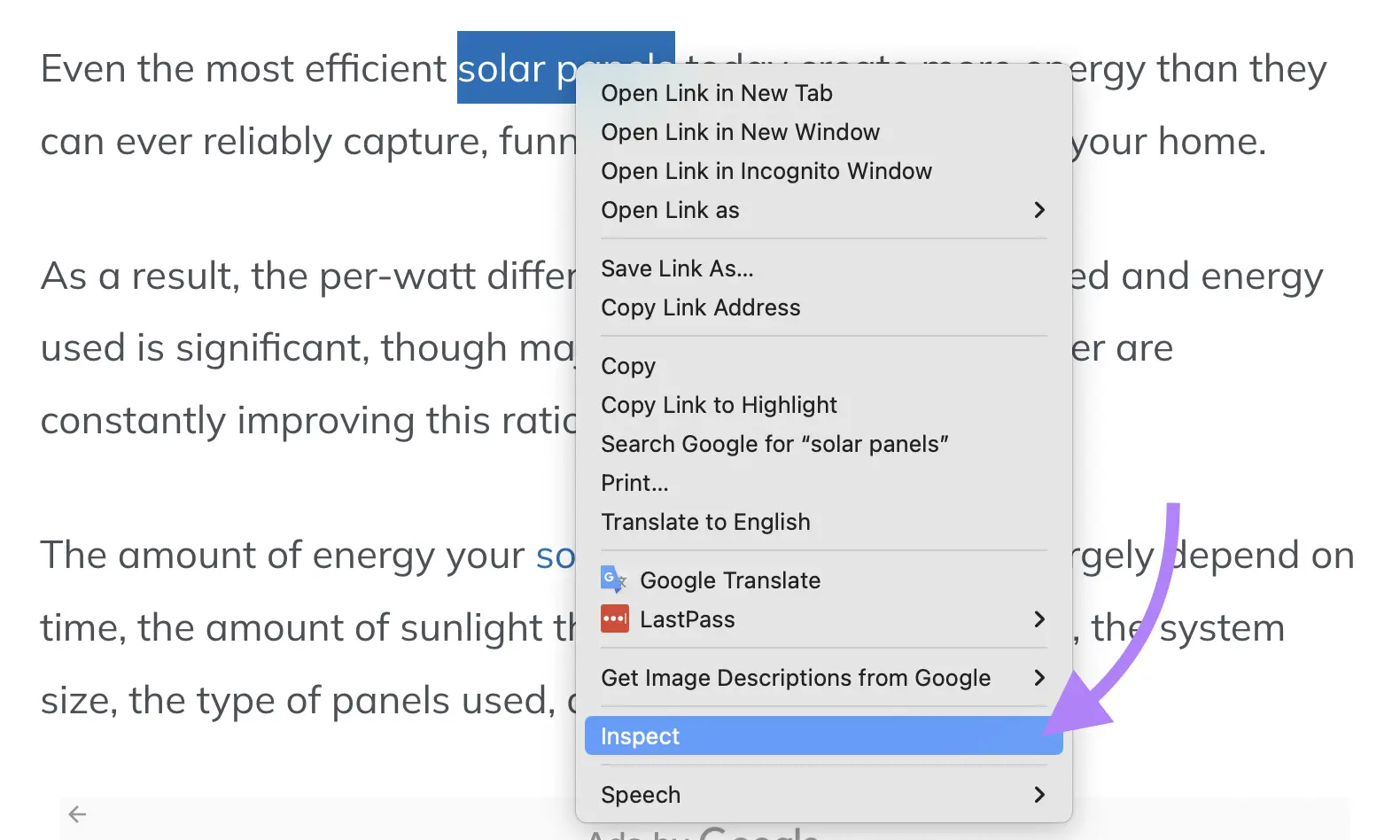
4. Check the rel attribute for nofollow, sponsored, or ugc.
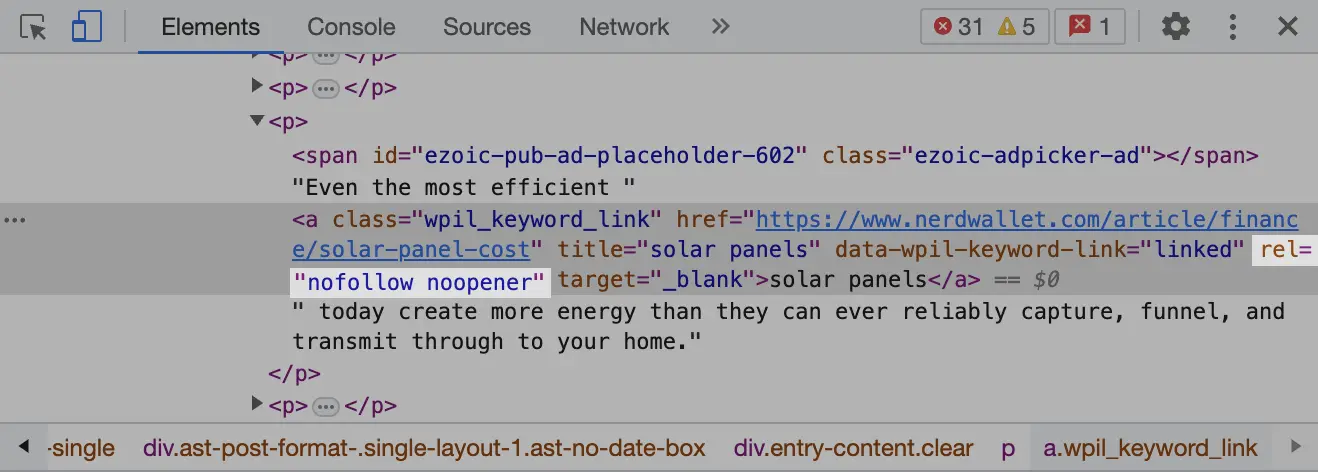
You can also view the page source and search for nofollow. However, Inspect is often better for links added by JavaScript because it shows the rendered HTML.
For a full site, use an SEO crawler and export links by rel value. Flag paid links without sponsored, user links without ugc, and important internal links marked nofollow. Add this to your technical SEO audit.
Common Nofollow Mistakes and Myths
Myth: Every Website Needs a Set Nofollow Ratio
There is no published ideal ratio. Do not add or remove attributes just to reach a number.
Myth: Nofollow Guarantees Google Will Not Crawl the Link
Nofollow is a hint. Google may also find the same URL elsewhere.
Myth: Nofollow Keeps a Page Out of Search
It does not. Use noindex for a crawlable page you do not want indexed. Google must be able to crawl the page to see the noindex rule.
Myth: Nofollow Conserves PageRank for Other Links
Do not use nofollow for PageRank sculpting. Improve navigation and internal linking instead.
Myth: rel=”dofollow” Is Required
It is not a standard value you need to add. A normal link is enough.
Mistake: Confusing Nofollow With Noopener or Noreferrer
These values do different jobs. nofollow describes a search relationship. noopener and noreferrer affect browser behavior, security, and referral data.
Nofollow Best Practices
- Use standard links for trusted editorial sources and important internal pages.
- Use sponsored for ads, affiliate links, gifts, and compensated placements.
- Use ugc for links added by users.
- Use nofollow for unvouched links when the other values do not apply.
- Do not use nofollow as an indexing, privacy, canonical, or crawl-budget fix.
- Audit templates and sitewide modules, not just individual posts.
- Check the rendered HTML after CMS or plugin updates.
- Evaluate backlinks by relevance, audience, placement, and real outcomes.
FAQs About Nofollow Links
1. Do nofollow links pass PageRank?
Not in a way you should count on. Google treats nofollow as a hint and generally does not consider qualified links for ranking. It may decide to use a link based on other signals.
2. Can Google crawl a nofollow link?
Yes. Since March 1, 2020, nofollow has been a hint for crawling and indexing. The linked URL may also be found through sitemaps or other links.
3. Can a page linked only through nofollow be indexed?
It can be. Nofollow is not an indexing control, and Google may discover the URL in other ways. Use noindex if you want a crawlable page excluded from Google Search.
4. Should internal links be nofollow?
Usually, no. Important internal links should be standard crawlable links. If you need to control crawling, indexing, duplication, or access, use the tool designed for that job.
5. Should affiliate links use nofollow or sponsored?
Use rel=”sponsored” because compensation is involved. Google still accepts nofollow, but sponsored gives a more precise description.
6. Are nofollow backlinks worthless?
No. They can send referral traffic, build awareness, and lead to other coverage. They just do not provide guaranteed ranking credit.
7. Do I need to change old paid links from nofollow to sponsored?
Not necessarily. Google says existing nofollow links for paid placements remain acceptable. Use sponsored for new compensated links when practical.
8. Can I use nofollow and sponsored or UGC together?
Yes. Google accepts multiple rel values, such as rel=”ugc nofollow”. Use only the values that accurately describe the link.
Build a Cleaner, Stronger Link Strategy
Nofollow is not an SEO shortcut or a penalty shield. It is a label that helps Google understand why a link exists.
Use the right label, keep important internal paths clear, and focus your link-building work on real relevance and value. If you need help auditing link attributes, fixing technical issues, or earning stronger authority, explore Ignite Visibility’s SEO services.